Spotify Studio is a desktop app from Spotify that turns a plain-language prompt into a private podcast, using your calendar, email, bookings, and web searches. Episodes land in your own Spotify library. Nobody else can find or follow them.
A public show reaches Spotify a different way. You submit one RSS feed to Spotify for Creators, and every episode you publish afterward syncs on its own. Jellypod generates the episodes and hosts that feed, so the whole path from idea to a live Spotify show takes one setup.
Key takeaways
- Spotify Studio makes private, personal podcasts for one listener. It cannot launch a public show.
- Spotify released it in May 2026 as a research preview in more than 20 markets, for listeners 18 and older.
- A public show reaches Spotify through an RSS feed submitted once to Spotify for Creators. New episodes then sync automatically.
- Jellypod hosts the feed on every plan, so you generate, publish, and let Spotify pick up each episode.
- Private Jellypod podcasts have no feed. Set Visibility to Public or Unlisted before you submit.

What does Spotify Studio do?
Studio is built around an AI agent that can browse the web and read your own context. Spotify's example prompt, as reported by TechCrunch: "Create a daily audio brief for my road trip through Italy. Walk me through my day using my calendar and bookings."
It connects to email, calendar, and booking services to build that brief. The result is saved to your Spotify library and syncs across your devices. Per the same report, these podcasts are private: "They are not available publicly."
Spotify calls it a research preview, so features and availability may change. Check Spotify's own announcement for the current rollout.
Can you publish a Spotify Studio podcast?
No. Studio episodes stay in your library, and Studio does not create a public RSS feed. There is nothing to submit, no show page, and no way for a listener to subscribe.
If you want an audience, you need a podcast with its own feed. Studio is a good fit for a personal daily brief. It is the wrong tool for a recurring show.
How does a public AI podcast get on Spotify?
Spotify does not host your show. It reads an RSS feed, the public URL that lists your episodes, titles, and audio files. You submit that URL once in Spotify for Creators, verify you own the show, and Spotify syncs new episodes from then on.
That is also how Jellypod works. Every Public or Unlisted Jellypod podcast gets an RSS feed automatically, and the feed updates whenever you publish, unpublish, or edit the show's title, description, or cover art. Hosting is built in, so you do not pay for a separate host. The product-update post on publishing to Spotify from Jellypod covers the launch of the integration.
Distribution to Spotify is included with every plan.
How do you submit your feed to Spotify?
- Generate and publish an episode in Jellypod. Open the podcast page and click the RSS badge (or the Spotify badge) to copy your feed URL.
- Go to Spotify for Creators and sign in. If you do not see a place to submit a feed, use "Add a new show," then "Find an existing show."
- Paste the RSS feed URL, review the show details, and submit for approval.
- Confirm ownership. Spotify emails a verification code to the address in your feed. Jellypod puts a forwarding address in the feed and passes the message on to your account email, so your real address is never shared with Spotify.
- Wait for approval. Jellypod's setup guide says this typically takes a few hours.
After that, do nothing. Each episode you publish in Jellypod appears in Spotify through the same feed. The full walkthrough is in the help doc on distributing to Spotify.
What if your show does not appear on Spotify?
Check three things in order.
- Visibility. A Private Jellypod podcast has no feed, and its URL returns a 404 to everyone. Change Visibility to Public in Edit Podcast.
- The feed URL. It must match what you submitted and load publicly.
- The verification email. Jellypod forwards mail only from known platforms, including Spotify. If the code never arrived, contact Jellypod support.
If episodes are missing after the show is live, see why an RSS feed is not updating.
Do you need to submit again for Apple Podcasts and YouTube?
Yes, once per directory, using the same feed URL. You do not re-upload episodes anywhere. Apple Podcasts and YouTube each read the feed, and new episodes follow. Jellypod's YouTube distribution is audio only, so if you want a real video presence, read how to make a video podcast.
How is Spotify Studio different from NotebookLM?
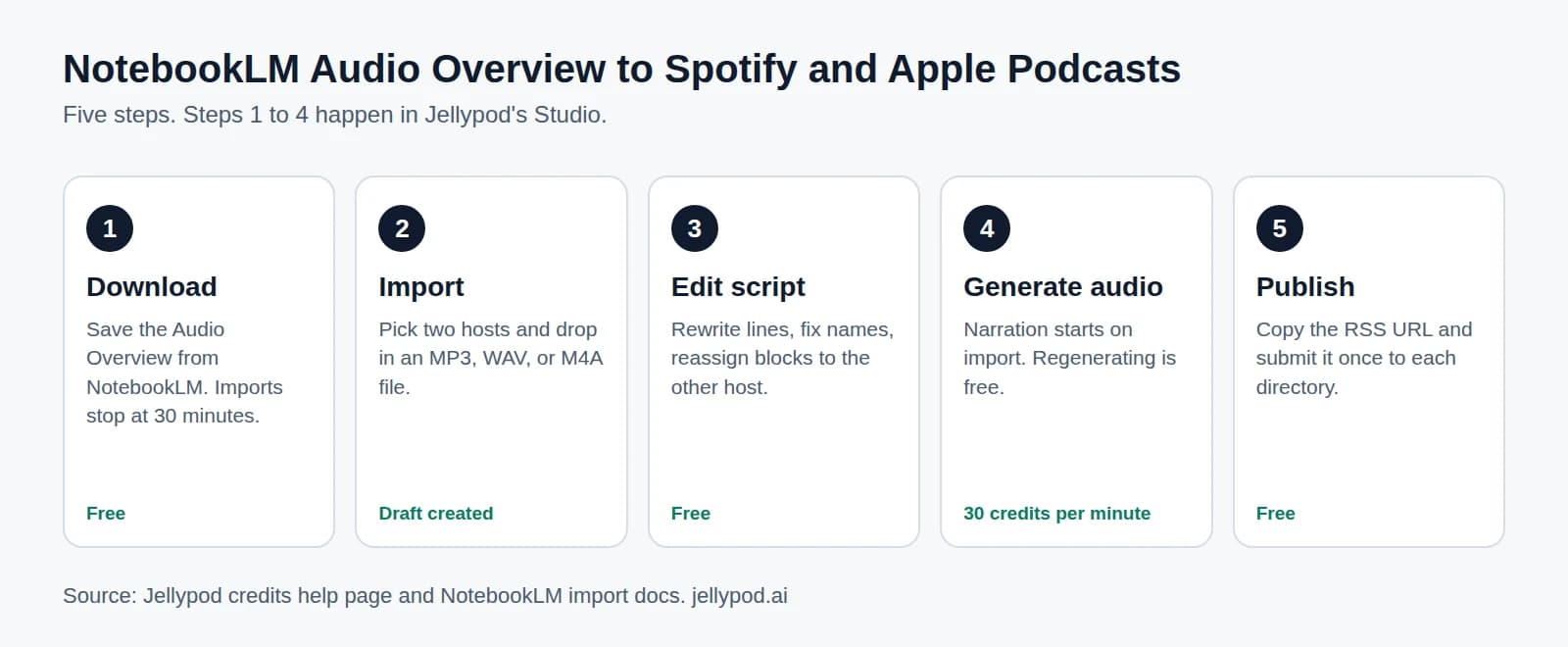
NotebookLM builds audio from sources you upload, such as PDFs and links, so it stays close to the documents. Studio builds from your day: calendar, inbox, and live web search. Both produce a listen for one person, and neither gives you a public feed.
If you started in NotebookLM and want a show people can subscribe to, follow the steps in publishing a NotebookLM podcast to Spotify and Apple.
What should you prepare before you go public?
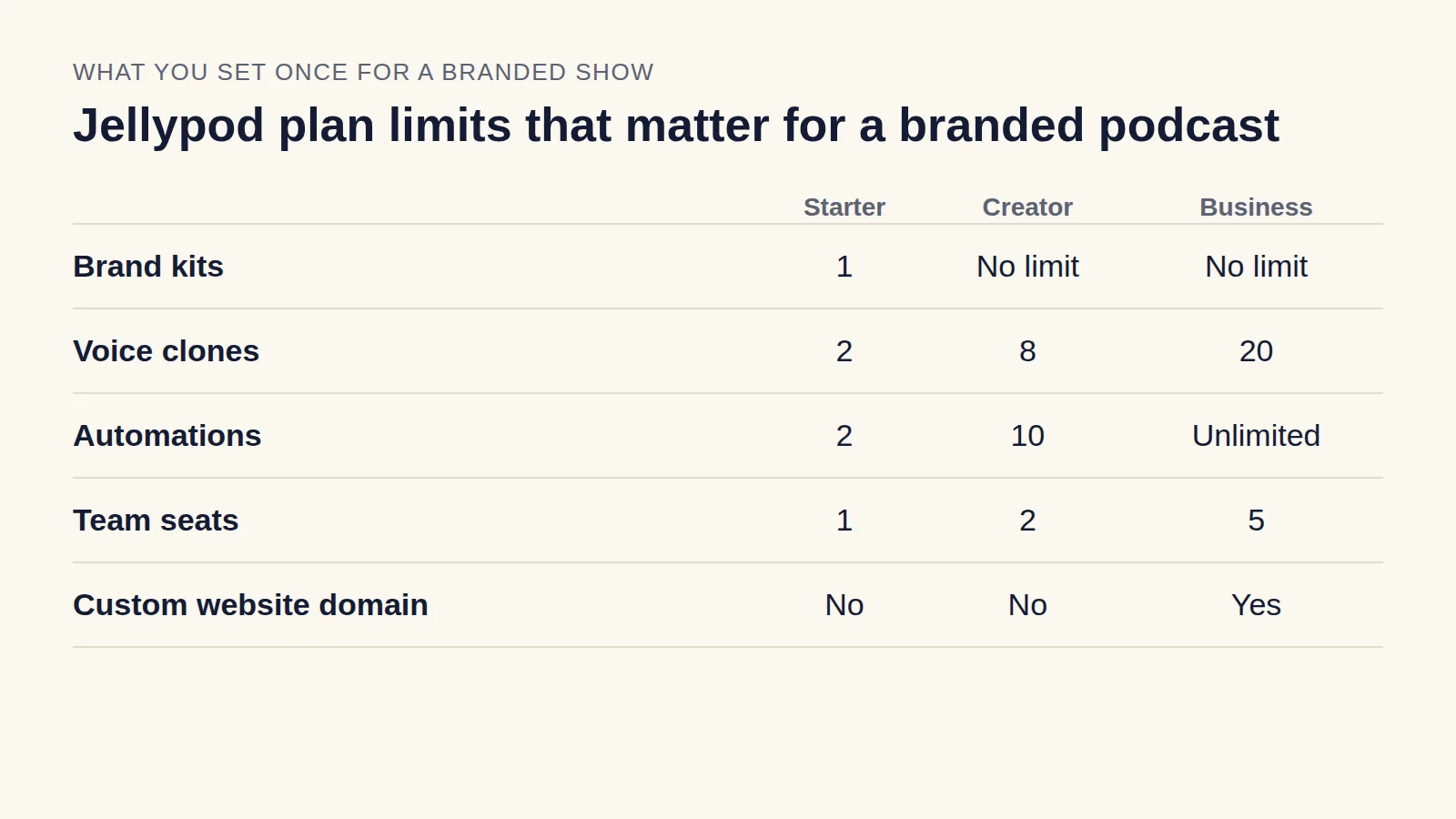
Set the show up before you submit, because Spotify pulls your details from the feed. Finish your cover art (see the podcast cover art guide), write a clear description, and decide whether the show carries a company voice. If it does, branded podcast covers how to plan it.
Generate an episode, then submit the feedTry Jellypod