The best NotebookLM alternative is Jellypod when you want control of the episode. You edit the script line by line, keep fine-grained control of pronunciations and pauses, choose or clone the voices, customize the hosts, and publish straight to a feed you own. You can also import an Audio Overview and rebuild it in those voices.
The other tools here solve narrower problems. ElevenLabs is strongest for voices, Descript for editing recordings, and Wondercraft for producing audio with a timeline. None of them replaces NotebookLM for asking questions of your sources, and you may not need to switch at all.
Key takeaways
- Pick Jellypod for script editing, fine-grained control of pronunciations and pauses, custom voices, host customization, and direct publishing to an RSS feed you own.
- NotebookLM lets you download an Audio Overview, share a link, or share the notebook. Its help page lists no script editor and no feed.
- ElevenLabs Studio turns PDFs and URLs into audio, Descript edits recordings through a transcript, and Wondercraft is a production studio. We did not find podcast hosting on the pages we checked for any of the three.
- Stay on NotebookLM if you only listen to the audio yourself or want quick research answers.
Which NotebookLM alternatives can turn documents into publishable audio?
Jellypod, ElevenLabs Studio, Descript, and Wondercraft can each turn documents into audio, and Jellypod is the one that lets you edit the script and publish a feed you own.
| Tool | Starts from | Edit the script before audio | Podcast feed |
|---|---|---|---|
| Jellypod | Documents, URLs, notes, or an imported Audio Overview | Yes, line by line in the script editor | Hosted RSS feed, submitted once to Spotify, Apple Podcasts, and YouTube |
| NotebookLM | Your notebook sources | Prompt instructions only | None: download, share link, or share notebook |
| ElevenLabs Studio | PDF, EPUB, TXT, HTML, or a URL | You supply or edit the text | Not listed on its Studio page |
| Descript | Recordings | Edit the transcript to edit the audio | Publishes to an outside hosting service |
| Wondercraft | Prompts and scripts | Timeline editor | Not listed on its pricing page |
Competitor cells come from each vendor's own pages, checked on September 29, 2026. Plans change, so confirm before you commit.
Can you turn a NotebookLM Audio Overview into a podcast you own?
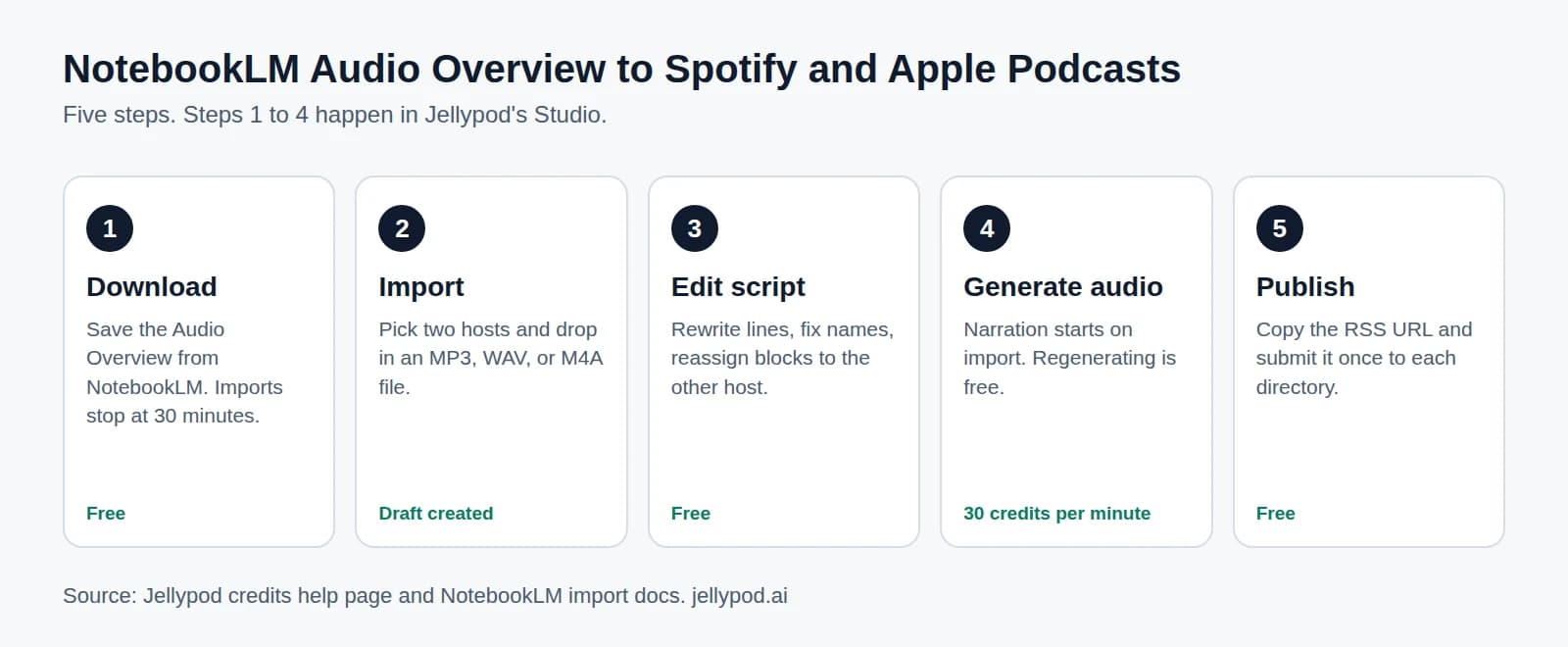
Yes, and this is the part only Jellypod does. NotebookLM import takes the audio file and rebuilds it as an editable draft. The steps:
- Download the Audio Overview from NotebookLM (MP3, WAV, or M4A, up to 30 minutes).
- In Jellypod, open a podcast, choose Import from NotebookLM under Create New Episode, and pick a first and second host.
- Jellypod transcribes the file and separates the speakers. Each speaker maps onto one of your two hosts, in the order they first speak. If the audio has more than two voices, the extras cycle back onto those two hosts, and you can reassign any block in the script editor.
- Audio generation starts in your hosts' voices, and you land in the script editor with a draft. Non-speech sounds like [laughter] are dropped on import.
- Rewrite lines, fix names, regenerate the parts you changed, and publish.
The host picker draws on 3,300+ library voices or a clone of your own voice. Starter includes 2 voice clones and Creator includes 8. The voice-swapping guide covers that step in detail, and publishing a NotebookLM podcast to Spotify walks the full path end to end.
If you have not made an Audio Overview yet, skip it. Upload a PDF with PDF to podcast, or add docs and links in the AI podcast generator, then edit the script it drafts. Imported audio uses credits like any other episode, so starting from sources costs the same and saves you a step.
How does Jellypod compare with NotebookLM feature by feature?
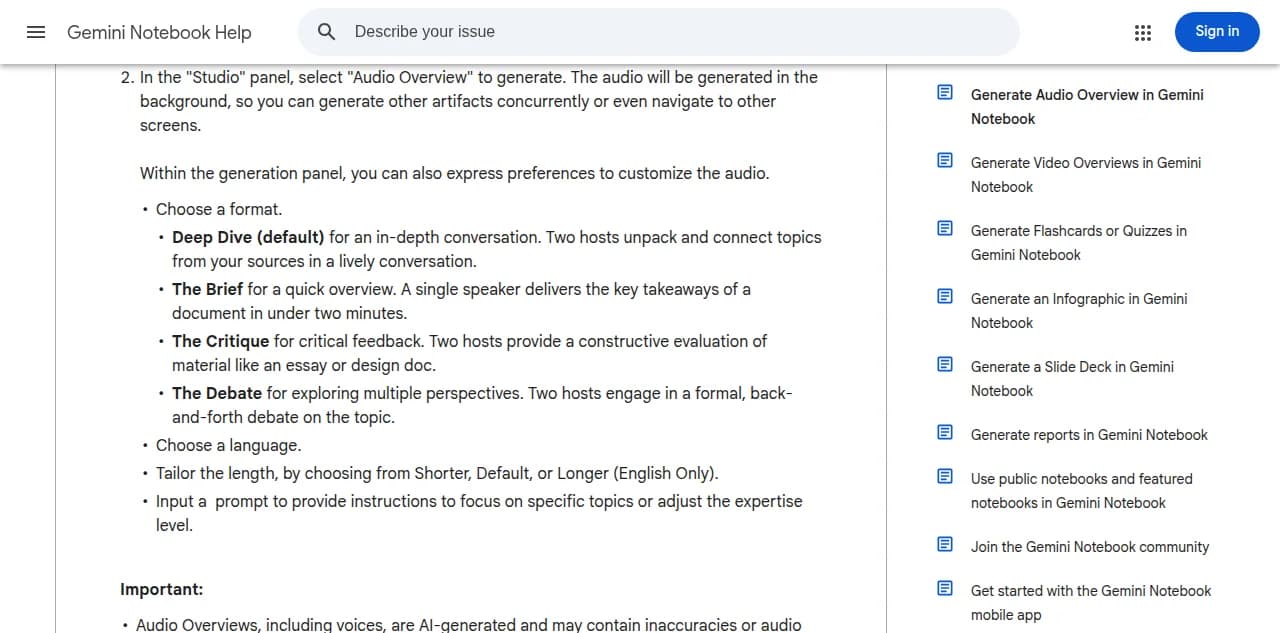
Jellypod adds line-by-line script edits, pronunciations and pauses, custom or cloned voices, hosts you name, and direct publishing. NotebookLM offers four Audio Overview formats, 80+ languages, and Shorter, Default, or Longer length in English, according to Google's Audio Overview help page, and you steer it with a prompt. The Jellypod vs NotebookLM comparison lays out every row, including the ones where NotebookLM wins, such as source Q&A with citations.
When does ElevenLabs, Descript, or Wondercraft fit better?
- ElevenLabs Studio. Choose it when voice quality is the priority. Its Studio page says projects can start from a URL or files including PDF and EPUB, and describes an end-to-end workflow for audiobooks, podcasts, and narrated videos. You would host the result somewhere else.
- Descript. Choose it when you already have a recording. Its podcasting page says it transcribes your files so you can edit them like a doc, and that you publish to a hosting service of your choice. It is built around recordings, not documents.
- Wondercraft. Choose it when you want a timeline studio for audio. Its pricing page lists a free tier and paid tiers with credits, and describes an AI podcast generator with music and chapters. It did not describe hosting or RSS, so ask before assuming a feed.
For a wider ranking that includes NoteGPT and others, see our best AI podcast generators roundup.
What does it cost to move from NotebookLM to Jellypod?
NotebookLM is free with a Google account, and its paid tiers raise limits without making the Audio Overview editable (NotebookLM pricing). Jellypod has a Free plan with 500 credits and no credit card, and paid plans include a 7-day free trial. Starter is $25 a month billed annually and includes 5,000 credits a month.
Writing and editing use no credits. Narration costs 30 credits per minute of audio, so a 10-minute episode is 300 credits. Regenerating narration, rendering, downloading, and publishing use no credits. Distribution to Spotify, Apple Podcasts, and YouTube needs a paid plan or trial.
Script edits, publishing, and exports use no credits. Jellypod has a Free plan with 500 credits and no credit card, and paid plans include a 7-day free trial.
When should you not switch from NotebookLM?
Stay put in these cases:
- You listen to the audio yourself and nobody else needs to subscribe.
- You use NotebookLM to question your sources and cite them. Jellypod has no Q&A mode over sources.
- You need a video summary rather than an audio show. That is a different job from this page.
Switch when you want the audio to become a recurring show: your own hosts, corrected names, and a feed listeners can subscribe to. You can also do both: research in NotebookLM, then produce in Jellypod.
Why does owning your podcast feed matter?
A podcast that lives inside an assistant app is a feature, and features get cut. Microsoft retired Copilot Podcasts on August 18, 2026. Its support page says previously created podcasts and their links are no longer accessible, and that podcasts could be downloaded from the web library only before that date. Anyone who did not download in time lost their episodes.
Audio you downloaded still plays, but an episode with no feed cannot be subscribed to. An RSS feed you control keeps listeners' subscriptions working if you change tools. Jellypod hosts that feed and lets you download every episode. To start from a PDF, use PDF to podcast. For notes or a topic, open the AI podcast generator.