
Trusted by 100K+ creators
AI Voice Cloning
Record a minute of audio, and your voice can narrate your podcasts, videos, shorts, and voiceovers, even in languages you do not speak.
Clone your voice7-Day Free Trial. Cancel Anytime.
“I am just gonna record a little bit of my voice right here and just see how good I can actually get the voice cloning software to be.”
Original recording
The recording uploaded to train the clone.
Cloned voice
The clone trained on that sample, reading the line back.
4.6out of 5 on G2












AI voice cloning: record once, use it everywhere
Record or upload a minute of audio and Jellypod builds a clone that keeps your tone, pace, and emotion. Save it as a character and it narrates podcasts, videos, shorts, and voiceovers in any of 121 languages.
Invite a guest to clone their own voice from a link, or import a Professional Voice Clone from ElevenLabs.
How to use AI Voice Cloning
Step 01
Record your voice
On Characters, click Create Voice Clone and record or upload at least 30 seconds of audio.Step 02
Review the character
Jellypod clones the voice and drafts a character name and description. Play the preview and adjust.Step 03
Use it everywhere
Pick the character in any podcast, video, short, or voiceover.
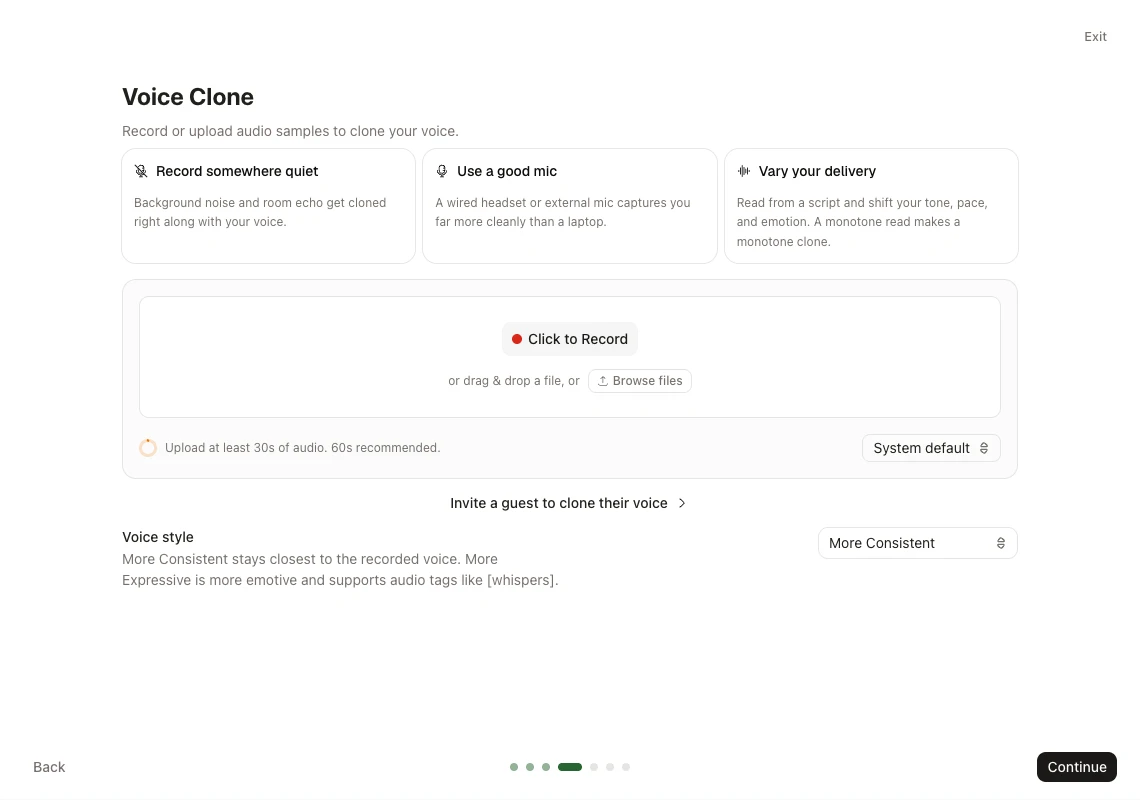
Record in your browser
Record in the browser or upload audio or video, and Jellypod pulls out the audio. Some clones also offer a More Consistent or More Expressive style.
Clone Your Voice
voice-sample.mp3
1:42Analyzing your voice
72%Your voice is ready
Private to your accountInvite a guest
Send a single-use link and a guest records their own samples, no account needed. Their character lands in your workspace.

Speak new languages
One English recording can narrate a Spanish video and a Japanese episode. Voice clones speak all languages. Read the help guide.
Stories from Johns Hopkins, Ohio State, and Busylike
It's a digital version of myself and a way to amplify [my voice] without having to hire another employee.
 Boi CarpenterVP Alumni RelationsJohns Hopkins University
It's not about replacing lectures. It's about reinforcing the arc of learning in the moments students actually have.
 Steve DeNunzioMBA ProfessorThe Ohio State University
If you are already investing in content marketing, Jellypod is a must-have to integrate into your strategy.
 Vadi EfeFounderBusylike
You just dump in your information and structure your podcast. It was the easiest thing I've ever done.
 Dr. Louise LambertAssociate Professor, Psychologist
FAQ
How much audio do I need?
Can I clone someone else’s voice, like a guest?
Is my voice private?
Can I use my clone in videos and shorts?
Can I bring a voice from ElevenLabs?
Discover more about AI Voice Cloning
Explore related
More from Jellypod
Clone Your Voice for AI Podcasts
Upload a short sample once. Jellypod uses that clone as a host on later episodes so you stop re-recording the same explanations.
Read more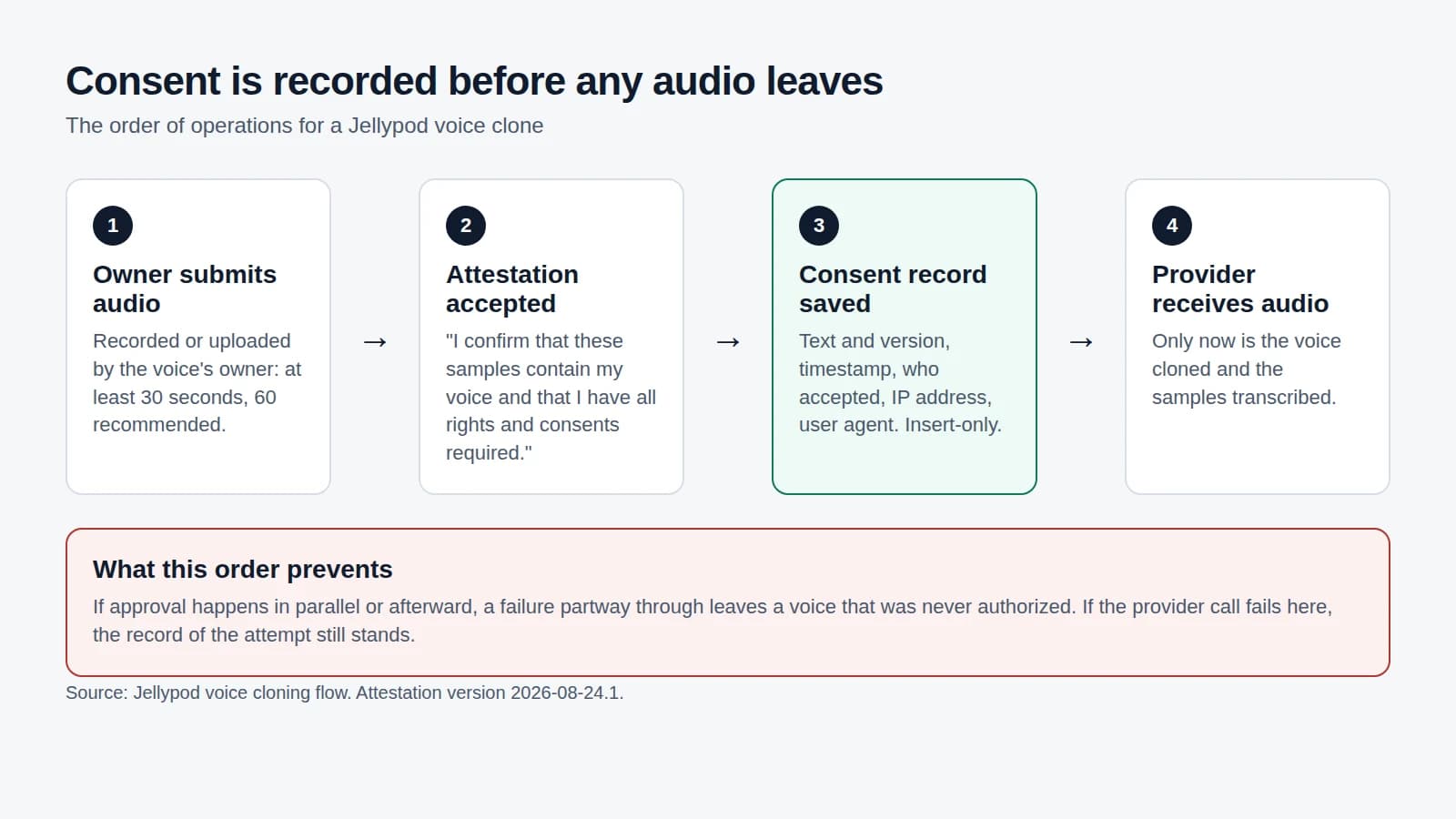
AI Voice Cloning Consent: What to Demand From a Tool
Check any cloning tool against a five-step consent sequence, and see exactly how Jellypod records who agreed to what before a sample leaves our servers.
Read moreInvite guests to clone their voice
Email anyone a link to record a voice clone in your account. They upload a sample, you get a new host ready to use in your podcast.
Read more

Your voice, in everything you make
7-Day Free Trial. Cancel Anytime.
Your clone becomes a character
Your clone gets a name and backstory like any character. Cast it next to library and designed voices in the same episode or video.