

Trusted by 100K+ creators
Turn your PDF into a narrated video
Upload a PDF or slide deck. Jellypod writes the narration, voices it, and keeps each page on screen while it is read.
Start free with 500 credits. No credit card required. Paid plans include a 7-day free trial.
4.6out of 5 on G2












Your PDF, narrated page by page
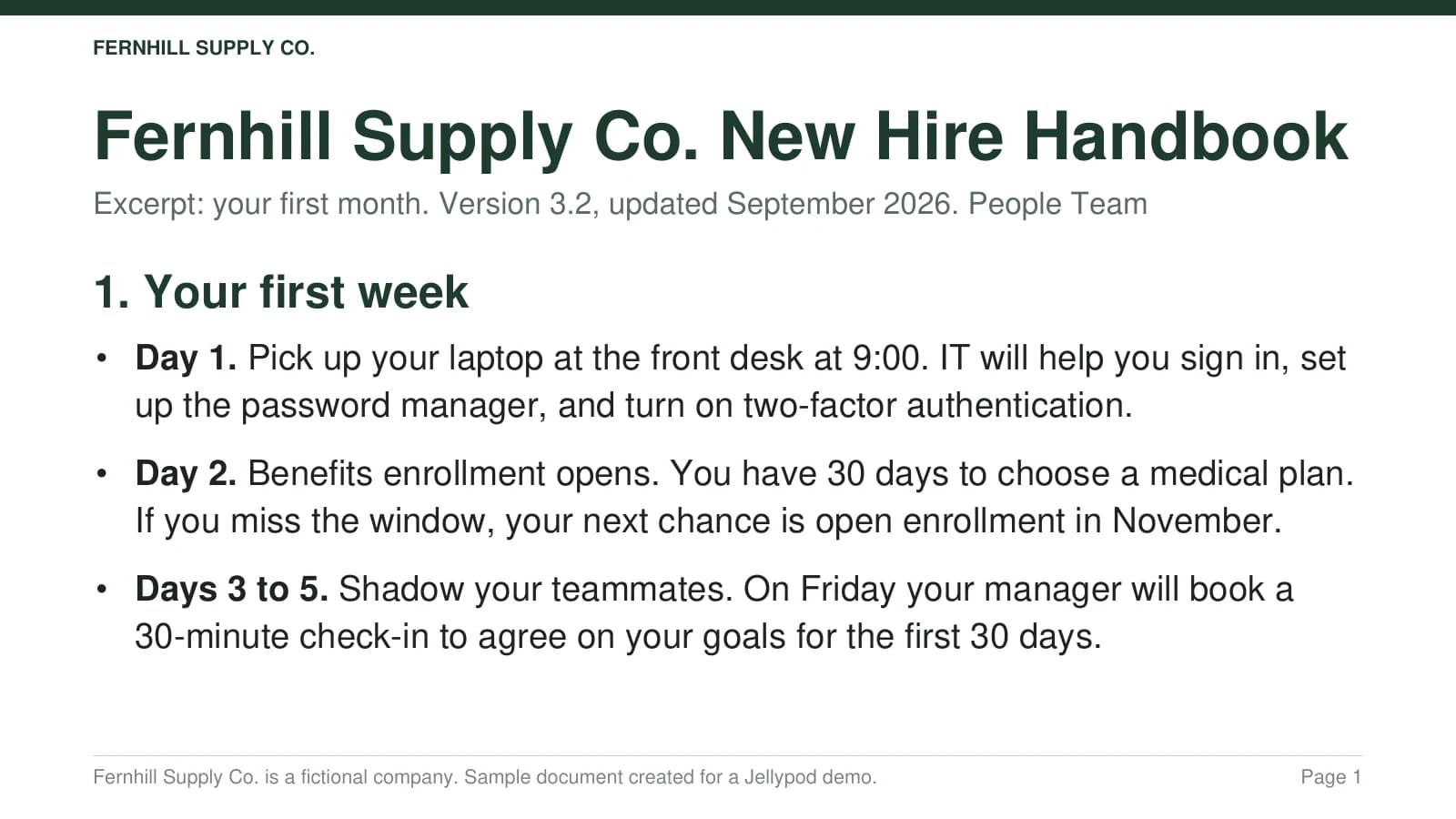
Real Jellypod output: the opening of a voiceover made from a three-page sample handbook PDF. Fernhill Supply Co. is a fictional company.
Try it with your PDFPick who narrates your slides

Marcus Hayes
English

Audrey
French

Minho
Korean

Nell Harding
English (British)

Marcelo Costa
Portuguese

Devi
Hindi

Theo Ashworth
English (British)

Eva Dorado
Spanish

Jason Chen
Chinese

Claire Brooks
English (American)

Marco
Italian

Yui
Japanese

Leonie
German
AI voiceover that keeps each page on screen
Sales teams send a narrated deck when they cannot join the call. Educators and L&D teams turn a lecture or an SOP into a lesson people can replay.
How to add an AI voiceover to your slides
Step 01
Bring the files you have
Upload a PDF or a slide deck, or pick one from your Asset Library. Those pages become the visuals.Step 02
Pick the voice and length
Choose one to four characters, a language, and a length. Add a note on audience or tone if you like.Step 03
Generate and revise
Jellypod writes and times the narration. Edit a line, fix a pronunciation, then download the MP4.
Keep your slides on screen
Jellypod shows the full slide, then the chart or table being discussed, and your pages stay as you made them. Start from one file with PDF to video.
Script from your speaker notes
Speaker notes in a PowerPoint file steer that slide's narration, and timing cues stay out of the script. Convert the deck with PowerPoint to video.

Cast up to four narrators
- Cast one to four characters and hand off the narration at natural breaks.
- Pick from 3,300+ library voices across 121 languages, or your own clone.
Trusted at Ohio State, KU Leuven, and Johns Hopkins
It's not about replacing lectures. It's about reinforcing the arc of learning in the moments students actually have.
 Steve DeNunzioMBA ProfessorThe Ohio State University
You just dump in your information and structure your podcast. It was the easiest thing I've ever done.
 Dr. Louise LambertAssociate Professor, Psychologist
It enables us to make podcasts of peer-reviewed medical papers that nobody, until now, was going to read.
 Kris VanhaechtProfessor of MedicineKU Leuven
It's a digital version of myself and a way to amplify [my voice] without having to hire another employee.
 Boi CarpenterVP Alumni RelationsJohns Hopkins University
Can L&D teams turn a PDF into a narrated training video?
Yes. Upload the training PDF, and Jellypod writes narration timed to each page while those pages stay on screen.
A handbook, SOP, or onboarding pack becomes a landscape video people can watch on their own. For a single file, start with PDF to video, then edit a line and download the MP4. The full workflow is an AI voiceover for training videos. For a narrated lesson without an avatar, see this Synthesia alternative.
FAQ
Will Jellypod change my slides?
How many credits does a voiceover use?
What files can I upload?
Can I hold a page on screen a little longer?
What file do I download, and can I embed it?
Discover more ways to narrate your files
Explore related
More from Jellypod
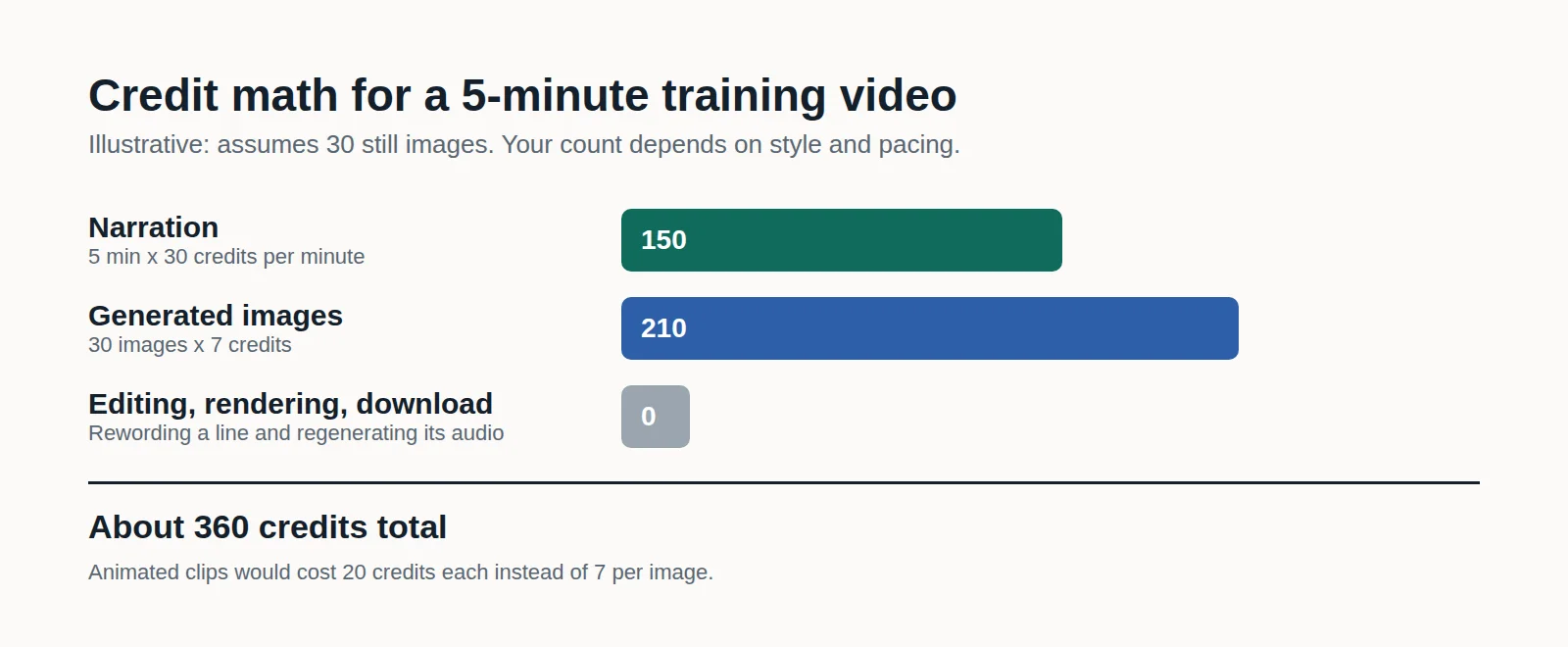
How to Make Employee Training Videos With AI (and What It Costs)
Turn an SOP, policy PDF, or slide deck into a narrated training video you can fix line by line when the process changes, and see the credit math before you generate.
Read moreVoiceovers
Upload documents and images and get a narrated video back, with every visual timed to the script.
Read moreVoiceovers Read Your Speaker Notes
Upload a PowerPoint and Jellypod uses the speaker notes on each slide as context when it writes that slide's narration.
Read more

Give your deck a voice
Start free with 500 credits. No credit card required. Paid plans include a 7-day free trial.
One deck, three formats
The same characters and voices also lead AI podcasts, videos, and shorts, so one deck can become a walkthrough, an episode, and a short.