A prompt like "make a podcast about onboarding" leaves the audience and the point of the episode open. Tell the AI who will listen and what they need to learn.
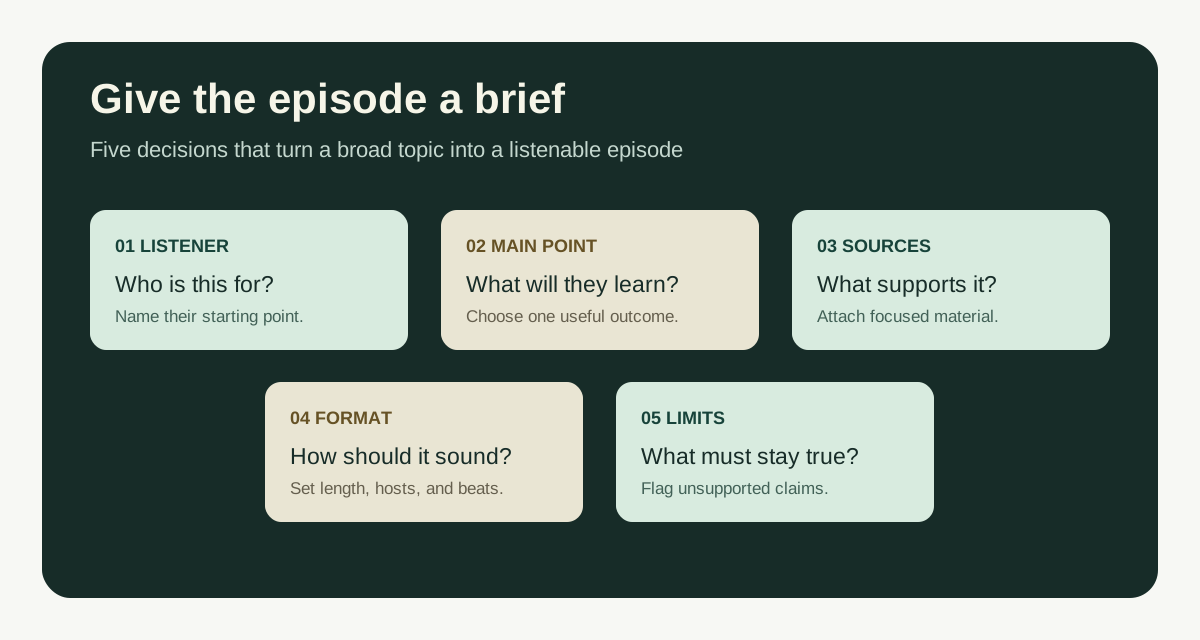
To create a good podcast, write a prompt that names the listener, the main point, the source material, the length, and the format. Say what to leave out. In Jellypod, you can add a prompt and attach files or links, then edit the script. The same guideline works in a general AI writing tool.
What should a prompt include to create a good podcast?
Give the AI enough detail to choose what belongs in the episode. OpenAI's prompt guidance recommends clear instructions and relevant context. For a podcast, cover these five points:
- Listener: Say who they are and what they already know. "New sales hires who have never handled a renewal call" is more useful than "professionals."
- Main point: State what the listener should be able to explain or do afterward.
- Sources: Name the document, lecture, interview notes, or approved policy that supplies the facts. Tell the model which source takes priority if they disagree.
- Format: Specify a target duration, solo or two-host delivery, and the main beats. Ask for examples that work when heard once.
- Limits: State what the episode must avoid, such as invented quotes or advice outside an approved document.
A listener cannot scan backward through a dense explanation. Ask for short sentences, clear transitions, and examples that make sense when heard once. See how to write a podcast script for speaker labels and script structure.
What is a good podcast prompt template?
Replace the brackets with your details. Delete any line that does not fit the episode:
Create a [length]-minute [solo / two-host] podcast episode for
[specific listener]. They already know [baseline knowledge].

The episode should help them [one specific goal]. Use [attached
sources / named notes] for factual claims. If a detail is missing,
leave it out or flag it for review. Do not invent quotes or statistics.

Open with [specific question, problem, or example]. Cover these beats
in order: [beat 1], [beat 2], [beat 3]. Spend the most time on [priority].
Use [tone] language, short spoken sentences, and one concrete example
per major point. End with [one useful next action].
You can paste this into Jellypod's episode composer and attach sources with the + button. A duration written in the prompt overrides the duration control, according to the first episode guide. Give one target length.
Flagging missing details gives you something specific to check in the draft.
How do you turn a document into a podcast prompt?
Attach the current document, name the part your listeners need, and say which details must stay exact. Jellypod's sources guide recommends two or three focused sources over many loosely related ones.
For a trainer turning an onboarding handbook into audio:
Create an eight-minute solo episode for new account managers in
their first week. Use the attached onboarding handbook as the source.
The listener should be able to explain our three-step handoff from
sales to support.

Start with a realistic handoff that goes wrong because ownership is
unclear. Explain each step in order, naming the owner and the trigger
for moving to the next step. Use one example that follows the same
customer through all three steps. Do not add policy, deadlines, or
escalation rules that are absent from the handbook. Close by telling
the listener which checklist to open before their first handoff.
Check every owner, deadline, and rule in the draft against the handbook. If the attachment is already a complete script, Jellypod may use it word for word. Say "rewrite this" if you want a new script, as the source behavior guide explains.
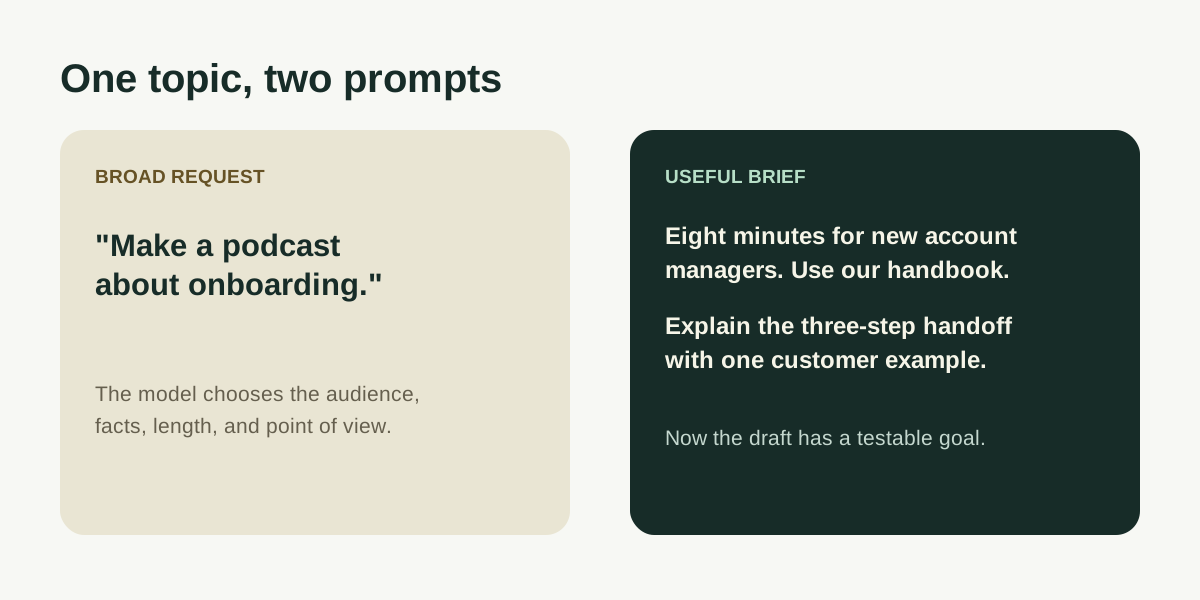 The specific prompt gives the AI a listener, source, and goal.
How do you prompt a two-host podcast without filler?
Give the hosts different jobs. One explains; the other asks questions or tests the explanation with an example. "Make it conversational" can leave both speakers repeating the same point.
For an educator turning lecture slides into a review episode:
Create a ten-minute two-host review for first-year biology students
who attended the lecture on cell respiration. Use the attached slides
for facts and terminology. The goal is to help students explain why
ATP yield changes under different conditions.

Host A explains each stage. Host B asks the question a student might
ask when the stages sound similar, then tests the explanation with a
simple example. Cover glycolysis, the citric acid cycle, and the
electron transport chain in that order. Define each new term once.
Do not add numbers or mechanisms that are not in the slides. End
with two review questions and a short answer to each.
Jellypod lets you choose hosts in the composer before generation, as described in its episode creation guide. The prompt gives each host a job; the host setting chooses the voices. If you want to write every turn yourself, use a labelled script.
Can you make a good podcast from a topic alone?
Yes. Narrow the question and check the factual claims in the script. Jellypod's Podcast Agent can research a topic without attachments. For a policy, medical, legal, or internal training episode, attach approved material and ask a subject expert to review the draft.
For a topic-only explainer:
Create a seven-minute solo episode for small nonprofit teams that
have never published audio. Answer one question: what must be ready
before we publish our first public podcast episode?

Use a simple example of a staff member turning an event recap into
an episode. Cover the audience, a clear title, rights to any music
or recordings, and a final factual review. Keep platform-specific
claims out unless you can identify the current source. End with a
four-item pre-publish checklist.
If the episode will appear in Apple Podcasts, its content guidelines require accurate metadata and prominent disclosure of AI-generated audio or voices.
How do you fix a podcast draft that sounds generic?
Name the part that failed. "Make it more engaging" gives the AI little to work with. Say whether the opening takes too long, the hosts repeat each other, or the example stops short of a decision.
Use follow-up instructions like these:
- "Open with the customer handoff from the source document. Get to the first decision within 30 seconds."
- "Keep Host B's questions, but remove answers that repeat Host A's previous line."
- "Replace the abstract example in section two with the approved case on page four of the attachment."
- "Cut the last segment to two sentences and end with the checklist the listener will use."
Listen after editing. A line that reads well can be hard to follow aloud. Jellypod's script editor lets you change one block and regenerate its audio. Check names, numbers, and quotes against the source.
Frequently asked questions
How long should a podcast prompt be?
A short paragraph is enough if it names the listener, goal, source, format, and limits. Add detail only when it helps the AI choose what to write. OpenAI's prompt guidance calls for clear instructions and relevant context, with no fixed length.
Should I include the whole script in the prompt?
If every word is already approved, supply the script. Jellypod's source guide explains when it reads an attached script word for word. The script guide shows the import format.
Should I ask for a podcast outline first?
Ask for an outline when a subject expert needs to approve the order of ideas. Request the main beats and the source behind each one. Jellypod's current episode workflow generates a script and audio in one pass, so review the draft there.
What if the AI invents a fact?
Remove the claim or replace it with a fact you can verify. In the next prompt, name the source: "Use only the attached policy for deadlines and eligibility rules." Jellypod's sources guide explains what attachments give the agent, but you still need to check the script.
What should you do before publishing?
Check the facts, then read the script aloud. Cut anything that slows the opening or repeats an earlier point. Give the episode a title that says what it covers; Apple Podcasts recommends clear titles that tell listeners what they will hear.
Use the template above to create an episode in Jellypod, attach the source, and check the script before publishing.

![A script with [Maya] and [Dev] speaker labels beside the three speaker blocks an import reads from it](/_next/image?url=%2Fblog%2Fhow-to-write-a-podcast-script%2Fscript-block-format.webp&w=3840&q=75&dpl=dpl_7xzRST161iyro3GpvKssBRfEKFVN)