Give every AI host a job before you give it a voice. One host leads, one explains the source, one asks the question a listener would ask. Then pick voices that sound different from each other and read the script before any audio is generated.
In Jellypod you can cast one to four hosts on an episode, each a saved character with a name, backstory, personality, and voice. The generated conversation opens in the script editor, so you can fix roles and lines while it is still text.
Key takeaways
- Define each host by what it does in the episode (lead, explain, question), not only by how it sounds.
- Jellypod allows one to four hosts per episode. Start with two, and add a host only when removing its lines would lose something the episode needs.
- Pick voices that differ in pace, accent, and vocal weight, and test them on a phone speaker.
- Review the script before the audio: reassign any line spoken by the wrong host, then adjust speaker spacing (from -1.00s to +1.00s) if the turns feel rushed or slack.

How many AI hosts should an episode have?
Start with two. Two voices are easy to tell apart, and each can have a clear job: one leads, the other explains, questions, or challenges. Add a third when the material needs another credible point of view, and use all four only when each has a role that lasts the whole episode.
Jellypod's limit is four hosts on a single episode, and a host can be reused across a series. The limit is a ceiling, not a target. Before adding a host, delete its lines from the outline. If the episode loses a needed question, expertise, or transition, keep the role. If nothing changes, cut it.
| Hosts | Format | Example |
|---|---|---|
| Two | Guide and specialist | A trainer introduces each policy section, a specialist explains what changes daily work |
| Three | Moderator and two viewpoints | A faculty host compares two readings of a case with two subject-matter voices |
| Four | Structured panel | A nonprofit frames one issue through research, community, operations, and a moderator |
How do you give each host a distinct role?
Write one sentence per host that describes a job in the episode. "Maya is warm and curious" says how she sounds. "Maya asks the question a new employee would ask after each section" tells the script what she does. You need both, but the job comes first.
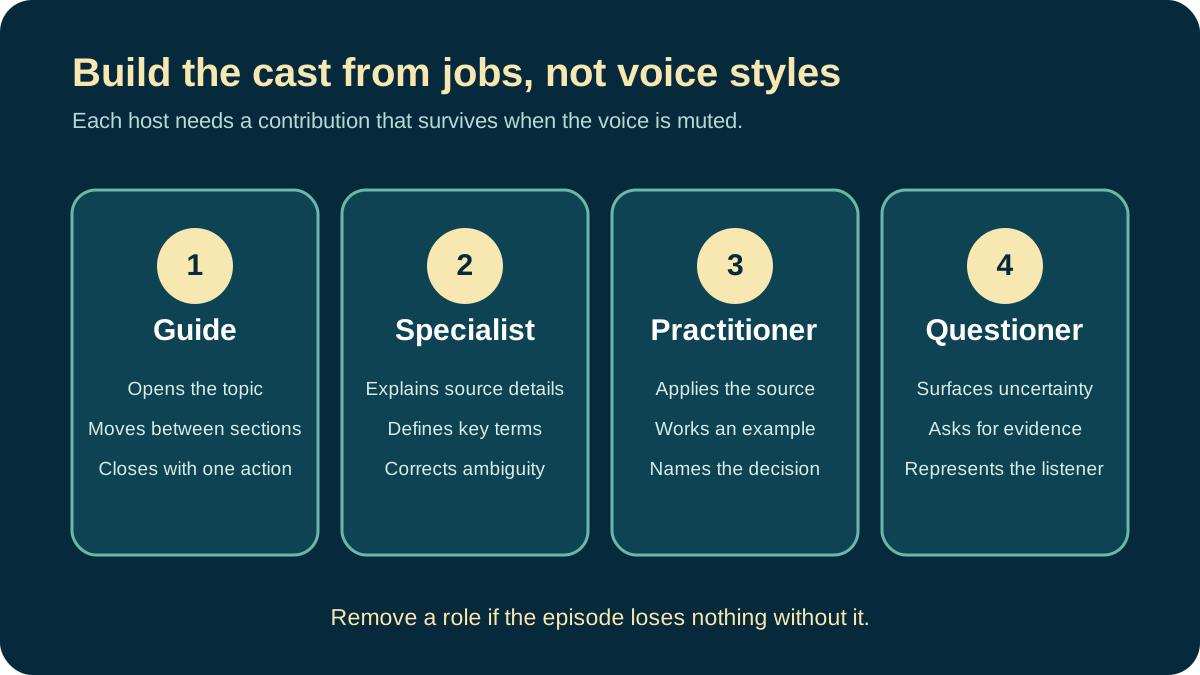
Four roles cover most professional conversations:
- The guide introduces the topic, handles transitions, and closes.
- The specialist explains terms, evidence, and source details.
- The practitioner connects the source to a decision or task.
- The questioner surfaces ambiguity and asks for a concrete example.
In Jellypod, put the job in the character's personality field. That text shapes how the host writes and speaks in every episode it joins, so "asks for one concrete example before moving on" does more than "friendly." The character creator can draft a name, backstory, and personality from a one-line description, and you can edit all of it afterward.
Avoid fictional credentials. A host can present sourced clinical or legal information, but its backstory must not imply a licensed professional or a real employee. Label AI hosts where your audience or channel expects disclosure.
How do you choose voices listeners can tell apart?
Choose contrast that survives ordinary listening. Pitch helps, but pace, accent, vocal weight, and speaking style usually matter more, and a phone speaker flattens pitch differences that studio headphones reveal.
Preview your shortlist in the Jellypod voice library with a sentence from the actual episode. A product name, acronym, or technical term tells you more than a demo line. Then play the candidates back to back. If you need the speaker label to tell two hosts apart, change one voice before you write around the problem.
If you clone a voice, clone only one you own or have permission to use, and make it clear in the script when the voice speaks for the person versus performs generated dialogue. Our guide to making AI voices sound human covers pacing and delivery once the cast is set.
How do you set up several hosts in Jellypod?
- Create each host as a character, with a name, personality, and voice.
- Open the podcast or new episode and pick one to four hosts in the host picker.
- Add the documents, links, or notes the conversation must follow.
- Generate the script and review it in the script editor.
- Generate the audio.
You can create a host from the picker without leaving the episode, and the same hosts can return in later episodes. That suits a course series where one guide appears weekly and a specialist joins only for the relevant module. Characters are limited to 10 on Starter and Educator plans, and unlimited on Creator, so a small recurring cast is the practical fit on a lower plan.
How should a multi-host script be structured?
Label every speaking turn and give one host ownership of each section. The others contribute questions, examples, or a counterpoint the source supports. Alternating names at random is not a conversation.
[PRIYA, GUIDE]
The updated expense policy changes two deadlines. Sam, start with the one
that affects every employee.

[SAM, SPECIALIST]
Receipts are now due within ten calendar days of the purchase. The previous
policy allowed thirty days.

[PRIYA]
What happens when a hotel sends the final invoice late?

[SAM]
Submit the available receipt within ten days, then attach the final invoice
when it arrives.
Priya never repeats Sam's answer, and Sam never changes topic before answering. For longer episodes, rotate the lead host per section: the guide states the question, the specialist answers from the source, the practitioner works an example, and the guide closes the decision. Solo, interview, and roundtable formats are laid out in our podcast script guide.
Natural dialogue is uneven. One host answers in two sentences, the other follows up in six words. Read only the speaker labels and the first sentence of each turn: you should hear question, answer, clarification, example, decision. A stack of mini-essays needs rewritten transitions. Cut filler such as "great point" and "exactly" unless it changes the pace. Let hosts disagree only where the source does.
What should you review before publishing?
Review the script, then the voices, then the full playback. Errors are cheapest to fix in that order.
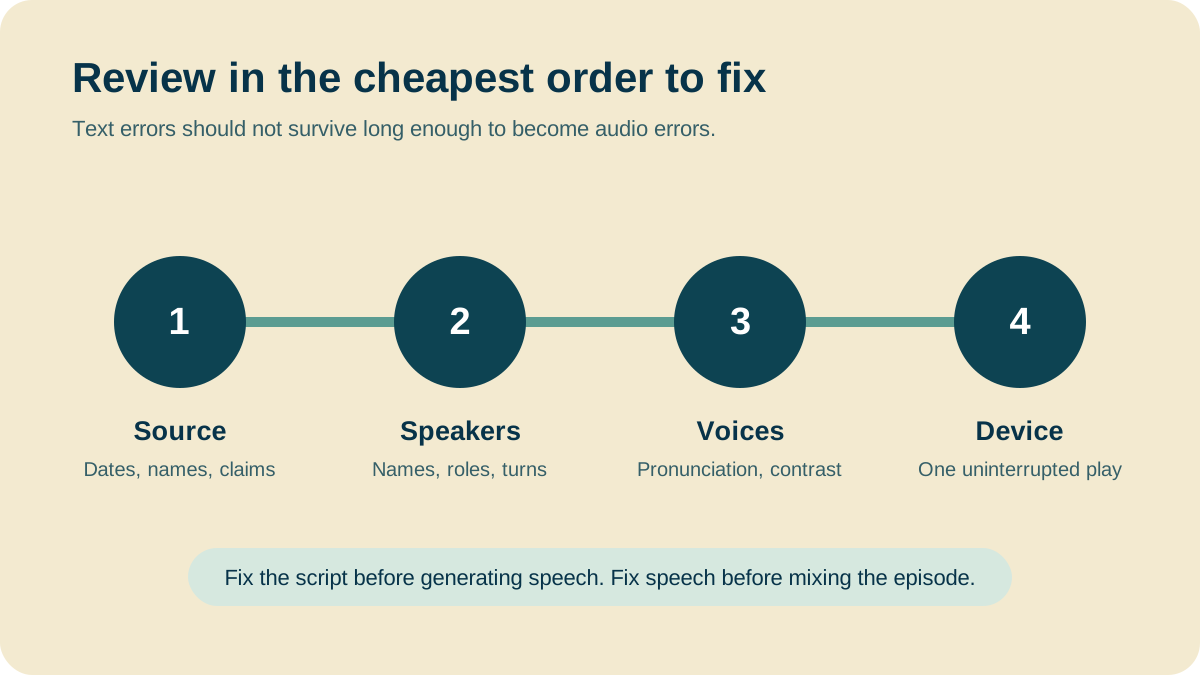
In the script editor, each speech block shows its host's name. Click the name to reassign the block to another host, and only that block is flagged for regeneration. Check every date, name, unit, and quotation against the source, then confirm each line belongs to the right host.
After the audio exists, open Audio Settings on the episode timeline and adjust speaker spacing. It adds or collapses the gap between every speaker clip, from -1.00s to +1.00s in 0.05s steps, with 0 as the default. Tighten it for a quick banter show, loosen it for a dense explanation. Reset returns it to 0.
Finish with one uninterrupted listen on the device your audience uses, usually a phone with earbuds. Note any moment where you lose track of the speaker or rewind for meaning.
- Every host has a necessary role.
- Speaker labels and voices match.
- Names, acronyms, and technical terms are pronounced correctly.
- The conversation stays faithful to the sources.
- Disclosures and voice permissions fit the channel.
For fiction with a larger cast, the same casting logic applies with more attention to character contrast. See how to make an audio drama.
Create a Multi-Host EpisodeOpen![A script with [Maya] and [Dev] speaker labels beside the three speaker blocks an import reads from it](/_next/image?url=%2Fblog%2Fhow-to-write-a-podcast-script%2Fscript-block-format.webp&w=3840&q=75&dpl=dpl_HRNS8EH1Z2unmgMVzqyGZSXhhQBL)