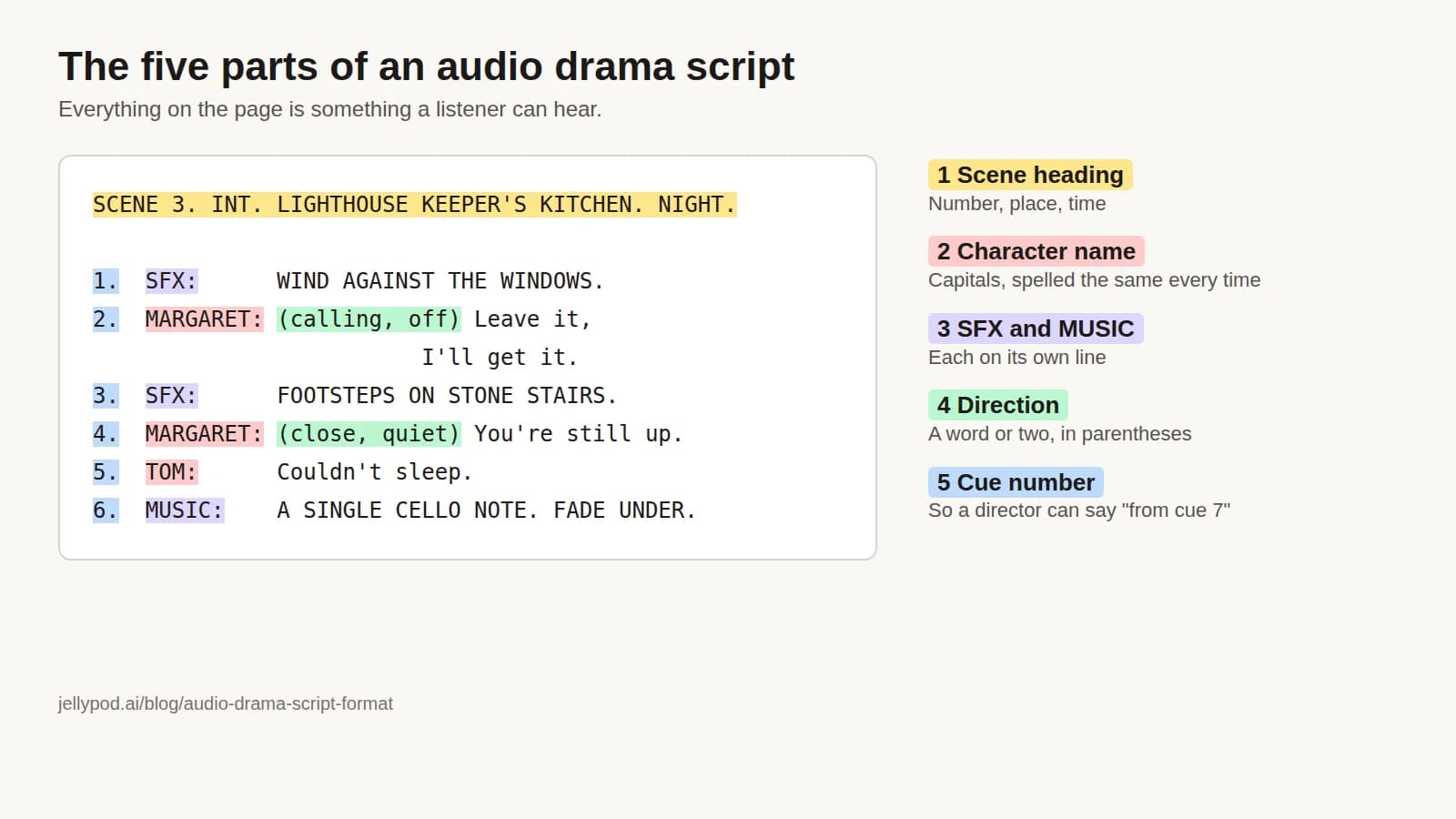
The standard audio drama script format has five parts: a scene heading that says where and when, character names in capitals before each line, sound effect and music cues on their own lines, short performance directions in parentheses, and numbered cues so a director can say "take it from cue 7." If a detail cannot be heard, it does not belong on the page.
That layout is for human cast and crew. To have AI voices perform the script, Jellypod's audio drama maker imports it with a named speaker on each line, matches each speaker to a character, and voices the dialogue. The sections below cover the layout first, then the small changes that make a script import cleanly.
Key takeaways
- The five parts: scene heading, capitalized character names, separate SFX and MUSIC lines, short parenthetical directions, and numbered cues.
- A screenplay describes what the audience sees. An audio script can only describe what they hear, so every action needs a sound or a line that reacts to it.
- For Jellypod import, label each spoken line
[NAME]orNAME:, remove SFX lines and cue numbers from the import copy, and keep the cast to four speakers, narrator included. - Scripts can be pasted or uploaded as .txt, .md, .docx, .doc, .rtf, .pages, or .pdf, up to 4 MB.
What does an audio drama script look like?
Here is a short scene in a common radio layout. Names are in capitals, sound cues are marked SFX, music is marked MUSIC, and every cue is numbered.
SCENE 3. INT. LIGHTHOUSE KEEPER'S KITCHEN. NIGHT.

1.  SFX:      WIND AGAINST THE WINDOWS. A KETTLE STARTS TO WHISTLE.

2.  MARGARET: (calling, off) Leave it, I'll get it.

3.  SFX:      FOOTSTEPS ON STONE STAIRS, COMING DOWN. THE KETTLE STOPS.

4.  MARGARET: (close, quiet) You're still up.

5.  TOM:      Couldn't sleep. The light skipped twice tonight.

6.  MARGARET: It's an old lamp, Tom.

7.  TOM:      (beat) It skipped the same way the night the Aurelia went down.

8.  SFX:      A LOW FOGHORN, FAR OFF.

9.  MARGARET: (whispering) Nobody sounds that horn anymore.

10. MUSIC:    A SINGLE CELLO NOTE, HELD. FADE UNDER.
The wind and kettle set the room and weather before anyone speaks. "Off" and "close" tell the actor where Margaret stands relative to the microphone. Tom's line names the ship so the listener learns it without a narrator, and the foghorn raises a question the next scene has to answer.
How do you format a radio script?
Conventions vary by producer, so check a specific broadcaster's or publisher's guidelines before you submit. Most share these rules:
- Head each scene with a number, place, and time.
SCENE 3. INT. KITCHEN. NIGHT.The listener never hears it, but cast and sound designer need it. - Capitalize character names and spell them the same way every time. Put the name at the left margin, then the line.
- Give sound and music their own lines.
SFX:andMUSIC:in capitals let the sound designer skim for them. - Number the cues. Some producers restart at 1 on each page, others number through the scene. Pick one and stay consistent.
- Keep directions to a word or two.
(whispering),(off),(beat). Leave the rest to the performer. - Never split a speech across a page turn in a script that live actors will read. A page turn mid-line costs a take.
- Set a narrator's lines apart, in bold or italics, so they can be recorded as a separate session.
- Open with a cast list: each character's name, age, and one line of description.
How is an audio drama script different from a screenplay?
A screenplay describes what the audience sees. An audio script can only describe what they hear.
| Screenplay | Audio drama script |
|---|---|
| Action lines describe what we see | Every action needs a sound, or a character has to react to it |
| Faces identify characters | Characters get named in dialogue, early and more than once |
| A cut changes the location | A transition needs music, a location sound, or a line that sets the place |
| Silence reads as tension | Silence longer than a moment reads as a technical fault |
| Many characters can share a scene | Two or three speakers per scene is easier to follow |
A test for any line of action: would a listener know it happened? "She picks up the letter" is invisible. "Is that a letter from Dad?" is not.
How do you prepare an audio drama script for Jellypod?
Jellypod's script import reads a script, lists every speaker it detects, and asks you to match each one to a character before anything is created. Prepare the file like this:
- Label every spoken line. Put
[MARGARET]orMARGARET:at the start of the line, with the speech right after it. Bold, heading, list, and blockquote formatting are fine, so a script pasted from Word or Google Docs still works. - Keep effect lines out of the speech. Jellypod voices dialogue, not effects, and a line like
SFX: FOGHORNcan show up as a speaker in review. Delete SFX and MUSIC lines from the import copy, keep them in your working script, and lay your own sound and music on the timeline after the audio is generated. Bracketed performance cues such as[Laugh]or[Pause]are usually folded into the surrounding line. If one still appears as a speaker, use Remove in the review step. - Drop the cue numbers. The import looks for a label at the start of the line, so a leading
4.in front of the name gets in the way. Cue numbers are for the studio script, not the import copy. - Convert directions to audio tags. A stage direction like
(whispering)is text. Jellypod's audio tags, such aswhispers,nervous,sarcastic, or a custom tag liketakes a deep breath, are what the voice performs. - Stay at four speakers. An episode holds up to four characters, and a narrator counts as one. If a script uses more, the import asks you to give a speaker a character already in use, or remove one.
The Margaret and Tom scene above, prepared for import (SFX, MUSIC, and cue numbers removed, directions turned into audio tags):
[MARGARET]
[whispers] Leave it, I'll get it. You're still up.

[TOM]
Couldn't sleep. The light skipped twice tonight.

[MARGARET]
It's an old lamp, Tom.

[TOM]
It skipped the same way the night the Aurelia went down.

[MARGARET]
[whispers] Nobody sounds that horn anymore.

How does Jellypod match speakers to characters?
If a detected label matches an active character anywhere in your account, that character is preselected. If it does not, you choose an existing character or create a new one generated from that speaker's lines, and you can edit its name and voice afterward. One character cannot voice two speakers in the same import. Nothing is created until you click Import script.
If the automatic review times out, or you label every turn with a [Name] bracket, the script imports verbatim, and every label must already match a saved character. Import replaces the script in the episode you are importing into, and you can reassign any single block to a different character in the script editor.
Files up to 4 MB are accepted in the formats listed above. Document formats are converted to text first, which takes a few seconds.
How do you write dialogue that works for listeners?
- Name people early. Use a character's name in their first scene and have others say it. In a four-person scene, have characters address each other directly.
- Give each voice a fingerprint. One character speaks in short sentences, another asks questions, a third has a phrase no one else uses.
- React to what is off the page. If someone enters, someone else says so: "The door's open. It was locked when I left."
- Write for breath. If you cannot say a sentence in one breath, split it. Long clauses trip human actors and AI voices alike.
How long is an audio drama script?
Read one full scene aloud at performance speed with a timer, count its words, and use that words-per-minute figure to size the rest of the episode. A page of rapid argument runs short, and a page with a long sound cue or a silent search of a dark room runs long, so a fixed pages-per-minute rule breaks down quickly.
Where to go next
For the full production process, see how to make an audio drama. For planning multiple episodes, see serial fiction for audio drama. The layout for a nonfiction show is different, and how to write a podcast script covers it. When your script is ready, start an audio drama in Jellypod.
![A script with [Maya] and [Dev] speaker labels beside the three speaker blocks an import reads from it](/_next/image?url=%2Fblog%2Fhow-to-write-a-podcast-script%2Fscript-block-format.webp&w=3840&q=75&dpl=dpl_HRNS8EH1Z2unmgMVzqyGZSXhhQBL)