Most audio dramas stall between the script and the first finished episode. Casting, recording, and editing turn one scene into weeks of scheduling.
To make an audio drama, write a script with a named speaker on every line, give each character a distinct voice, direct how the lines are delivered, layer music and effects under the dialogue, and publish through a podcast feed. In Jellypod's AI audio drama maker, AI voices replace the recording sessions, so one person can do all five steps.
Key takeaways
- The workflow is script, cast, direct, score, publish. AI voices remove the recording step, not the writing.
- Jellypod allows up to four speaking characters per episode (a narrator counts as one) and saves each character so the voice stays the same across a series.
- Jellypod does not generate sound effects. You add your own recorded or licensed effects to the timeline, plus stock music and looping ambience.
- Regenerating audio is free, so you can redo a single line as often as it takes.
What should your audio drama be about?
Start with a premise you can say in one sentence, a lead character, and a question the first episode raises. "A lighthouse keeper's wife starts hearing a foghorn that was decommissioned in 1962" is enough.
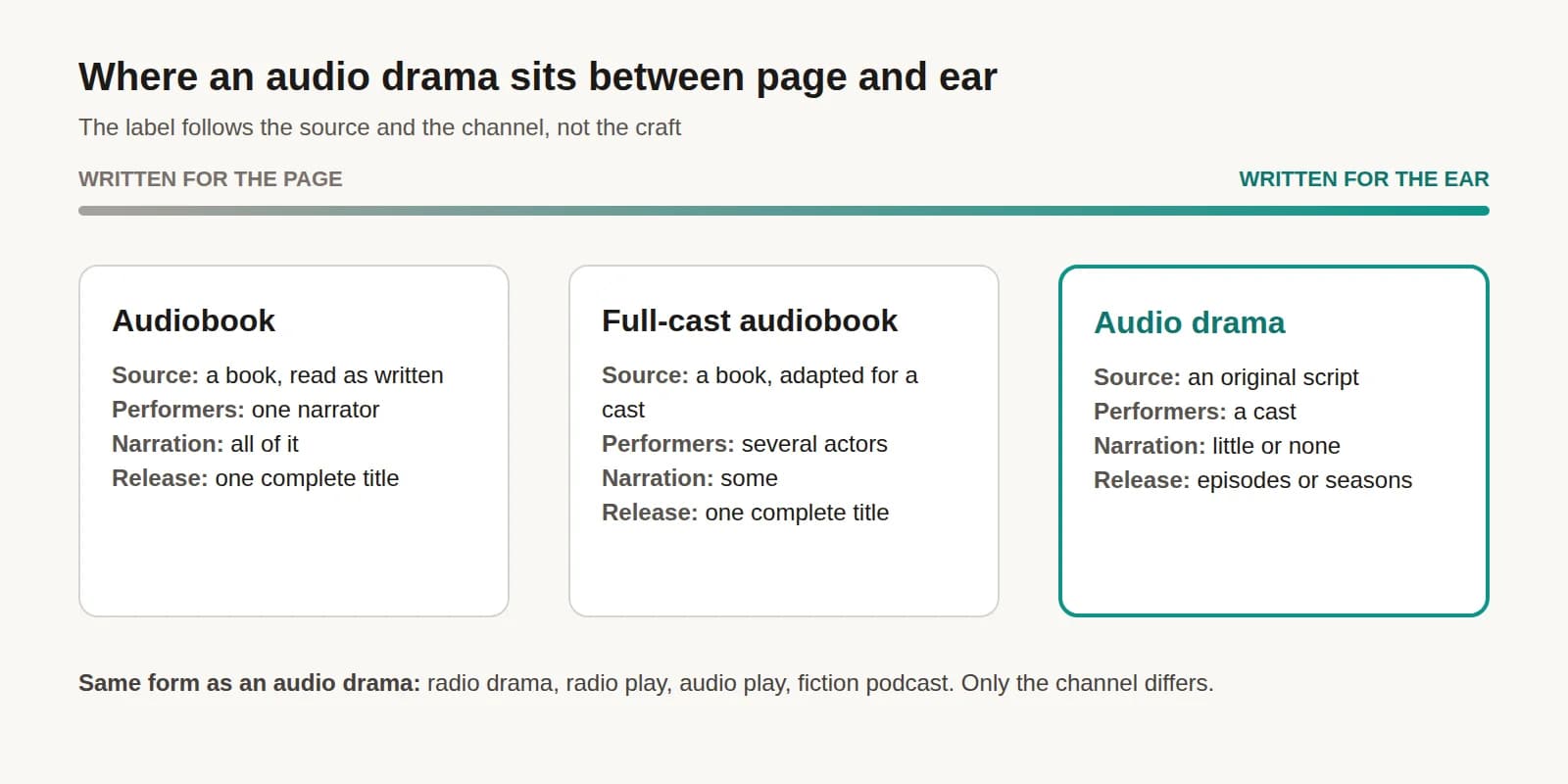
Then decide two things before you write. First, the format: a standalone story, an anthology, or a serial. Serials build the strongest listening habits (see how to write serial fiction for audio). Second, the cast size. Plan two or three speaking characters per scene, because that is what listeners can follow by ear. If you are new to the genre, what an audio drama is covers the genre and its history.
How do you write an audio drama script?
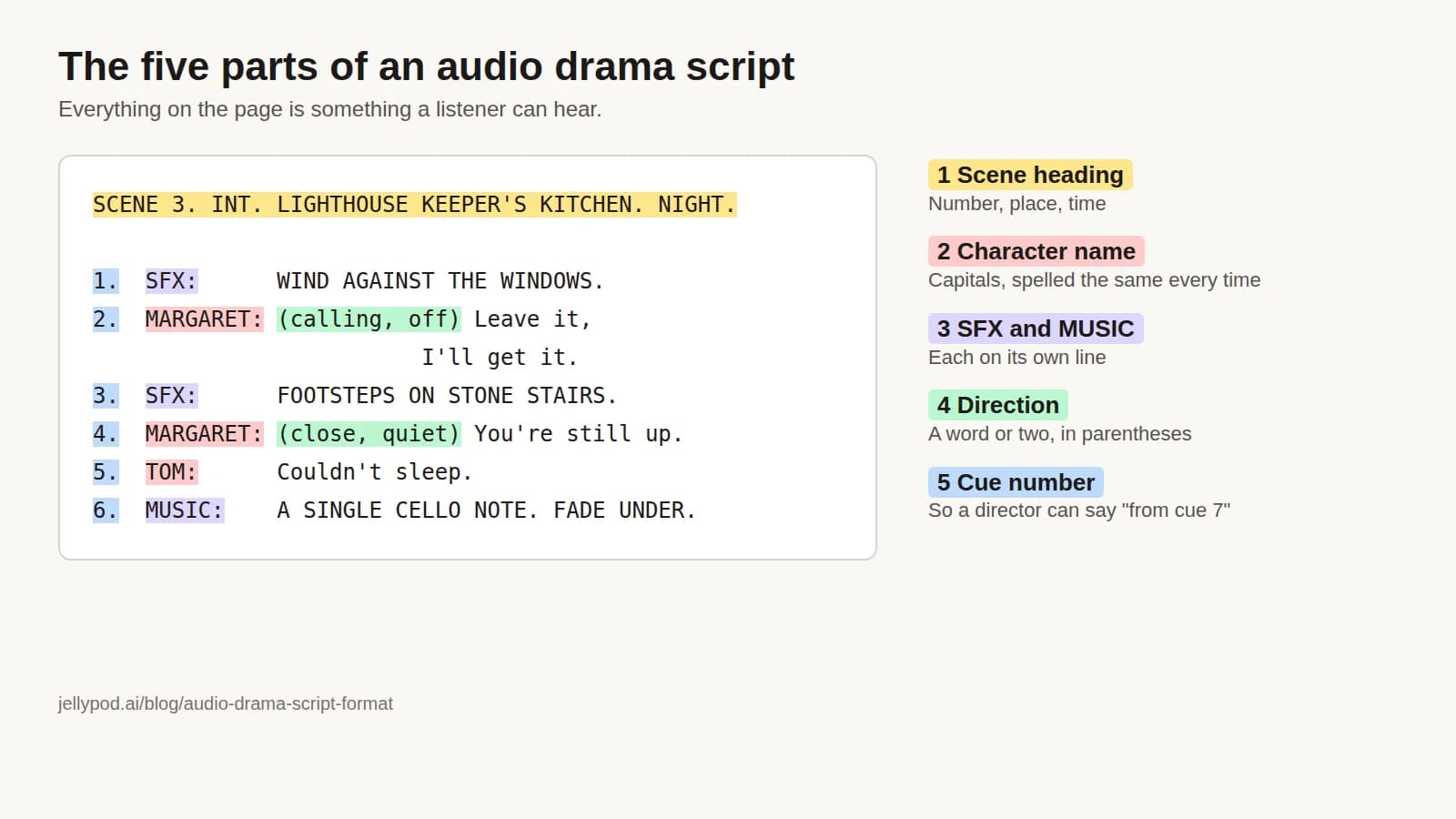
Write scenes, not chapters. Open each scene with a sound that tells the listener where they are, name the characters early, and describe every action through sound or a character reacting to it. The audio drama script format guide has a full example scene.
For AI production, one rule matters most: start every spoken line with the speaker's name, like MARGARET: or [MARGARET].
There are two ways to get a draft into Jellypod:
- Import a finished script. Paste it, or upload a TXT, MD, DOCX, PDF, or similar file up to 4 MB. Jellypod lists every speaker it detects for you to review before anything is created.
- Have AI draft it. Describe the story, characters, and tone in the episode prompt, then edit the result line by line.
Jellypod screens scripts for content its speech providers will not voice, such as graphic violence. Describing violence does not trip the check, so war, crime, and horror stories import normally.
How do you cast voices for an audio drama?
You create characters instead of auditioning actors. In Jellypod, open Characters and Voices and choose New Character. Describe the character and let AI draft the name, backstory, and personality, or fill those in yourself. A saved character is reusable in every episode, so your lead sounds identical in episode one and episode twenty. The AI character creator page shows the flow. Starter plans hold 10 saved characters; Creator and Business plans have no cap.
Each character gets a voice in one of three ways:
- Voice Library. 3,300+ voices across 121 languages, searchable by description, accent, and gender.
- Voice Design. Jellypod reads the character's backstory and generates voice options to match. A specific backstory (age, region, how they talk) gives a closer match.
- Voice clone. Clone your own voice to play a role. Starter includes 2 clones, Creator 8, and Business 20.
Cast for contrast. Listeners identify characters by voice alone, so vary age, pitch, pace, or accent. Two similar voices in one scene blur together within a minute. Add invented names and places to the pronunciation guide so every character says them the same way each episode.
How do you direct AI voice performances?
Direction happens through audio tags inside the dialogue. Click into a line, type /, and pick a tag: reactions (laughs, sighs, gasps), emotions (nervous, calm, sarcastic), or delivery (whispers, hesitates, pauses). If none fit, type a custom tag such as takes a deep breath. Tags shape the performance and never appear in transcripts or captions.
Not every voice can perform every tag. The script editor flags a mismatch with a warning chip before you generate. For a cloned lead, choose the More Expressive style when you create it. For more on getting natural delivery, see how to make an AI voice sound human.
After the first generation, listen through, edit any line that misses, and regenerate just that line. Regenerating audio is free. Credits are spent on the first generation: 30 credits per minute of audio, so a 20-minute episode is 600 credits. Starter is $25/mo billed annually with 5,000 credits a month, roughly 166 minutes of audio.
How do you add sound design to an audio drama?
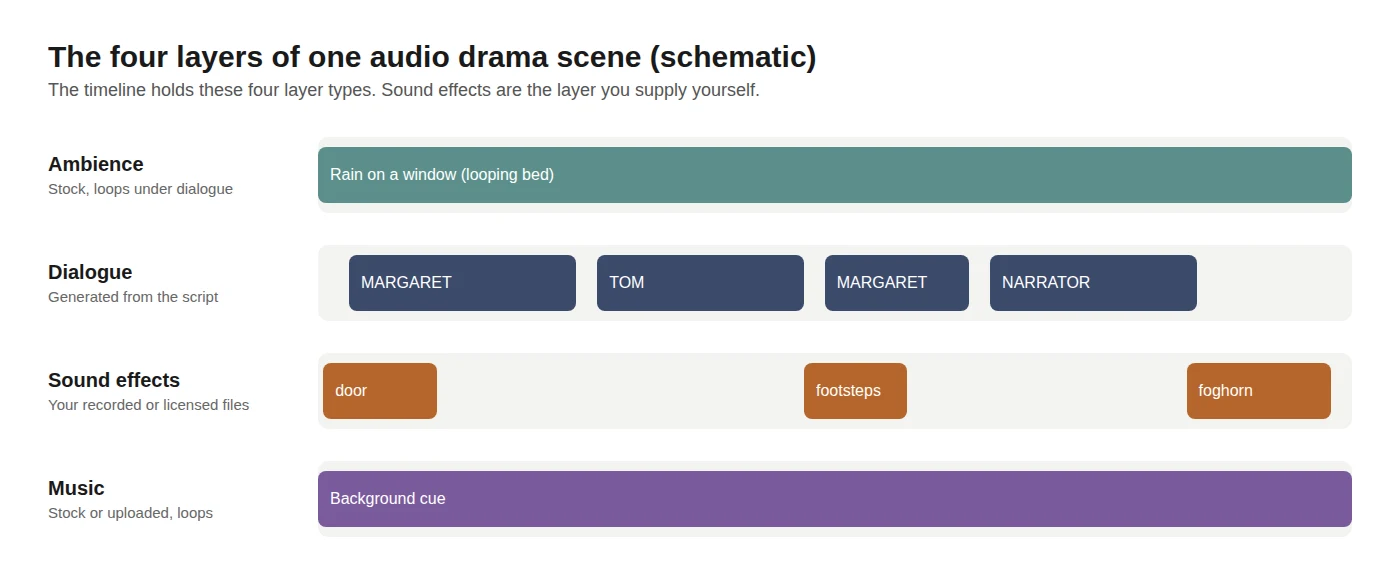
Sound is what turns recorded dialogue into a place. Build each scene in layers, back to front: ambience first, dialogue on top, effects on the action, music last.
In Jellypod, the timeline under the script editor holds four kinds of layers:
- Ambience. Search "ambience" in the stock library for looping beds such as rain on a window, a crackling fireplace, ocean surf, or coffee shop murmur. They mix under dialogue.
- Music. Choose Add Music, then intro, outro, or background. Use stock tracks or upload your own. Every track loops, so a short cue can cover a long scene.
- Sound effects. Drag your own audio files (a door, footsteps, a foghorn) onto the timeline. Each lands on its own track, where you can trim, move, fade, and set volume.
- Timing. Overlap two characters' lines for interruptions, or use the speaker spacing slider to tighten or loosen gaps across the whole episode.
Jellypod does not generate sound effects, so gather them before you mix. Record them yourself (a phone in a quiet room works) or license them. On Freesound, CC0 sounds can be used for anything, CC BY sounds can be used commercially with credit to the creator, and CC BY-NC sounds cannot be used in anything that earns money. If your show might carry ads or sponsors, skip the NC files and keep a credits list for every CC BY file.
Mark each sound you need on its own SFX: line in the script so you know what to gather. Check the mix on headphones and on a phone speaker, and raise any key effect that disappears on the smaller one.
How do you make a whole audio drama series?
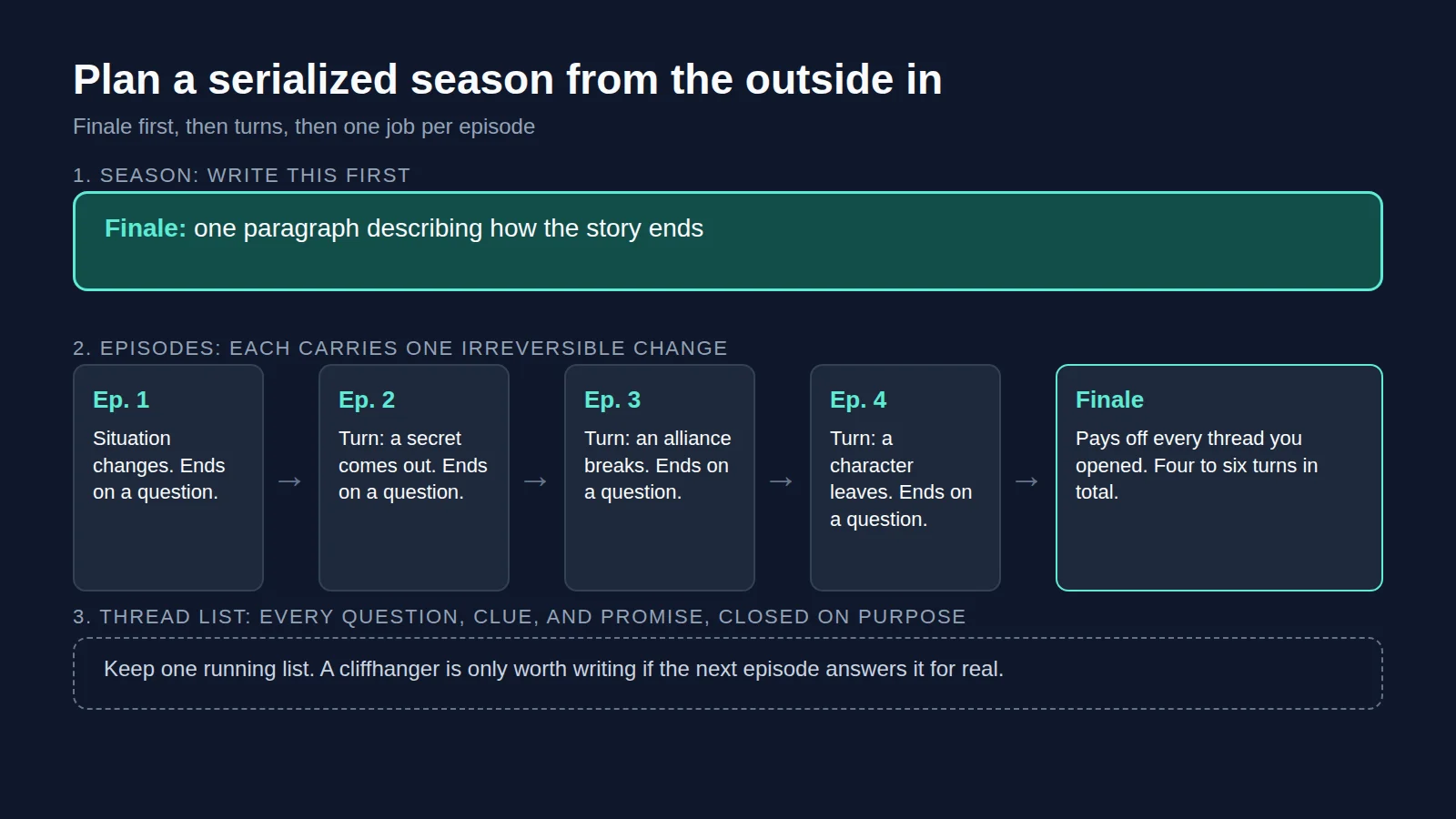
Once the pilot works, open your podcast, choose Generate a Multi-Episode Series, describe the season, and pick the episode count. Jellypod drafts an outline you can edit episode by episode before anything is generated.
Episodes are written in order. Each writer gets the full script of the previous episode and summaries of older ones, so names, facts, and open plot threads carry forward. Because the cast is saved, voices stay consistent. A show with more than two or three voices per scene is covered in how to create a multi-host podcast with AI voices. Episodes run up to 60 minutes.
How do you publish an audio drama podcast?
Publish each episode to your show's RSS feed and it reaches Spotify, Apple Podcasts, and YouTube, with a hosted podcast website listing every episode. Distribution is included on every paid plan. Schedule episodes ahead to keep a fixed release day, group them into seasons with their own titles, and cut a trailer in the lead character's voice.
Zero Day, a series made and published with Jellypod, is featured on the audio drama maker page.