
The best free AI voice generator depends on what you need after the voice is made. ElevenLabs is a strong place to audition text-to-speech and voice design. Async combines generated speech with recording and editing. Descript connects a written script to an audio or video editor. Jellypod fits teams that want to turn source material into an editable, multi-speaker episode with hosting and distribution in the same workflow.
Free plans are useful for evaluation, but their limits and usage rights differ. Compare the whole job: script preparation, pronunciation fixes, speaker assignment, export, and publishing. A convincing 20-second clip can still leave hours of production work.
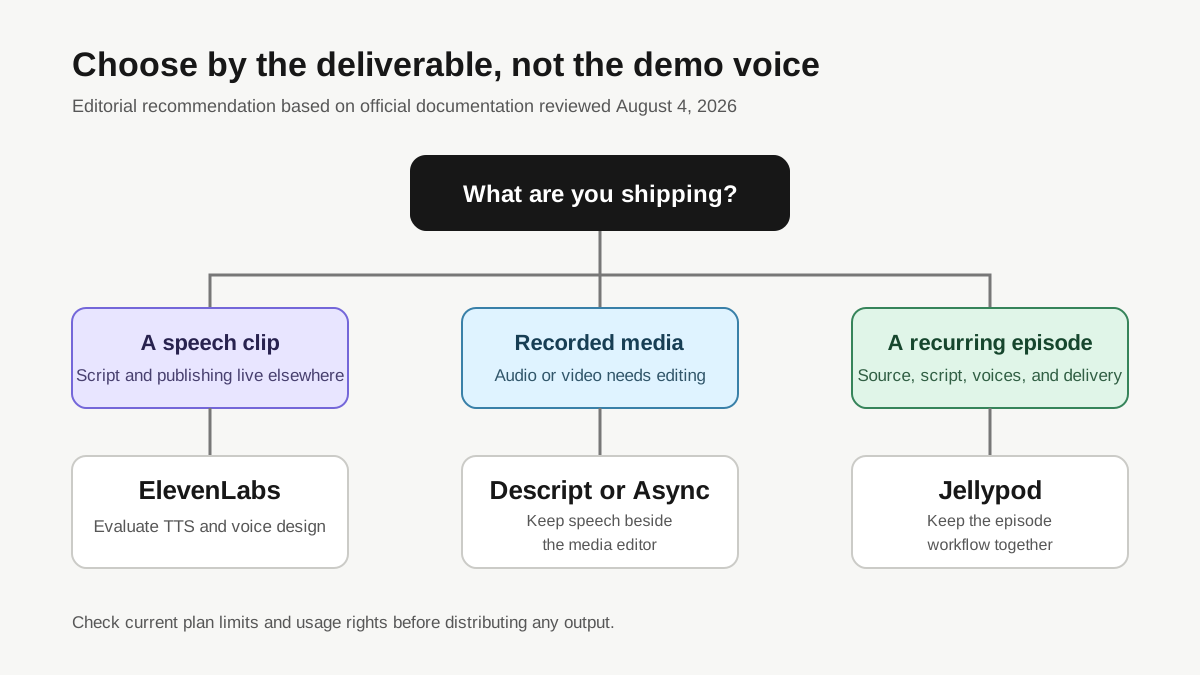
How did we compare free AI voice generators?
This comparison is a documentation review, not a listening test. We checked official product and pricing pages on August 4, 2026. We did not generate the same clip in every product, so judgments such as "best for" are editorial recommendations based on documented workflow fit. They are not audio-quality scores.
The review uses one practical scenario: a learning and development lead has a 90-second onboarding script with two speakers, a product name that needs a pronunciation correction, and a requirement to share the result internally. The six checks are:
- What can you make without paying?
- Does the free tier include commercial use?
- Can you choose, design, or clone a voice?
- Which languages and output formats are documented?
- Can you edit a complete spoken project, not only a clip?
- What work remains before the audio can be published or shared?
Limits change often. Follow the linked pricing page before starting a time-sensitive project.
Which free AI voice generator is best for each task?
No tool wins every row. The right choice changes with the deliverable.
| Tool | Best fit | Free access documented | Voice control | Production handoff | Editorial fit judgment |
|---|---|---|---|---|---|
| Jellypod | Source material to a complete podcast episode | Free preview on the public generator; drafting and editing are free in Studio | Stock voices, designed hosts, and voice cloning | Script editor, audio generation, hosting, RSS, and distribution | Best fit when the deliverable is a recurring episode rather than an isolated voiceover |
| ElevenLabs | Generating and auditioning speech clips | Free plan with 10,000 monthly credits | Voice Design on Free; cloning begins on paid plans | MP3 output on Free, plus Studio projects | Best fit when voice generation is the main job and another system handles publishing |
| Async | Recording, editing, and generated speech in one media workspace | Basic plan is free with lifetime TTS and export limits | Stock voices; its pricing page lists voice cloning on paid tiers | Text-based audio editing, MP3 export, and paid podcast hosting | Best fit for creators who also record people and edit mixed audio or video |
| Descript | Writing or editing narration inside an audio and video editor | Free plan and AI-credit limits are documented on its pricing pages | Stock AI Speakers and voice-clone features vary by plan | Write mode, text-based editing, timeline, and exports | Best fit when the script must stay attached to recorded or generated media during editing |
Sources: Jellypod AI podcast generator, ElevenLabs pricing, ElevenLabs text-to-speech documentation, Async pricing, Descript pricing, and Descript text-to-speech documentation.
Is ElevenLabs free for commercial use?
ElevenLabs has a free plan, but its documentation says commercial usage rights require a paid plan. The free plan currently includes text to speech, Voice Design, three Studio projects, and 10,000 monthly credits. Instant Voice Cloning and a commercial license begin with Starter, according to the official ElevenLabs pricing page.
That distinction matters for training, customer education, and marketing work. A free clip can help you judge pacing and pronunciation. It should not automatically become the soundtrack for a commercial course or campaign. Check the current license attached to your account before distributing the output.
ElevenLabs also documents MP3 as the default response format, with PCM, Opus, and telephony formats available in supported contexts. Its text-to-speech models cover different language sets, output limits, and latency targets. The product is a sensible evaluation choice when you already have a final script and a separate production path.
What does Async include on its free plan?
Async, formerly Podcastle, combines recording, editing, transcription, and generated voices. Its current pricing table lists a free Basic plan with one creator, a lifetime text-to-speech allowance, limited text-based editing, and one audio export. The same table documents higher export quality, more TTS characters, voice cloning, collaboration, and podcast hosting on paid tiers.
That makes Async different from a plain text-to-speech playground. You can evaluate how generated narration sits beside recorded media. But the lifetime allowances mean the free plan works better as a trial than as the operating model for a recurring internal series.
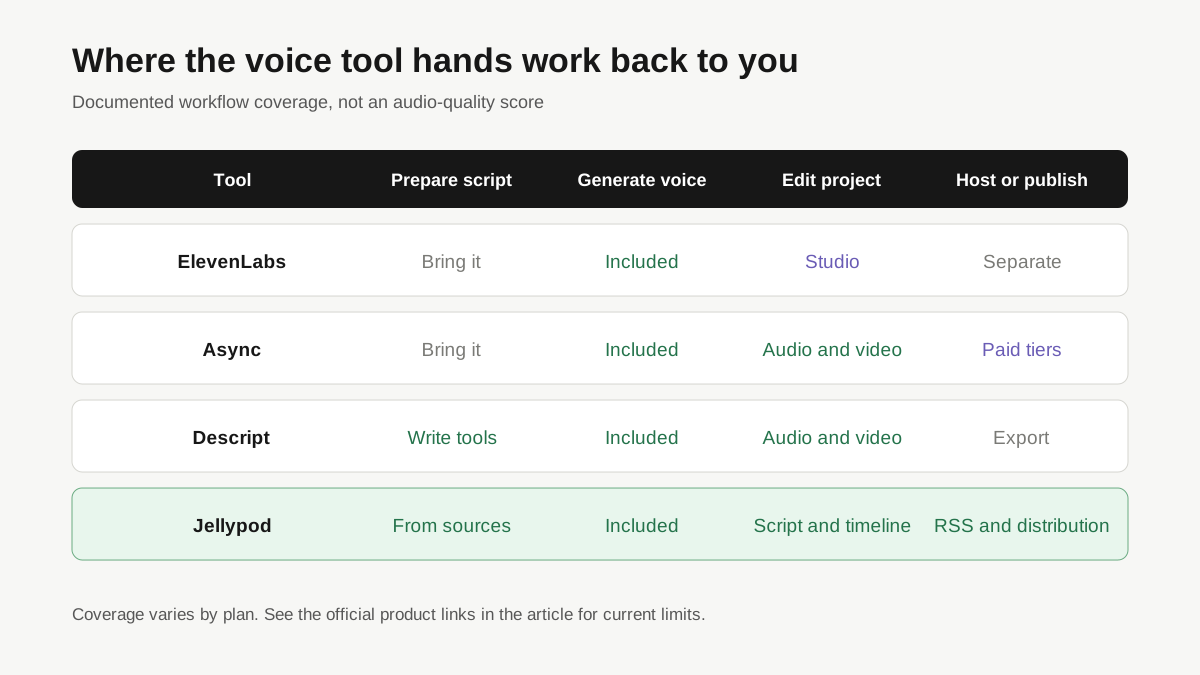
The matrix above shows why task framing matters. Async presents a broad media workspace. A buyer who needs recording and video tools may value that breadth. A training lead starting from documents may prefer a source-to-episode system with fewer handoffs.
Is Descript an AI voice generator or an editor?
Descript is primarily an audio and video editor with voice generation inside the editing workflow. In Write mode, you can draft placeholder text before recording or generating speech. You assign speakers to text, generate narration, and then work in the same script and timeline used for the rest of the media.
That is useful when your starting point is a recording, screen capture, or video composition. Descript's text-to-speech guide also documents separate steps for single-speaker and multi-speaker generation. Plan availability is tied to AI credits, so the current account limit matters more than a generic label such as "free."
Choose Descript when editing recorded media is central to the job. Choose a dedicated TTS tool when you only need speech files. Choose an episode platform when the script, voices, hosting, and recurring distribution need to stay together.
When is Jellypod a better fit than a raw voice generator?
Jellypod is the better fit when a voice clip is only one stage in the work. You can bring in a PDF, slide deck, URL, YouTube video, pasted text, or another supported source, create an outline and dialogue, assign persistent AI hosts, and edit every line before publishing. The script editor also includes pronunciation guidance and segment-level regeneration.
The free public generator creates a short two-host preview from pasted text or a PDF. Inside Studio, drafting, script edits, voice auditions, and segment regeneration do not consume credits. Credits are used when you publish, download, or render the finished work, as described on the Jellypod pricing page.
This workflow is designed for educators, clinical education teams, and L&D leads who already have source material. It is less suitable when you only need an API to return a speech clip. In that case, a dedicated TTS provider gives you a more direct path.
What should you check before choosing an AI voice?
Start with the words people will notice when they are wrong. Add names, acronyms, drug names, course codes, and product terms to a pronunciation checklist. Then listen for pauses at headings, lists, numbers, and sentence boundaries. A polished demo sentence does not expose the same problems as a training script full of domain language.
Confirm consent before cloning a voice. The recording must belong to you or come from someone who has authorized that use. Jellypod's terms require users to have the necessary rights for their inputs, and ElevenLabs documents voice-cloning verification in its voice-cloning guide.
Whichever tool you pick, the voice itself is only half the work. Script rhythm and delivery direction do the rest; see how to make an AI voice sound human instead of robotic.
Finally, inspect the handoff. Ask whether you receive a reusable project, editable dialogue, a downloadable file, an RSS feed, or only a generated clip. That answer usually decides the tool faster than a long list of voice names.
Can a free AI voice generator make a complete podcast?
Some free tools can create a sample or limited export, but a complete podcast needs more than text to speech. You still need a source-grounded script, speaker labels, pronunciation review, music decisions, metadata, hosting, and a distribution path. The amount included depends on the product and plan.
If your goal is a single narration file, begin with a dedicated voice generator. If your team needs a repeatable series from documents or training material, evaluate the episode workflow first and the individual voice second.