
Batch Generation
Queue a month at once
Each episode's scheduled release updates your RSS feed, website, and every connected platform, and then emails you the moment it ships.
- Fire and Forget
- Goes live without you online
- Content
- Growth on Autopilot

Content Schedule
Generate an entire month's worth of content in a single sitting, while spreading out each episode for a scheduled future date and time.
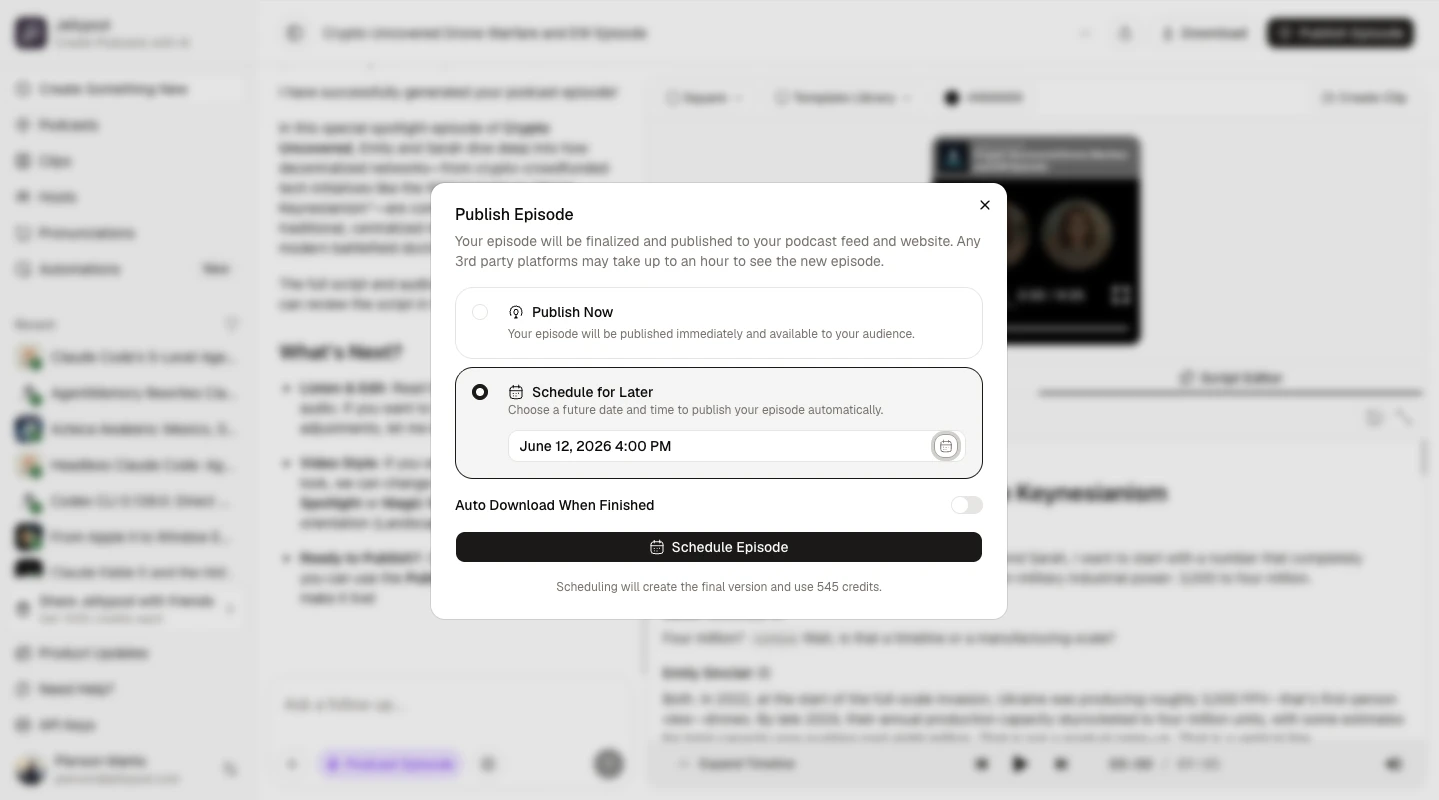
Inspiration may not always line up with the optimal time to publish your latest episode. With scheduling, you can complete its creation now, while setting the show to go live to every platform sometime in the future.
Episode scheduling lets you finish an episode now and publish it at a future date and time you choose. Instead of shipping the moment you hit generate, you can batch a week or a month of episodes in a single sitting and let each one go live on its own schedule, holding a steady release cadence with no manual work on the day.
Open any episode, click Publish Episode, choose Schedule for Later, and pick any future slot. Drafts stay drafts until their moment arrives, you get an email confirmation as soon as each one publishes, and you can cancel a scheduled episode at any time to revert it to a draft with nothing lost. Scheduling is available on every paid plan.
Publish episode
ScheduledUp next in the queue
Set a future publish date and time instead of publishing instantly. Drafts stay drafts until their moment arrives.
Queue a week or a month of episodes in advance to hold a steady release cadence without manual work.
Receive an email confirmation as soon as each scheduled episode is published.
Batch Generation
Each episode's scheduled release updates your RSS feed, website, and every connected platform, and then emails you the moment it ships.
Jellypod is a complete end-to-end workflow, from source to published episodes on every platform. Here are a few other features that pair naturally:
Stay on top of everything without lifting a finger. With automations, write your episode prompt once, set a schedule or trigger, and Jellypod takes it from there.
Learn moreAutomation
ActivePrompt
The most important AI launches and research from the past day
Next runs
Every show gets a managed website and one-click distribution to every major platform, with no extra hosting fees.
Learn more
AI Podcasting 101
Episodes
36 published
Getting Started: Your First AI Episode
Published12:00Turn Any Document Into a Podcast
Published04:18Total plays this month
1,235
+18%See who is listening, where they are, and which episodes drive growth, tracked across every platform automatically.
Learn moreAnalytics
Last 30 days12,480
+18%1,204
+9%Plays
Top countries
See how educators, clinicians, and teams use Jellypod to reach audiences that never finished their documents.

How Busylike turns its marketing blog into two branded podcasts and a B2B lead channel.
Read story
How an Ohio State MBA professor turns dense lectures into episodes his students actually finish.
Read story
How Kaishan USA turns technical product knowledge into SEO-optimized podcasts.
Read story
How KU Leuven turns peer-reviewed medical research into podcasts that reach clinicians.
Read story
How Johns Hopkins alumni relations scaled one expert voice without hiring a producer.
Read story
How a practicing psychiatrist reached thousands of patients with straight answers about mental health.
Read story
How a psychology professor turned her research into a published show in minutes.
Read story
How the Covation Center gave its artists a branded podcast with full creative control.
Read story
How Advancer's founder ships more content in less time without a studio or editor.
Read story
How 3 Rivers Energy launched a company podcast without standing up a media team.
Read storyFrequently asked questions
Go from idea to published episode in minutes. No recording, editing, or experience required.