
Make an AI voice sound natural by changing the script before you touch any voice setting. Most text-to-speech models read plain text evenly, so a line written like a memo comes out sounding like one.
In Jellypod's script editor, you rewrite each line the way you would say it, add inline tags such as [laughs] or [pauses] where a person would react, and fix any name the voice gets wrong. Because you can regenerate a single line for free, you can keep adjusting until it sounds right.
Key takeaways
- Write for the ear: short sentences, contractions, one idea per line. This fixes more flat delivery than switching voices does.
- Add tags where a person would react. Jellypod's script editor has reactions (
[laughs]), emotions ([excited]), and delivery cues ([whispers]), and you can type custom ones. - Tags only work if the voice's model can perform them. Unsupported tags are stripped from the audio with no error, though the editor flags them first.
- Fix names and jargon once in the pronunciation guide, and every episode uses your spelling.
- Regenerating a single line costs no credits, so treat the first take as a draft.
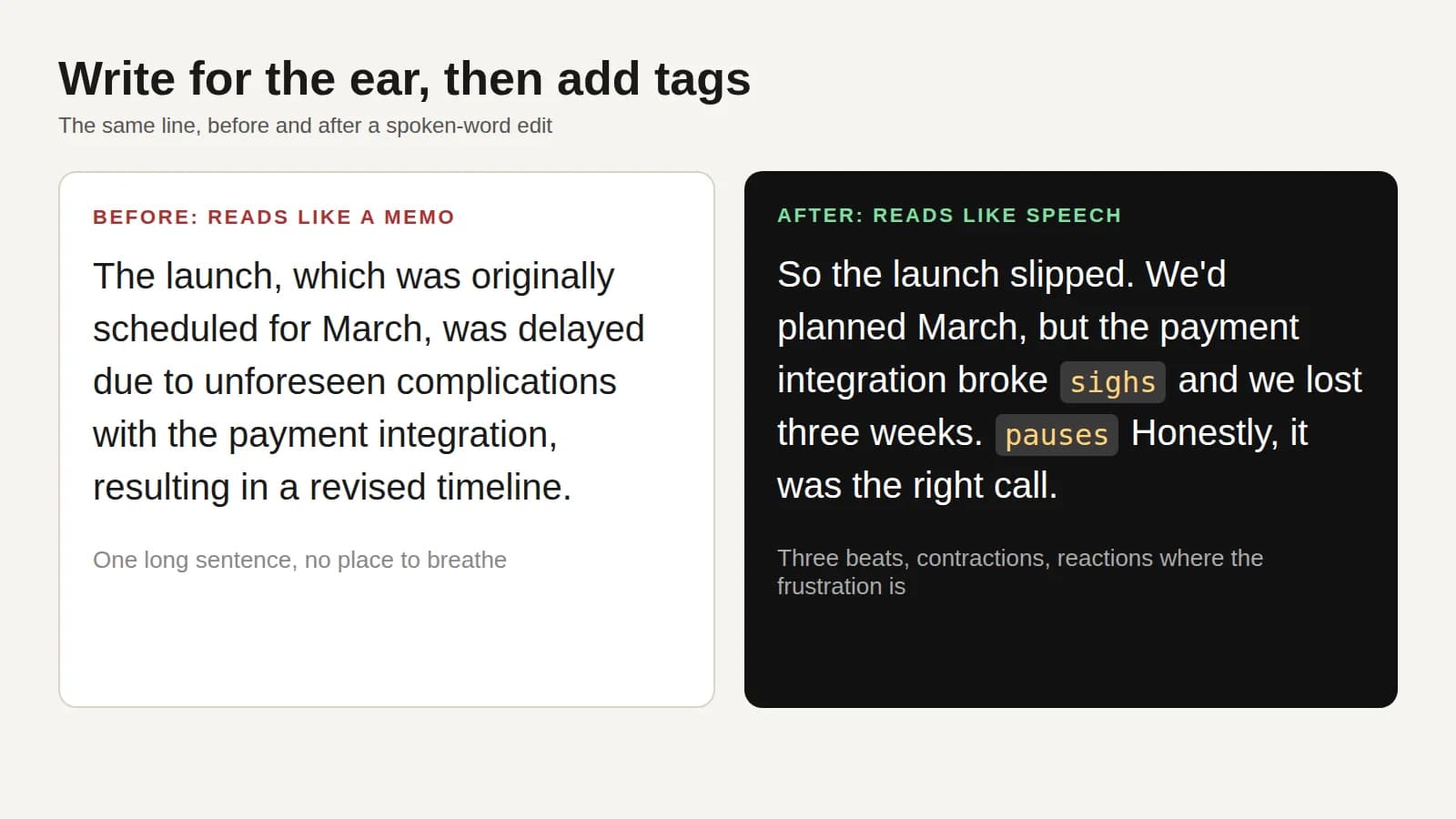 The same line before and after a spoken-word edit. The example is ours, not a sampled output.
How do you write a script that sounds spoken instead of read?
Cut every sentence down to what you would say out loud. A stack of clauses that reads fine on a page gives the model no place to breathe, so it delivers all of it at the same pace.
Punctuation is your main pacing control. A comma, a period, and an ellipsis each imply a different pause, and a question mark lifts the end of the line. "This matters." and "This matters, actually." use nearly the same words and land differently.
Here is the same line before and after a spoken-word edit, with tags added. We wrote this example to show the edit, it is not a sampled output.
Before:
The launch, which was originally scheduled for March, was delayed due to unforeseen complications with the payment integration, resulting in a revised timeline.
After:
So the launch slipped. We'd planned March, but the payment integration broke [sighs] and we lost three weeks. [pauses] Honestly, it was the right call.
The second version splits one long sentence into three beats, uses contractions, and puts a reaction where the frustration is. For a full method on structuring the whole script, see how to write a podcast script.
Can you add laughs, pauses, and emotion to an AI voice?
Yes, if the voice's model performs audio tags. In Jellypod, click into a speech block and type a cue in square brackets, such as [laughs], or your own custom cue. Closing the bracket turns it into an inline chip so you can see where each cue lands before you generate.
The preset tags fall into three groups, per Jellypod's audio tags help page:
- Reactions:
laughs,sighs,gasps,clears throat - Emotions:
excited,nervous,calm,frustrated,sarcastic - Delivery:
pauses,hesitates,dramatic,whispers
Custom tags work too, and short descriptive ones do best, like chuckles nervously or takes a deep breath. The audio prompting update has the full walkthrough.
Two limits matter. Tags work only inside speech blocks, not music blocks. And if a voice's model cannot perform tags, they are removed during audio generation without an error, so listen to the result. Before generation, the script editor turns an unsupported tag into a warning-colored chip. For a voice clone, choose the More Expressive style when you create it.
Tags do not appear in captions, transcripts, or subtitles, and they cost no extra credits. Audio generation is billed at 30 credits per minute regardless of tags. Use them sparingly: one well-placed [sighs] does more than a tag on every line.
Why does the AI mispronounce names and how do you fix it?
The model guesses at any word it has not seen, and a wrong guess on a name or product term breaks the illusion faster than flat delivery does. Fix it once in the pronunciation guide rather than editing every script.
Add the word and how it sounds, either as a respelling (for example "keen-wah" for quinoa) or in IPA. Jellypod fills in the other form. Voices that read IPA get the IPA, and every other voice gets the spelling. You can preview the result in any character's voice before using it, and the rule applies across your whole workspace.
Does the voice you pick matter more than how you direct it?
Direction matters more, but the voice sets a ceiling. A voice built for formal narration stays formal with pause tags added, so pick one whose accent and register fit the content. Jellypod's text to voice tool reads any script or document word for word in the voice you choose, and you can edit and regenerate single lines afterward.
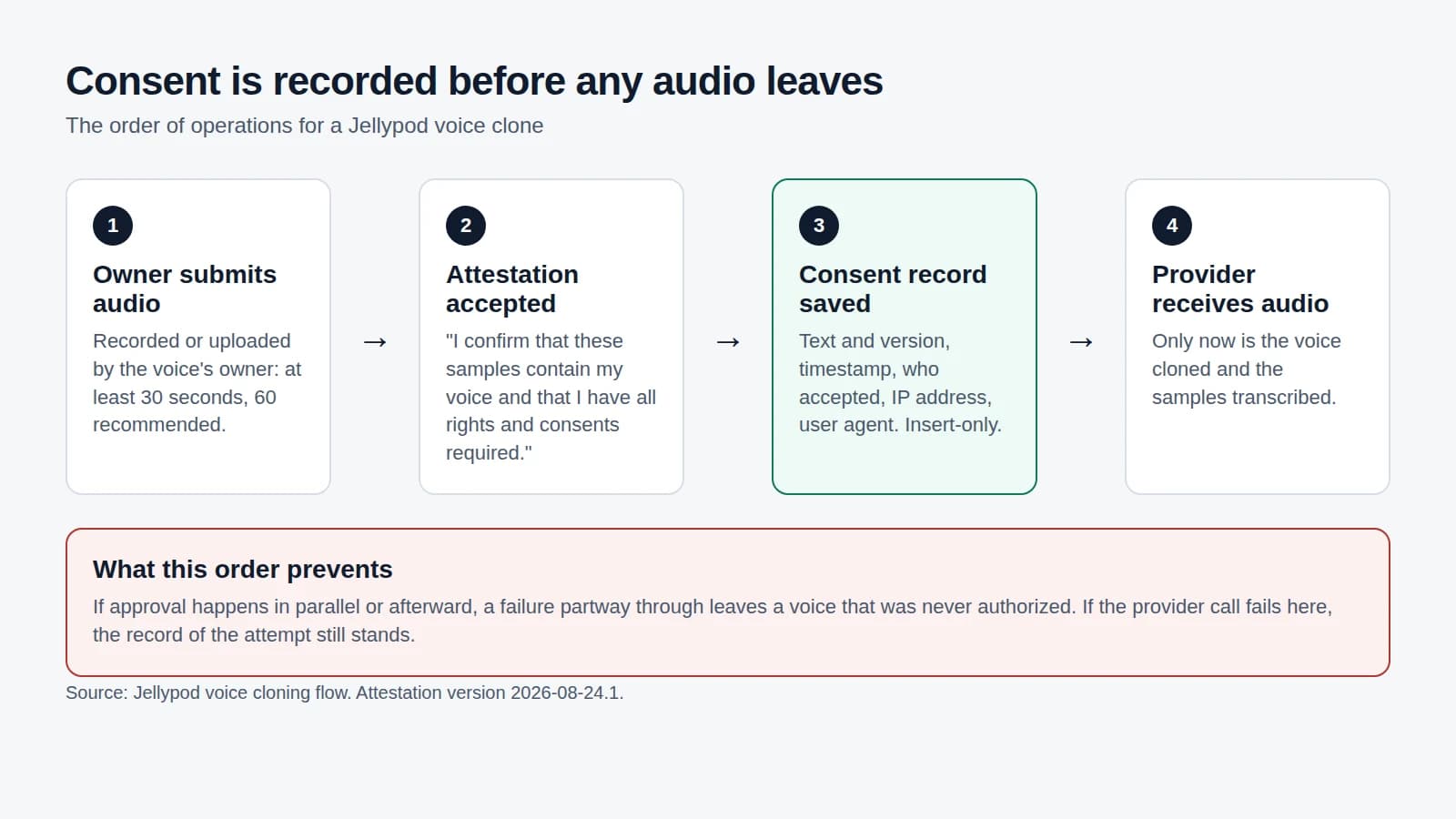
For a recurring show, a saved character keeps one host consistent across episodes. If you want the voice to be a specific person's, clone it with voice cloning, and read what consent should look like before you clone anyone else's voice.
Two hosts also help. Jellypod can write short reactions like "mhm" or "no way" that the second host says over the speaker. They play only when an episode has exactly two hosts and both voices support them. See how to create a multi-host podcast with AI voices for casting.
How do you fix a line that still sounds off?
Change the words first, then the tag, then the voice. Regenerate only that block: hover over a speech block and click Regenerate Audio. Jellypod flags any edited block whose audio is out of date, and regenerating is free, so you can try several versions of a line.
If you are comparing tools before you commit, check whether each one lets you direct individual lines or only a whole clip. If cost is part of the decision, see our ElevenLabs pricing breakdown.
Frequently asked questions
What is the fastest way to make an AI voice less robotic?
Rewrite the script the way you would say it: short sentences, contractions, punctuation chosen for pacing. Then add one or two tags where a person would react.
Do audio tags cost extra?
No. Audio generation is 30 credits per minute, and tags do not add to it. Regenerating audio for a single line is free.
Why did my tag do nothing?
The voice's model likely cannot perform tags. Jellypod strips those tags during generation without an error, and the script editor marks them with a warning-colored chip beforehand. Switch to a voice that supports them.
Is a cloned voice more natural than a stock voice?
A clone starts from a real person's pacing and tone, so it is the better match when the show should sound like that person. A well-directed library voice is still a good fit for most shows.

![A script with [Maya] and [Dev] speaker labels beside the three speaker blocks an import reads from it](/_next/image?url=%2Fblog%2Fhow-to-write-a-podcast-script%2Fscript-block-format.webp&w=3840&q=75&dpl=dpl_42UpQD7Pm3qLnVKpNt6BgATmGDRD)