Speechify's free plan gives you 10 robotic voices at up to 1.5x speed, and Premium costs $29 a month. If that is why you are looking around, the right replacement depends on whether you want a document read word for word or explained.
For word-for-word listening, Microsoft Edge Read Aloud is the best free option, ElevenReader is the closest cheaper app, and Paper2Audio is built for dense academic PDFs. If you would rather hear a document talked through, Jellypod's PDF to podcast turns it into a two-host conversation with a script you can edit before any audio is generated. It is not a read-along reader, so it will not replace Speechify for following the text as it plays.
Key takeaways
- Edge Read Aloud is the best free option: it reads web pages and PDFs aloud and highlights each word.
- ElevenReader is the closest paid swap: 10 free hours a month, then $11 a month or $8.25 a month billed annually.
- Paper2Audio is the pick for research papers: it handles equations, tables, and citations, with a free plan of 56 hours of audio a week.
- Jellypod explains a document as a two-host conversation you can edit first. It has no reader app, word highlighting, or free plan.
- Choose by job: read it aloud (Edge, ElevenReader, NaturalReader, Voice Dream, Paper2Audio) or hear it explained (Jellypod).
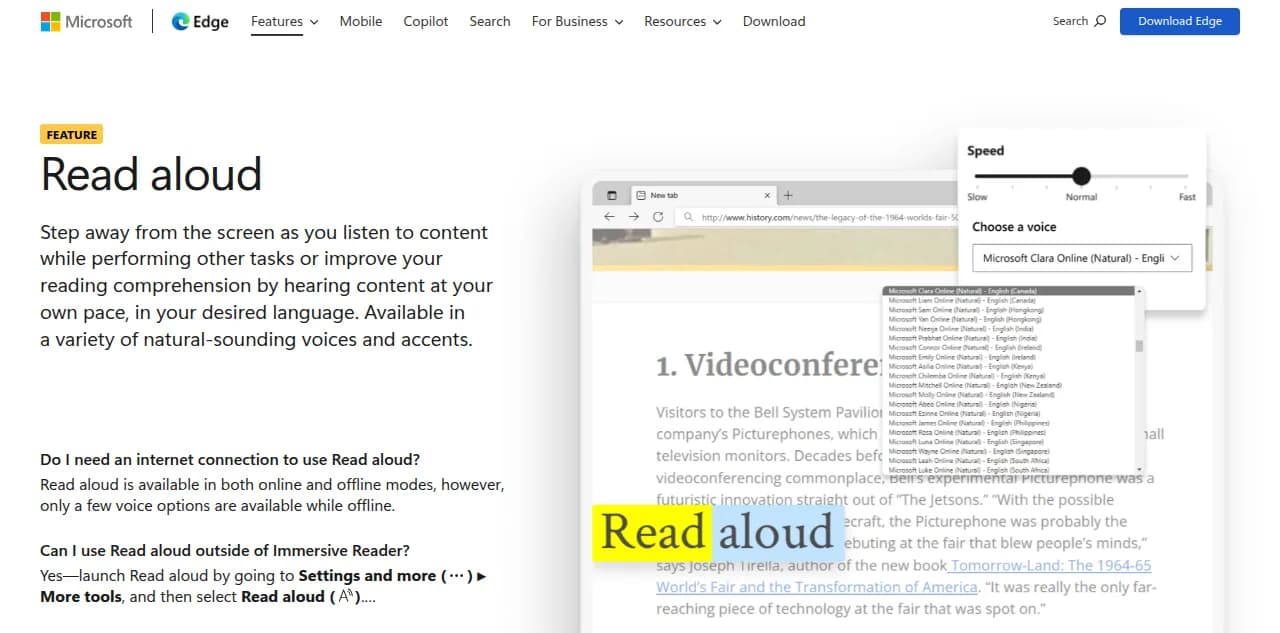
Edge Read aloud, the free option: pick a voice and speed, and it highlights each word. Screenshot of Microsoft's feature page.
Which Speechify alternative should you pick?
Prices and limits below come from each vendor's own pages, checked on September 29, 2026. This is a documentation review, not a timed listening test.
| Tool | Best for | Free option | Paid price | Platforms |
|---|---|---|---|---|
| Speechify (reference) | All-in-one reader | 10 basic voices, up to 1.5x | $29/mo or about $139/yr | Web, mobile, desktop |
| Edge Read Aloud | Free reading in a browser | Fully free | None | Windows, Mac, iOS, Android |
| ElevenReader | Natural voices on a phone | 10 hours/month | $11/mo or $8.25/mo yearly | Web, iOS, Android |
| NaturalReader | Browser and Chrome extension | Basic voices, no MP3 export | From $13.90/mo or $79/yr | Web, mobile, Chrome |
| Paper2Audio | Research papers | 56 hours/week | Plus $16/mo or $192/yr | Web, iOS, Android |
| Voice Dream Reader | Accessibility on Apple devices | Free download | In-app subscription | iPhone, iPad, Mac |
| Jellypod | A document explained by two hosts | None (7-day trial, card required) | From $25/mo billed annually | Web, including phone browsers |
Sources: Speechify pricing, Edge Read aloud, ElevenReader pricing, NaturalReader plans, Paper2Audio pricing, Voice Dream Reader, and Jellypod pricing.
What is the best free alternative to Speechify?
Microsoft Edge Read Aloud. It is built into the Edge browser and reads web pages aloud in natural-sounding voices. Since Microsoft added PDF support, you can open a PDF in Edge, press Read aloud, and it starts at the top and highlights each word as it goes.
Microsoft lists Read aloud on Edge for iOS and Android too. It gives you no audio file to keep, so it suits reading a course PDF at a laptop more than building a commute playlist.
What is the closest paid alternative to Speechify?
ElevenReader, from the voice company ElevenLabs. The free plan includes 10 hours of text-to-audio a month, 1,000+ voices, and playback up to 4x. Ultra adds unlimited text-to-audio for your imports, offline downloads, and custom voices for $11 a month, or $8.25 a month billed annually. That works out to $99 a year against Speechify Premium's roughly $139.
NaturalReader is the other mainstream pick, mostly for Chrome users. Its personal plans start at $13.90 a month or $79 a year for Lite, which includes OCR, a pronunciation editor, and MP3 export. Audio from those plans is licensed for personal use only.

ElevenReader's pricing page, September 2026.
What is the best Speechify alternative for research papers?
Paper2Audio. It is built for documents that trip up standard text-to-speech: equations, tables, figures, and citations, which it handles instead of reading aloud literally. The free plan covers 56 hours of audio a week, and the site says uploaded content on the free plan may be used to improve its models. Plus is $16 a month, or $192 a year, with a higher limit, audio export, and a promise that your content never trains its models.
Paper2Audio narrates your document for you. It does not publish anything or turn the paper into a conversation. If you are also weighing an explain-it-to-me approach for coursework, see our guide to AI podcasts for studying.
What is the best Speechify alternative for accessibility?
Voice Dream Reader, if you use Apple devices. It imports PDFs, EPUBs, Word documents, PowerPoint files, and web pages, works offline, and supports VoiceOver, Dynamic Type, Voice Control, and refreshable braille displays. It is not available on Android or Windows, and the vendor page does not state a price, so check the App Store listing before you subscribe.
Can you get a PDF explained instead of read aloud?
Yes, and this is the one job the readers above do not do. A reader speaks every sentence. A podcast condenses a 60-page report into a conversation about what matters in it.
In Jellypod, you upload a PDF and two AI hosts discuss it. The PDF to podcast tool drafts the script first, and you edit any line before audio is generated. Editing is free: credits are spent only when audio is generated. Then you download an MP3 or publish to Spotify, Apple Podcasts, and YouTube. The Starter plan is $25 a month billed annually, with a 7-day free trial that requires a payment method, and includes 5,000 credits a month.
If you want your exact words read aloud, text to voice narrates a TXT, DOCX, or PDF in one of 3,300+ voices, or a clone of your own.
Know the limits before you pay. Jellypod runs in the browser, including on phones, but it has no mobile reader app, no word-by-word highlighting, no camera scanning, and no browser extension. An AI-written conversation can also drop nuance from the source, which is why the editable script matters: read it against the PDF before you generate. The Jellypod vs Speechify comparison covers the head-to-head, and our AI podcast generator roundup covers other tools that make podcasts from documents. NotebookLM is the free version of the same idea, with fixed hosts and no script editing, and we list its options in NotebookLM alternatives.
Is Speechify Premium worth paying for?
If you read on several devices and want scanning, 5x speed, 1,000+ voices, and AI Podcasts in one app, yes. Speechify's pricing page lists Premium at $29 a month, with a 60% saving on the annual plan.
Most people need less. Edge covers free reading in a browser, ElevenReader Ultra costs less on a phone, and Voice Dream covers Apple accessibility. Speechify's own AI Podcasts sit behind Premium.
Frequently asked questions
Is there a totally free version of Speechify?
What is the best Speechify alternative for PDFs?
Is there a Speechify alternative for Android?
Can I keep the audio as a file?
The short version
For free reading aloud, use Edge. For a cheaper Speechify on your phone, use ElevenReader. For dense papers, use Paper2Audio. To hear a document talked through by two hosts, try PDF to podcast.
Turn a PDF into a podcastTry Jellypod