A toolbox talk is a short safety briefing, usually five to fifteen minutes, that a supervisor gives a crew on one hazard before work starts. OSHA does not use the term, but it does require that workers be instructed in the hazards they face, and that the instruction be delivered in a way they can understand. If half the crew does not follow the language of the talk, it is not doing that job.
Jellypod handles that gap. You upload one topic sheet or incident write-up, produce the briefing as a separate audio episode in each language on your crew, and hand out the files through your own channels.
Key takeaways
- OSHA has no "toolbox talk" rule. The requirement is instruction in hazard recognition that employees are capable of understanding, which in a mixed-language crew means their language.
- A 2025 scoping review of 14 studies lists language diversity, worker disengagement, and production pressure as the recurring challenges.
- In Jellypod, language is a podcast-level setting, so you make one private podcast per language, feed each the same source, and review each script before any audio exists.
- Private podcasts have no RSS feed and no share link. You download the audio and distribute it yourself, and Jellypod does not record who listened, so keep your sign-in sheet.
What is a toolbox talk, and does OSHA require them?
A toolbox talk (also called a tailgate talk or safety huddle) is a single-topic briefing held on site before the shift. OSHA does not mandate the format by name. The construction standard says the employer "shall instruct each employee in the recognition and avoidance of unsafe conditions and the regulations applicable to his work environment" (29 CFR 1926.21(b)(2)). A short talk on one hazard is a common way to meet that.
The word "instruct" carries a condition. OSHA's training standards policy statement says "train" and "instruct" mean "to present information in a manner that employees receiving it are capable of understanding." OSHA also publishes ready-made toolbox talks, some in English and Spanish, on its alliance products page. Check the standard that applies to your trade, since general industry and construction differ.
Why do toolbox talks fail on mixed-language crews?
The 2025 scoping review in Safety (Kearney, Hisel, and Staley) found 14 studies published between 2000 and 2024, ten of them in construction. Every study reported positive outcomes, with the clearest gains in workers' safety knowledge. The challenges it lists are worker disengagement, language diversity, and production pressure. Its recommended practices are regularly scheduled talks, engaged workers, trained supervisors, and culturally appropriate, tailored materials.
Each of those maps to something you can fix. A supervisor translating on the fly drops detail. A talk read from a handout puts people to sleep. A talk scheduled "when there's time" gets cut on the day the schedule is tight.
How do you run a toolbox talk for a multilingual crew?
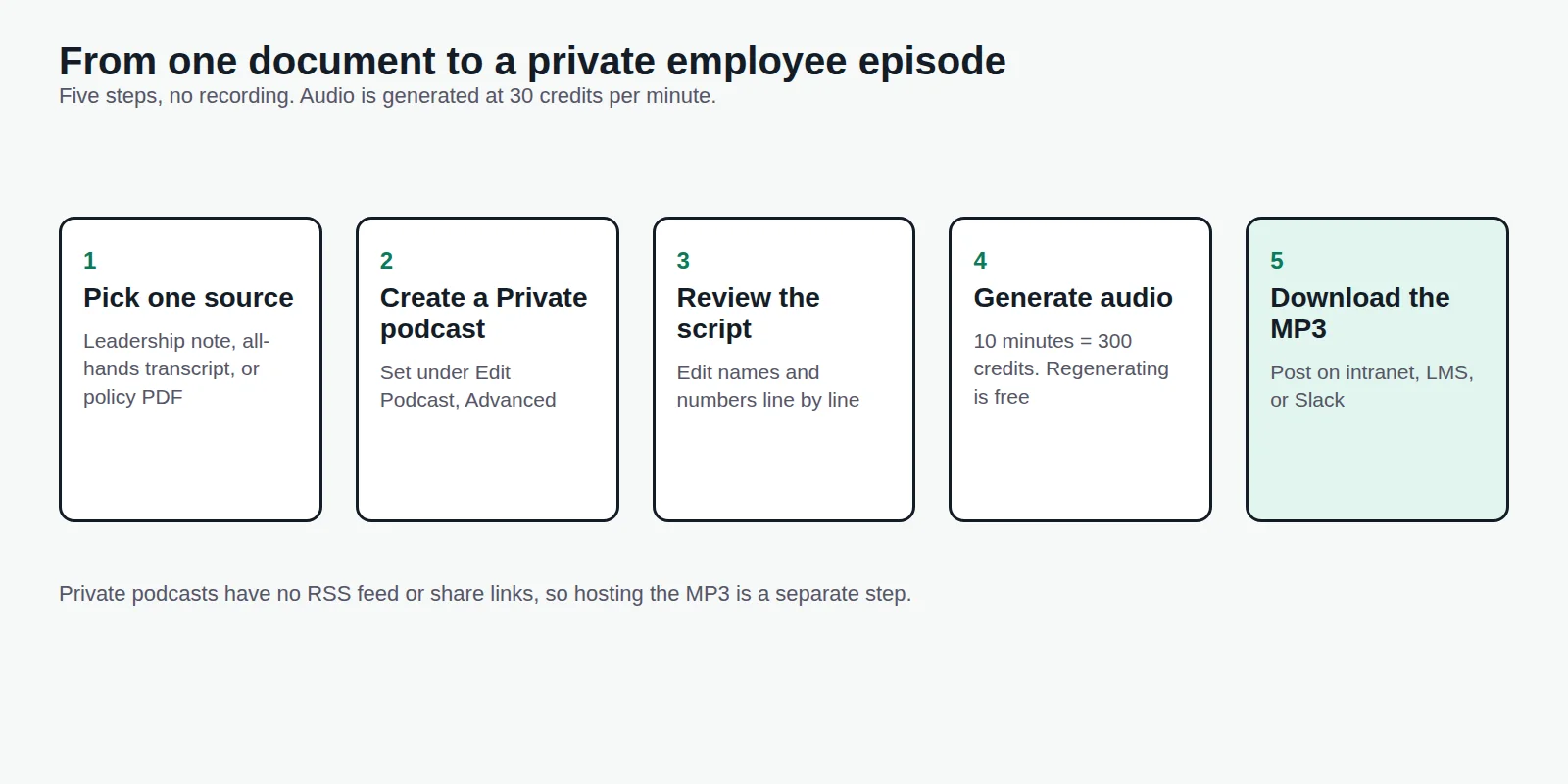
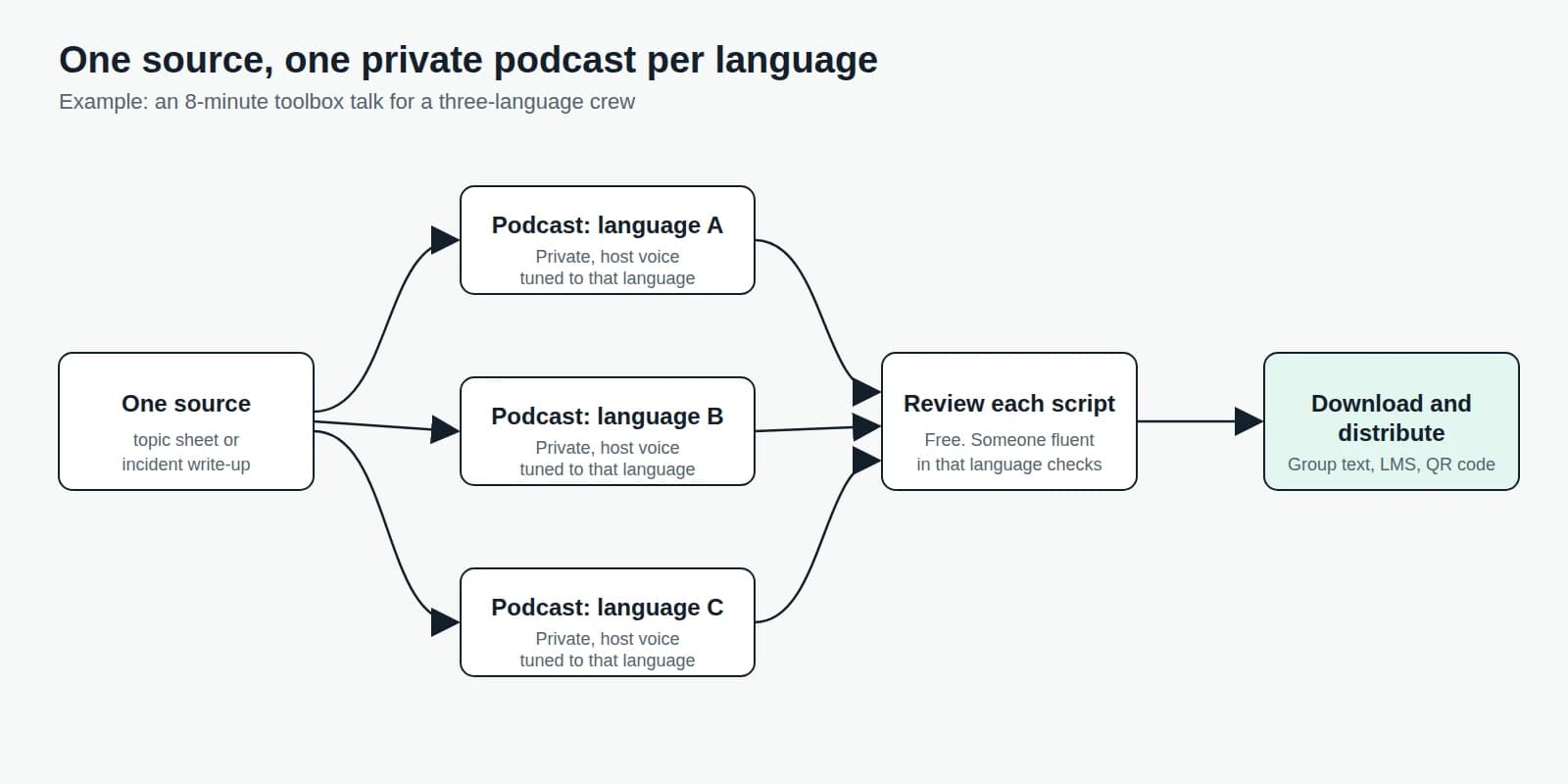
Jellypod writes each script in the language set on the podcast, so the setup is one podcast per language. The steps:
- Pick one hazard and one sourceUpload the topic sheet, incident write-up, or procedure. Jellypod writes the script from your source, and a source that already reads as a finished script is used word for word.
- Create one private podcast per languageSet each podcast's Language, then pick a host whose voice is tuned to that language from the Voice Library (3,300+ voices across 121 languages). Jellypod warns you if the voice and podcast language do not match.
- Add site terms to the Pronunciation GuideEquipment names, chemical names, and acronyms get said correctly once you add them to the Pronunciation Guide.
- Review every script before audioDrafting and editing cost no credits. Read each script against the source, especially measurements and procedures. Have someone fluent in that language check it, because Jellypod cannot vouch for a safety translation.
- Generate, download, and distributeNarration costs 30 credits per minute, so an 8-minute talk in three languages is 720 credits. Regenerating audio, downloading, and publishing are free.

If you would rather publish a talk openly, Jellypod's built-in hosting gives a public show a website and RSS feed. For the case for short audio over slides, see audio microlearning.
What does a toolbox talk script sound like?
Two hosts, one hazard, short sentences. This is an illustrative excerpt of the kind of script you would review in the editor, not output from a specific run:
Host A: Today's topic is ladders. Before you climb, look at three things. The rungs, the feet, and the top.
Host B: If a rung is bent, or the feet do not sit flat, stop. Tag the ladder and tell your lead.
Host A: Question for the crew when you finish listening: what is one place on today's job where a ladder is set up wrong?
Ending on a question for the crew is deliberate. The audio does the briefing, and your supervisor still runs the discussion.
How do you keep a toolbox talk program on schedule?
Automations generate an episode on a daily or weekly schedule, or whenever an email arrives at the automation's address. Each one posts to one podcast, so a three-language crew needs three automations. Starter includes 2, Creator 10, and Business unlimited.
Leave Auto-Publish off and each run saves as a draft for you to review, which is the right default for safety content. Forward the week's topic sheet to the automation's address and the drafts appear without anyone re-entering the setup. If a run fails three times in a row, Jellypod pauses the schedule instead of spending credits.
Can you keep toolbox talks private, and how do you prove attendance?
A Private podcast has no website, RSS feed, or share link, and only people in your Jellypod workspace can open it. Seats are limited (1 on Starter, 2 on Creator, 5 on Business), so the crew does not listen inside Jellypod. Download the audio and post it where your crew already looks: a group text, your LMS, an intranet page, or a QR code on the gate.
A public podcast gets an RSS feed that anyone can subscribe to, so use it only for content you would post openly.
Jellypod does not record who heard a private episode. Attendance stays on your sign-in sheet, with the topic and date. For scripts, the editor exports a .txt file you can attach to the record. Compliance training best practices covers what audio can and cannot prove, and internal communications podcasts covers reaching staff who are away from a desk.