Audio microlearning is a short training episode, usually 3 to 10 minutes, built around one objective and delivered as audio instead of a video or an app module. Because it needs no screen, it plays in a car, on a walk between buildings, or in the five minutes before a shift.
Jellypod builds these from material you already have. Export a training deck to PDF and upload it with PDF to podcast, or upload a document, then generate and review the script and narration. Most of the learning and development work we see is exactly this: one asset, one objective, one short episode.
Key takeaways
- Microlearning is a design choice (one objective, delivered short), not a video format or an app category.
- Audio fits policy changes, context, coaching, and refreshers. Video is still better for anything that needs a screen.
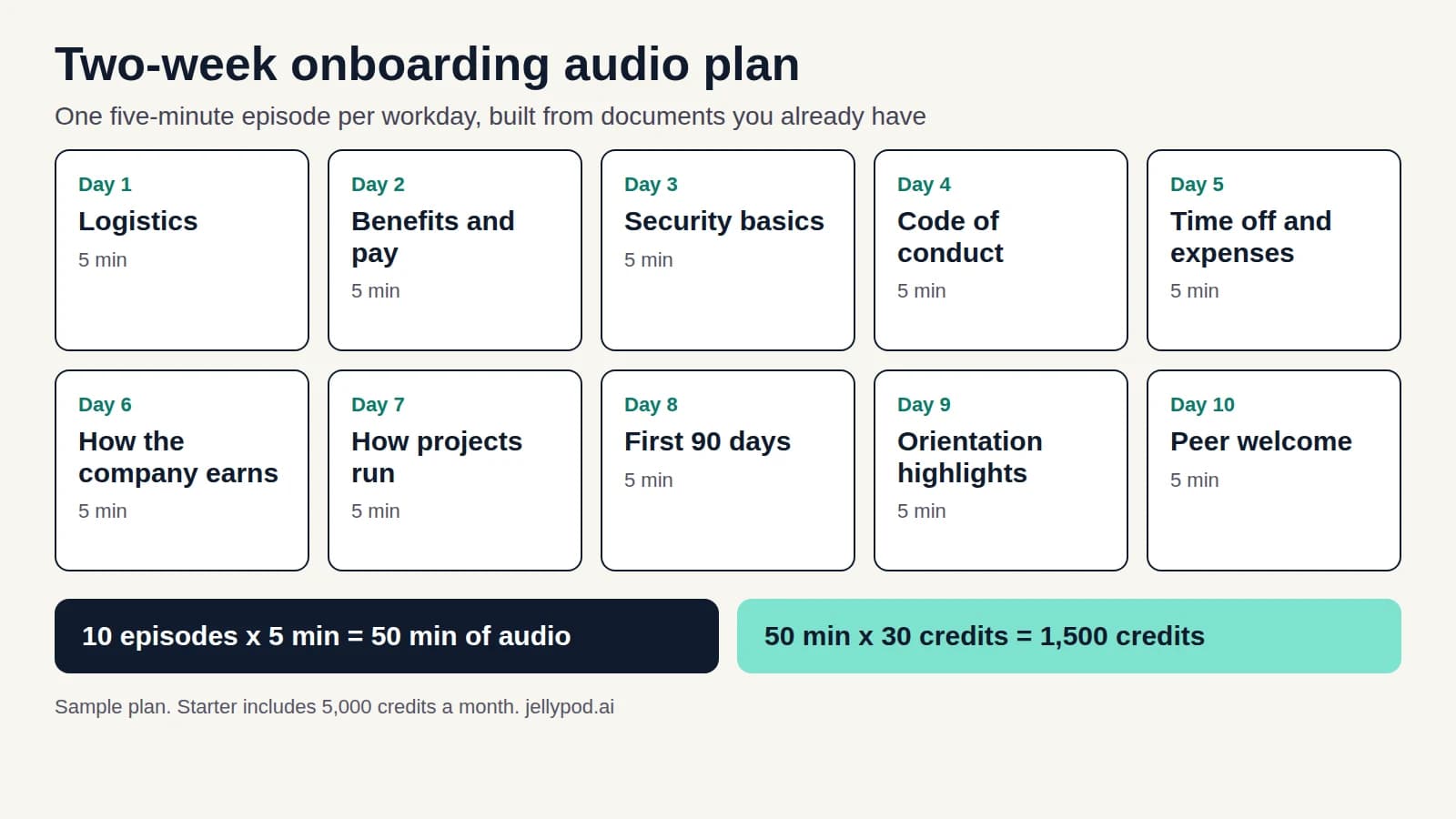
- Jellypod bills 30 credits per minute of narration, so a 5-minute episode costs 150 credits. Editing the script, publishing, and downloading use no credits.
Script edits, publishing, and exports use no credits. Jellypod has a Free plan with 500 credits and no credit card, and paid plans include a 7-day free trial.
- Start with one deck and one objective. If the objective needs more than one sentence, split it into two episodes.
Hear a deck become an audio briefing
This 171-second briefing covers five topics from an onboarding and employee-development deck: onboarding goals, training gaps, ADDIE, training evaluation, and training versus development. It demonstrates the deck-to-audio workflow. For a microlearning lesson, select one of those topics and define one objective before generating.
Loading audio example…
We uploaded the PowerPoint as a Voiceover, then used Copy to Podcast to reuse its saved narration. The Podcast has an independently edited opening and a source-review correction about planning with the Kirkpatrick model. Read its narrated script alongside the deck. Edits to either output do not automatically update the other.
Adapted from Lumen Learning's Human Resources Management, Module 7 under CC BY 4.0. Jellypod selected five slides, added a credit slide, and adapted the narration. No Lumen endorsement is implied.
Create an audio lesson, then add a source you have permission to use. Initial generation writes the script and narration together; review both, edit and regenerate affected narration, then export.

What is audio microlearning?
Microlearning breaks a topic into one narrow objective and delivers it in a short session instead of one long course. The definition holds regardless of format: a five-minute video walkthrough, a spaced-repetition quiz on a phone, and a six-minute audio briefing on a new policy all count if each targets one thing the learner needs to know or do.
Research attention is real. A 2021 review in the Journal of Workplace Learning found that microlearning publications grew 47 times from 2006 to 2019, while e-learning publications grew about 4.5 times (Leong, Sung, Au & Blanchard, 2021).
Why does audio suit people who multitask during training?
The TalentLMS 2026 L&D Report says multitasking during training reached 70% in 2025, up from 58% in 2024 and 64% in 2023. If learners are already doing something else, a format that works while they do it removes the fight for their screen.
The limit is just as clear. Audio cannot show a click path or a physical procedure. For those, use video (see employee training videos).
How does audio compare with video and app microlearning?
Most of what L&D and enablement teams produce (a policy change, a product launch briefing, a coaching tip) does not depend on watching something happen. That is where audio replaces a longer video or a re-recorded module.
What are examples of audio microlearning?
- Onboarding briefings: one policy, tool, or team norm per day for a new hire's first two weeks. See onboarding training new hires finish.
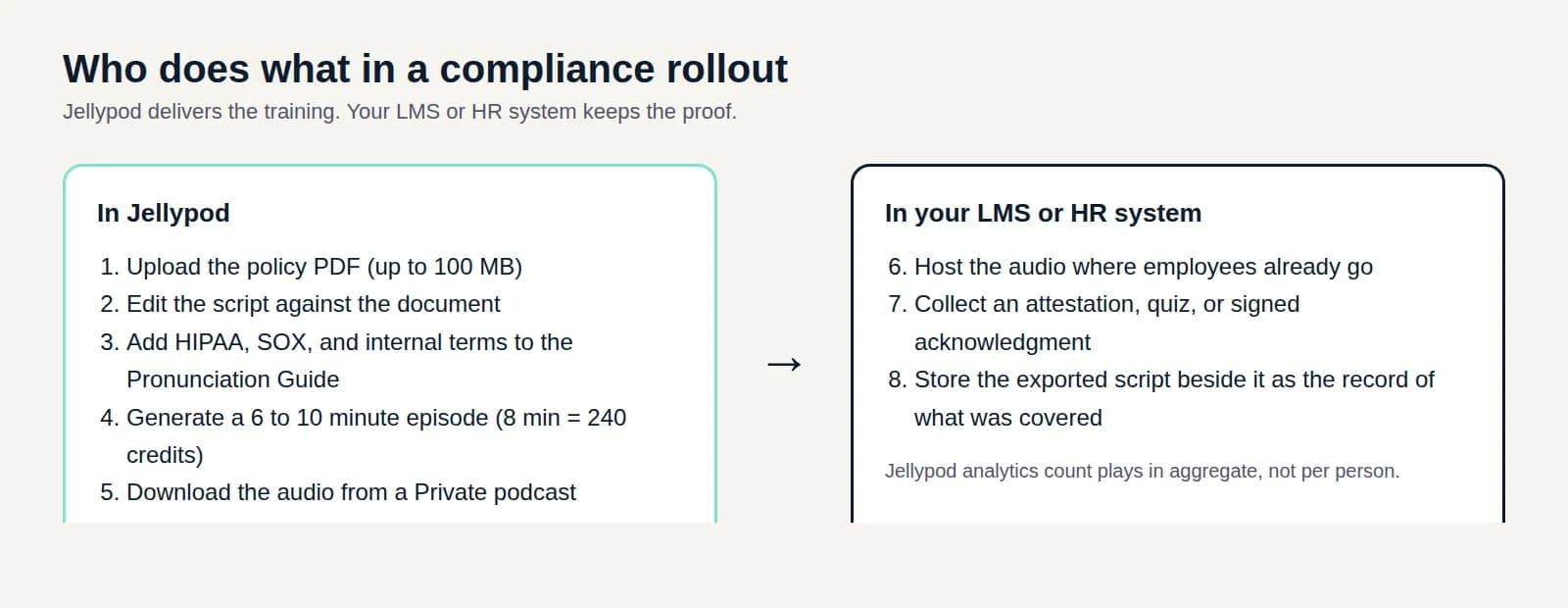
- Compliance refreshers: an episode on what changed in a policy and why. See compliance training best practices.
- Safety and procedure reminders: a recurring refresher timed to the start of a shift. See toolbox talks.
- Company updates for teams without desks: see internal communications podcasts.
- Sales and manager coaching: one objection or one technique per episode, built from a playbook or a leadership talk.
How do you turn a training deck into audio microlearning?
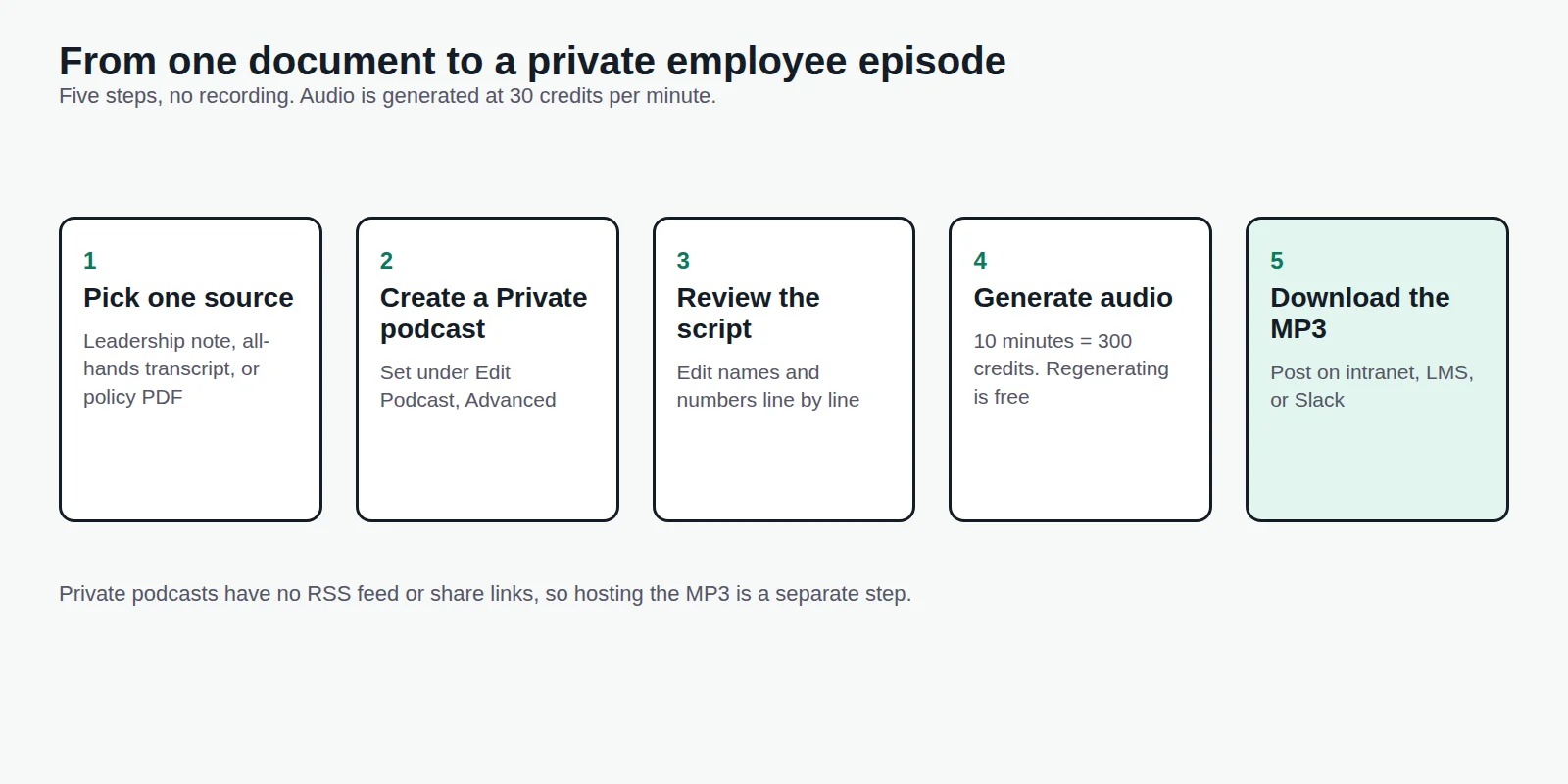
- Pick one asset and one objectiveA policy update, onboarding doc, or recorded session. State what a listener should know or do afterward in one sentence.
- Upload itExport the deck to PDF from PowerPoint, Keynote, Google Slides, or OpenDocument, then upload it with PDF to podcast. Speaker notes do not survive that export.
- Generate the episodeJellypod writes the script and generates narration together. Narration is 30 credits per minute, so a 5-minute episode is 150 credits. Choose a short runtime within your plan's episode-length limit.
- Review the generated script and narrationCompare both with your source, fix anything wrong and regenerate affected narration before exporting. Text editing uses no credits; later narration regeneration is free within the daily limit.
- Share itPublic podcasts get an RSS feed for Spotify, Apple Podcasts, and YouTube. Private podcasts have no feed, so for internal material download the audio from the Studio and post it in your LMS or team channel.
Recurring cases like onboarding tracks and policy refreshers can run on a schedule with podcast automations, which generate an episode on the days you choose and can hold it in drafts for review.
Can an audio lesson report completion to an LMS?
On Business and Enterprise, export the reviewed Episode as a SCORM audio package, then upload its ZIP to your LMS. The player saves resume position and reports completion after the learner covers your chosen share of the audio. SCORM packaging uses no credits; narration generation follows the usual credit rules.
This helps when an onboarding or policy recap needs an individual completion record. The record measures playback coverage, not recall or understanding. Keep a separate question or practical check for that. Follow the SCORM export walkthrough and choose a version supported by your LMS.
Is a podcast a form of microlearning?
Yes, when it is short and built around one objective. A 45-minute interview show is not microlearning. A six-minute episode on one policy change is.
Can audio microlearning replace video training?
Only for content that does not depend on watching something happen. A software walkthrough or a physical procedure still needs video. A policy explainer or a coaching tip does not.