
An AI podcast script generator turns source material into spoken structure: an episode outline, assigned speaker turns, and dialogue that can be edited before audio is produced. A usable result should stay grounded in the source, sound clear when read aloud, and give a human control over every final line. Jellypod keeps that process in one project, from uploaded documents and links through script editing, AI hosts, pronunciation review, audio generation, hosting, and distribution.
The generated draft is a starting point, not an authority. A subject-matter reviewer still needs to check claims, names, dates, emphasis, and anything the source leaves ambiguous.
How does an AI podcast script generator work?
The generator reads the supplied source, identifies the main ideas, proposes an order, and writes those ideas for the ear. For a multi-speaker episode, it also divides the material into turns so each host has a clear role. Jellypod accepts more than 70 supported source types, including PDF, DOCX, TXT, Markdown, slide decks, public URLs, and YouTube videos, according to its source documentation.
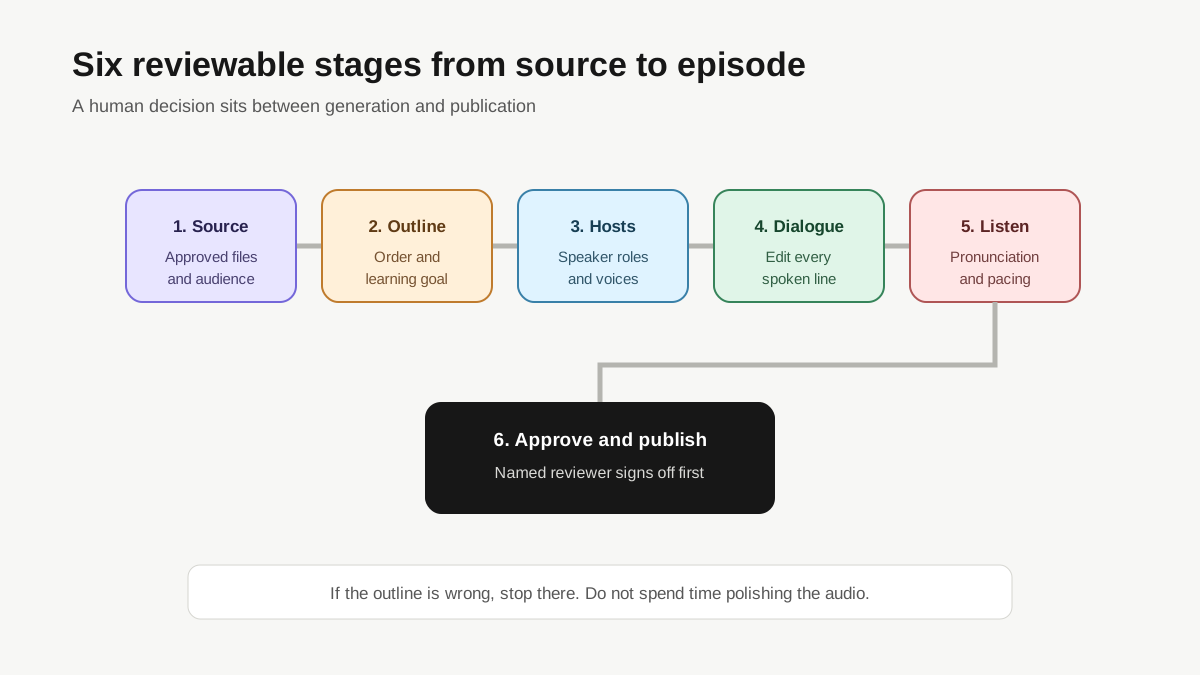
The workflow has six reviewable stages:
- Add an approved source and describe the audience.
- Review the proposed topic and outline.
- Choose one or more hosts and define their roles.
- Edit the generated dialogue line by line.
- Add pronunciation guidance and generate speech.
- Listen, correct individual segments, and publish only after approval.
Each stage should preserve a human decision. If the outline misses the learning objective, fixing a polished voice track later is wasted work.
What source material can you turn into a script?
Start with material your organization is allowed to use and prepared to stand behind. A professor might upload lecture notes and assigned readings. An L&D lead might use an approved policy and a manager checklist. A medical education team might use peer-reviewed papers plus an internally reviewed summary.
Jellypod can read files, pasted text, public pages, and supported media sources. That technical range does not remove editorial boundaries. Keep the source packet narrow when precision matters. Separate required facts from optional background, and tell the generator which source controls if two documents conflict.
For high-stakes topics, do not ask the system to fill gaps from general knowledge. Add the missing primary source or mark the gap for a human. Source grounding makes review faster because the editor knows what the script is allowed to say.
What does a source-to-script example look like?
Here is a concrete, reproducible example based on Jellypod's public supported-source documentation. The source says that users can upload documents through the source dialog and lists supported formats such as PDF, DOCX, TXT, Markdown, PPTX, CSV, and EPUB. The following outline and dialogue are an editorial illustration, not a claim that they came from an unattended product test.
Input brief:
Audience: faculty members preparing a weekly course recap. Goal: explain which teaching materials they can bring into the episode workspace. Format: two speakers, about 45 seconds. Constraint: mention only formats named in the source documentation.
Proposed outline:
- Begin with the faculty member's existing material.
- Name a few supported document and slide formats.
- Explain that the source becomes the basis for an editable episode draft.
- Ask the listener to verify the source selection before generating audio.
Illustrative dialogue:
Host 1: You do not need to rewrite this week's lecture from scratch. Start with the material you already gave your students.
Host 2: That can include a PDF, Word document, text file, Markdown file, PowerPoint deck, CSV, or EPUB. Choose the source that contains the version you want the episode to follow.
Host 1: Once the draft appears, check the outline and every claim before you generate the final audio.
This example is useful because every factual detail can be traced to one page. A broader source packet would need citations or review notes for each additional claim.
How do AI hosts change the script?
Speaker count changes the writing, not only the voice. A solo host needs clean transitions and enough context to carry the whole explanation. Two hosts can divide roles: one introduces a decision, while the other explains evidence, challenges an assumption, or gives an example. Four interchangeable speakers usually make review harder unless each has a clear purpose.
In Jellypod, an AI host has a voice and a persistent profile. The script assigns each segment to a host, so you can inspect who says what before generating speech. For professional education, useful roles include instructor and learner, policy owner and manager, or clinician and interviewer. Avoid fake disagreement. Give the second speaker a specific job, such as defining a term or testing how a rule applies.
Read the turns without audio first. If removing the speaker labels makes the dialogue confusing, the roles are not distinct enough. If every turn begins with agreement, the conversation probably needs editing.
Can you edit an AI-generated podcast script?
Yes. Editing is the control point that makes a generated script usable. Jellypod's script editor lets you rewrite individual lines, change speaker assignments, work with the agent on larger revisions, and regenerate the affected audio segment without replacing the rest of the episode.
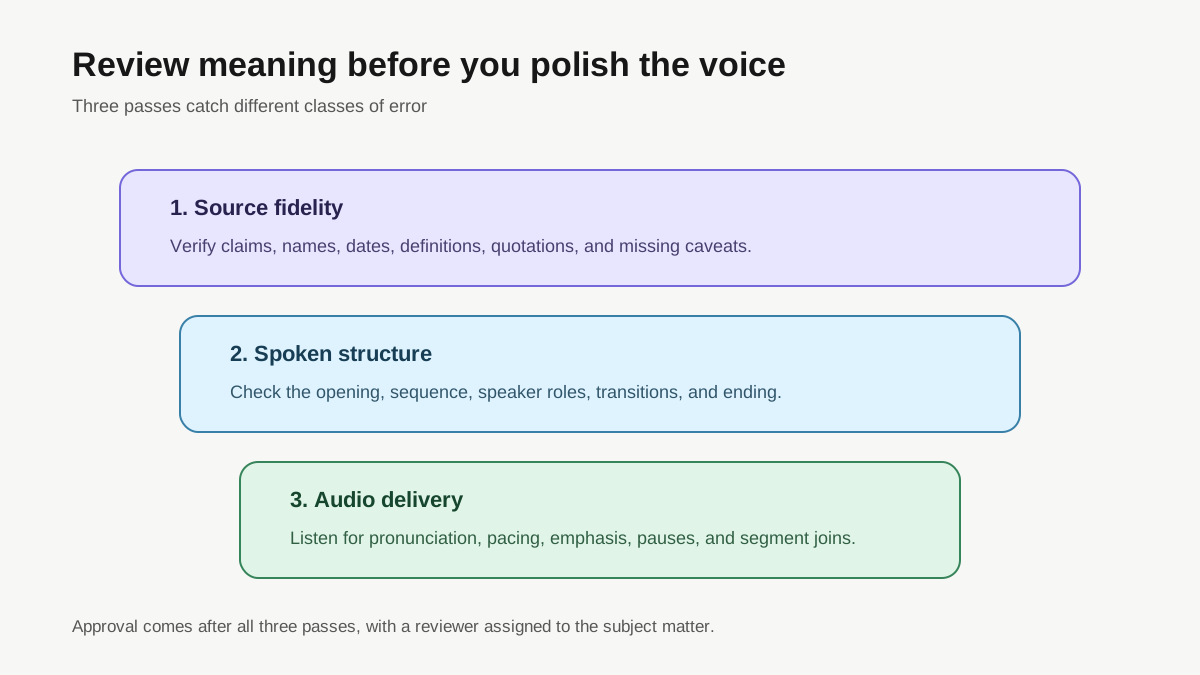
Review in three passes. The first pass checks fidelity to the source. The second checks structure: opening, sequence, transitions, and conclusion. The third checks spoken delivery, including sentence length, repeated phrases, abbreviations, and words that look different from how they sound.
Keep factual and stylistic revisions separate. A request such as "make this friendlier" can accidentally change certainty or remove a qualification. Lock the meaning first, then improve the delivery around it.
How do you fix names and technical terms before generating audio?
Create a pronunciation list before the first full listen. Include people's names, place names, acronyms, product names, drug names, and course codes. Jellypod's script workflow includes a pronunciation guide, and saved pronunciations can be reused in later episodes.
Write what the speaker should say, not only what appears in the source. An acronym may need to be expanded on first use. A URL may be better described as a resource in the show notes. A table row may need a sentence that explains the comparison instead of reading each cell aloud.
Then listen in context. Correct pronunciation does not guarantee good pacing. A technical term placed at the end of a long sentence may still be hard to follow. Shorten the line or give the other host a clarifying turn.
When should a human review the script?
Human review should happen before audio generation and again before publication. Early review catches a bad outline before it spreads across dozens of lines. The final review catches delivery problems that only become obvious when spoken.
Assign the reviewer according to the risk. A course owner checks learning objectives and citations. A policy owner checks obligations and dates. A clinician checks medical meaning. An editor can improve pacing, but should not silently decide what a specialist claim means.
The reviewer should be able to answer four questions:
- Can every material claim be traced to an approved source?
- Does each speaker have a clear purpose?
- Are names, numbers, and defined terms exact?
- Does the final audio preserve the approved script?
If any answer is no, keep the episode in draft.
Does generating a script also create the podcast audio?
That depends on the product. General writing tools usually stop at text. Jellypod keeps the script connected to AI hosts and audio segments, so approved dialogue can be generated and reviewed inside the same episode. You can then use the timeline editor for music and timing, download the result, or publish through the show's hosted site and RSS feed.
Drafting, editing, and segment regeneration do not consume Jellypod credits. The pricing documentation says credits are consumed when you publish or download episodes and when you render clips or video. That gives a team room to revise before committing to the final output.
What are the limits of an AI podcast script generator?
A generator cannot decide which unsupported claim your organization is willing to make. It cannot grant rights to a document or another person's voice. It also cannot replace a subject-matter reviewer who understands the consequences of a wrong date, missing caveat, or misleading simplification.
Generated speech can mispronounce a name or place emphasis on the wrong word. A source can also be incomplete, stale, or internally inconsistent. The safest workflow exposes those limits: approved sources, visible dialogue, named reviewers, a pronunciation pass, and a final listen.
Use AI to build and revise the draft. Keep authorship decisions with the people responsible for the material.