Most people looking for a Synthesia alternative are not unhappy with AI video. They are unhappy with one thing: the avatar on screen, stock clips that do not match the idea, or the price.
The right replacement depends on which one it is. If you still want a presenter, Synthesia and HeyGen are each other's closest swap. If you want stock footage from a script, Pictory is the standard, and InVideo AI adds generated clips. If you want no presenter and no stock, Jellypod's AI video generator turns a prompt, PDF, slide deck, or URL into a narrated explainer with original drawn scenes. It does not make talking heads.
Key takeaways
- Choose by what should be on screen: an avatar (Synthesia, HeyGen), stock footage (Pictory), generated clips (InVideo AI), or drawn scenes (Jellypod).
- Synthesia and HeyGen are the closest like-for-like swaps for each other, and both have free plans with tight limits.
- Jellypod is the faceless option: illustrated scenes in 16 styles, no avatar, one to four AI narrators, and no free plan (a 7-day free trial instead).
- For a full head-to-head with HeyGen, see Jellypod vs HeyGen. For what a finished explainer should cost, see explainer video cost.
 A scene from a Jellypod video in the Whiteboard Explainer style.
Which alternative fixes why you are leaving?
| If your problem is | Try | What you get |
|---|---|---|
| The avatar looks fake or is not what you want | Jellypod | Drawn scenes, no presenter |
| You want a presenter but Synthesia or HeyGen limits annoy you | HeyGen or Synthesia | The closest like-for-like swap for each other |
| Stock clips illustrate keywords, not ideas | Jellypod | Original scenes drawn for each spoken line |
| You want cinematic generated footage | InVideo AI | Generated clips plus stock, edited in plain language |
| You need to keep your own slides on screen | Jellypod voiceovers | Narration over your PDF or PowerPoint pages |
If the video only has to explain how something works, a diagram or an illustration usually carries the idea better than a talking head or a stock handshake. That is the gap Jellypod fills, and the reason an explainer video is often better without a face.
What does Jellypod do differently for faceless explainers?
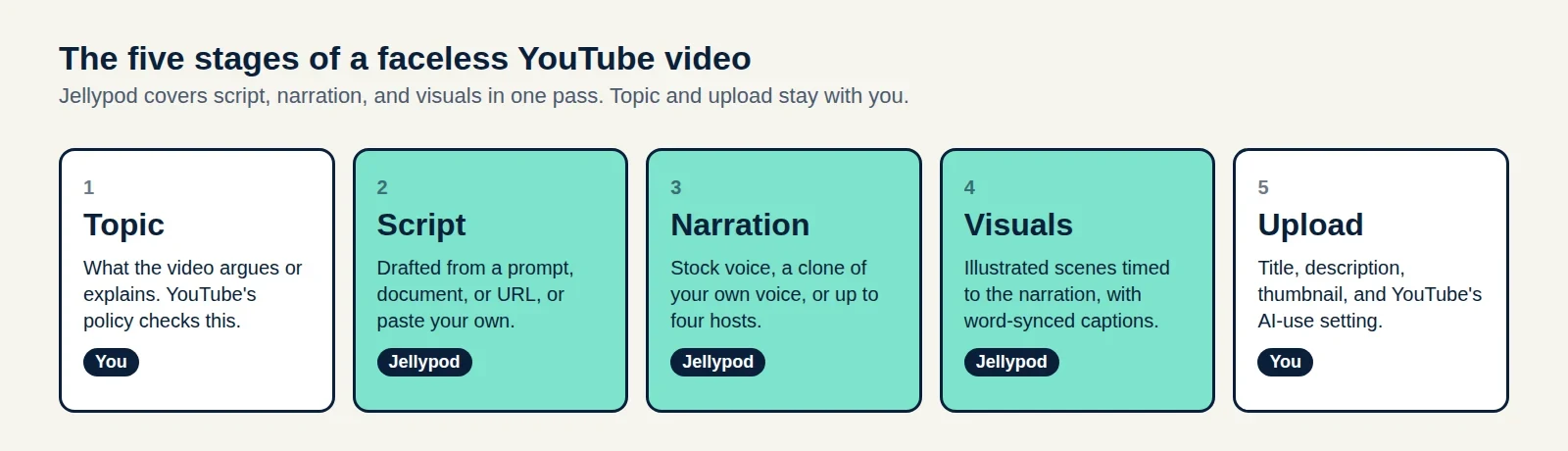
Jellypod is our product, so read this section with that in mind. The workflow has five steps:
- Give it a prompt, PDF, slide deck, document, URL, audio file, or finished script.
- Pick one of 16 visual styles (Whiteboard Explainer, Claymation, Stickman, Watercolor, Blueprint, and others) and an orientation.
- Jellypod writes and voices the narration, using one to four narrators from the voice library, a designed voice, or your own voice clone.
- It draws a scene for each line and renders a 1080p MP4 with word-synced captions.
- You edit by line: rewrite a line and only that audio regenerates, or redo one visual with a note or swap in your own image or clip.
Videos run 3 to 25 minutes, capped at 15 on Starter, 20 on Creator, and 25 on Business. For a whiteboard look see whiteboard explainers, and for a general no-camera setup see the faceless video generator.
 The same studio renders explainers in Claymation and other styles.
The limits are real. There is no photoreal presenter, no stock footage library, and no multitrack timeline editor. Videos render at 1080p, with no 4K option. There is no free plan: paid plans start with a 7-day free trial that includes 5,000 credits and needs a payment method, and Starter costs $25 a month billed annually.
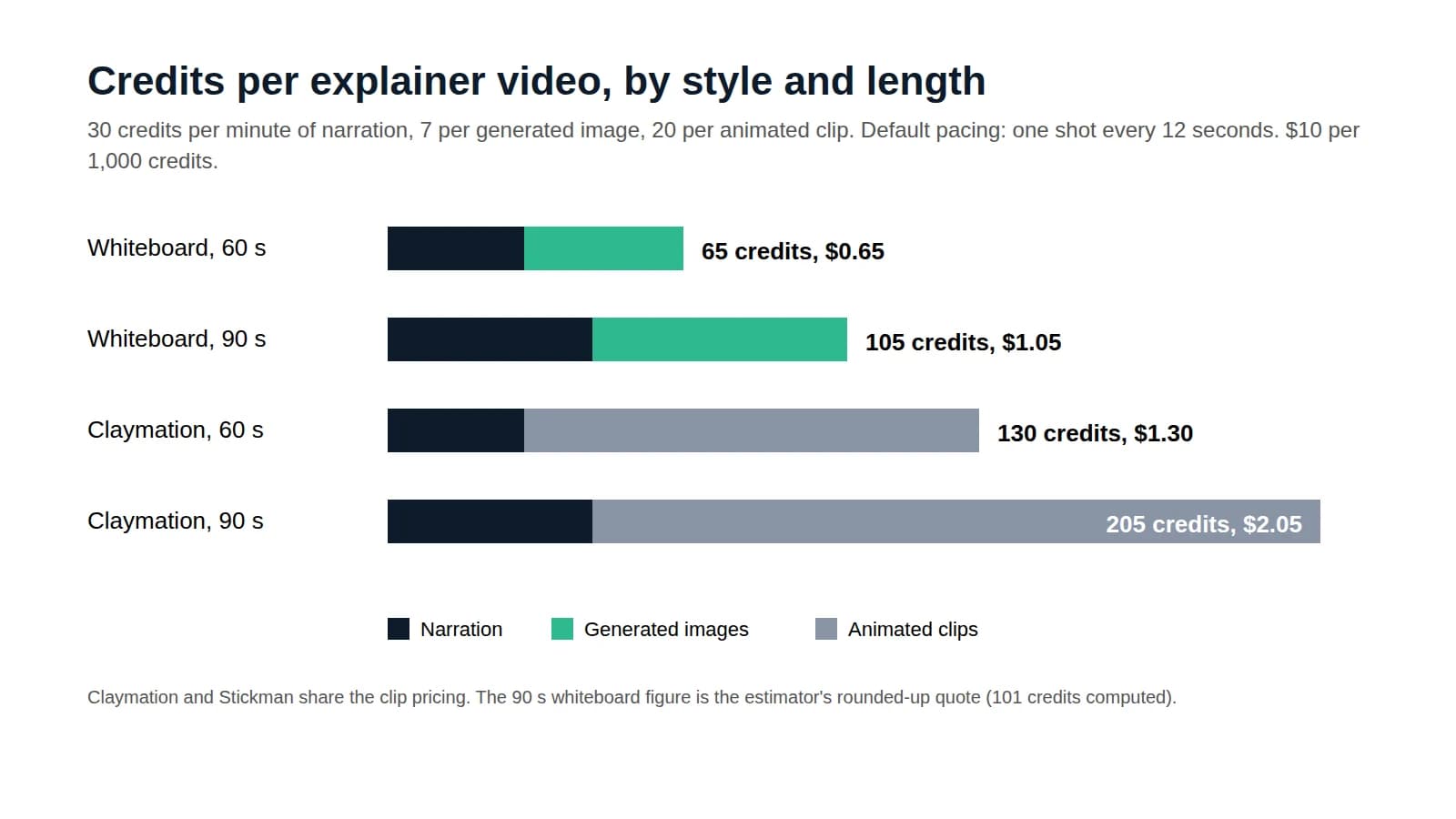
Credits are counted in a way you can estimate before you start: 30 credits per minute of narration, plus 7 per generated image and 20 per generated video clip. Drafting, editing, re-rendering, and downloading are free.
How do Synthesia, HeyGen, Pictory, and InVideo compare on price?
These are the plans as listed on each vendor's pricing page in September 2026. Plans change often, so check the linked page before you buy.
| Tool | What is on screen | Free option | Entry paid plan |
|---|---|---|---|
| Synthesia | AI avatar presenter | Free Basic plan, about 10 min of video a month, 9 avatars | Starter $29/mo, or $18/mo billed yearly |
| HeyGen | Realistic AI avatar | Free plan, 3 videos a month up to 1 min | Creator $29/mo, or about $24/mo billed yearly, videos up to 30 min |
| Pictory | Stock footage with voiceover | Free trial, no free plan | Starter $29/mo (200 video min), or $25/mo billed yearly |
| InVideo AI | Generated clips plus stock | Limited free plan, credits reset weekly | Starter $20/mo billed yearly, 400 credits per seat |
| Jellypod | Illustrated scenes, no avatar | 7-day free trial, no free plan | Starter $25/mo billed annually |
Price alone will not pick the tool, because the output differs. A tool that costs less but shows the wrong thing on screen costs you the re-edit.
When should you stay with Synthesia, HeyGen, Pictory, or InVideo?
Stay when the format is right and the friction is small.
Synthesia fits training and compliance videos where the same presenter should appear across many videos, and its free plan is enough to test that. HeyGen is the closer fit when you need a presenter and longer videos (up to 30 minutes on Creator). Our Jellypod vs HeyGen comparison covers that trade-off in full, so we will not repeat it here.
Pictory fits repurposing a blog post into a short social video when stock footage is acceptable. InVideo AI fits cinematic, generated footage with plain-language edits, and every paid plan includes timeline editing.
Leave when the avatar or stock footage is the part that fails. A script about compound interest gets coins and handshakes from stock, and a talking head over the same script gives viewers nothing to look at. A drawn chart of the money growing does.
Can you turn a PowerPoint into a video without an avatar?
Yes. Jellypod's voiceovers keep your own slides on screen and narrate them page by page. If you upload a .pptx, Jellypod uses each slide's speaker notes as the brief for that slide. A PDF export works too, but it drops the notes.
Pick a voiceover when your pages should stay as they are, and a video when you want new illustrated scenes. Synthesia and HeyGen also accept PowerPoint files, but they add an avatar presenter.
Who is already using this workflow?
Vadi Efe founded Busylike, a marketing agency that already published blog posts every week. He fed those posts into Jellypod and now runs two branded podcasts from them, one in his own cloned voice. That is the podcast side of the same source-to-media pipeline the video generator uses, so treat it as evidence for the workflow, not for the video output.
His summary: "It's a great tool to create audio and video podcast content at scale. If you are already investing in content marketing, it is a must-have to integrate into your strategy." Read how Busylike uses Jellypod.
Is there a free alternative to Synthesia or HeyGen?
With limits, yes. Synthesia's free plan gives about 10 minutes of video a month, and HeyGen's free plan allows three videos a month, each up to a minute. Both exist to let you test avatars, not to run a channel. Jellypod has no free plan, and the 7-day trial is the way to test it. If you are building a channel with no camera, the faceless YouTube channel guide covers the full setup.
The short version
Choose by what should be on screen and what is failing today. Keep an avatar tool if you need a presenter. If you want a narrated explainer with no camera and no avatar, make one with Jellypod's AI video generator.
Prices and limits were checked on each vendor's own site and on Jellypod's plan configuration in September 2026, and can change.