An explainer video is a short video that explains one idea, product, or process in plain steps, pairing a spoken script with simple visuals. Most run 60 to 120 seconds when they sell something and two to five minutes when they teach something.
The type you pick (whiteboard, animated, screencast, or live action) and the length you aim for should follow the job the video does. Jellypod generates the illustrated types from a script or document: it writes the narration, draws the scenes, and syncs captions, so you spend your time on the script.
Key takeaways
- An explainer video covers one idea with a problem, an answer, a few plain steps, and one next action.
- Match the type to the job: whiteboard to teach, animated to pitch, screencast to show software, live action to build trust.
- Match the length to the job: about a minute to earn attention, a few minutes to teach.

A frame from a Jellypod Whiteboard Explainer, the style people pick when the video has to teach.
What is an explainer video?
An explainer video answers a single question a viewer has, such as what a product does, how a process works, or why a concept matters. Unlike a demo that tours every feature, it strips the topic to the essentials.
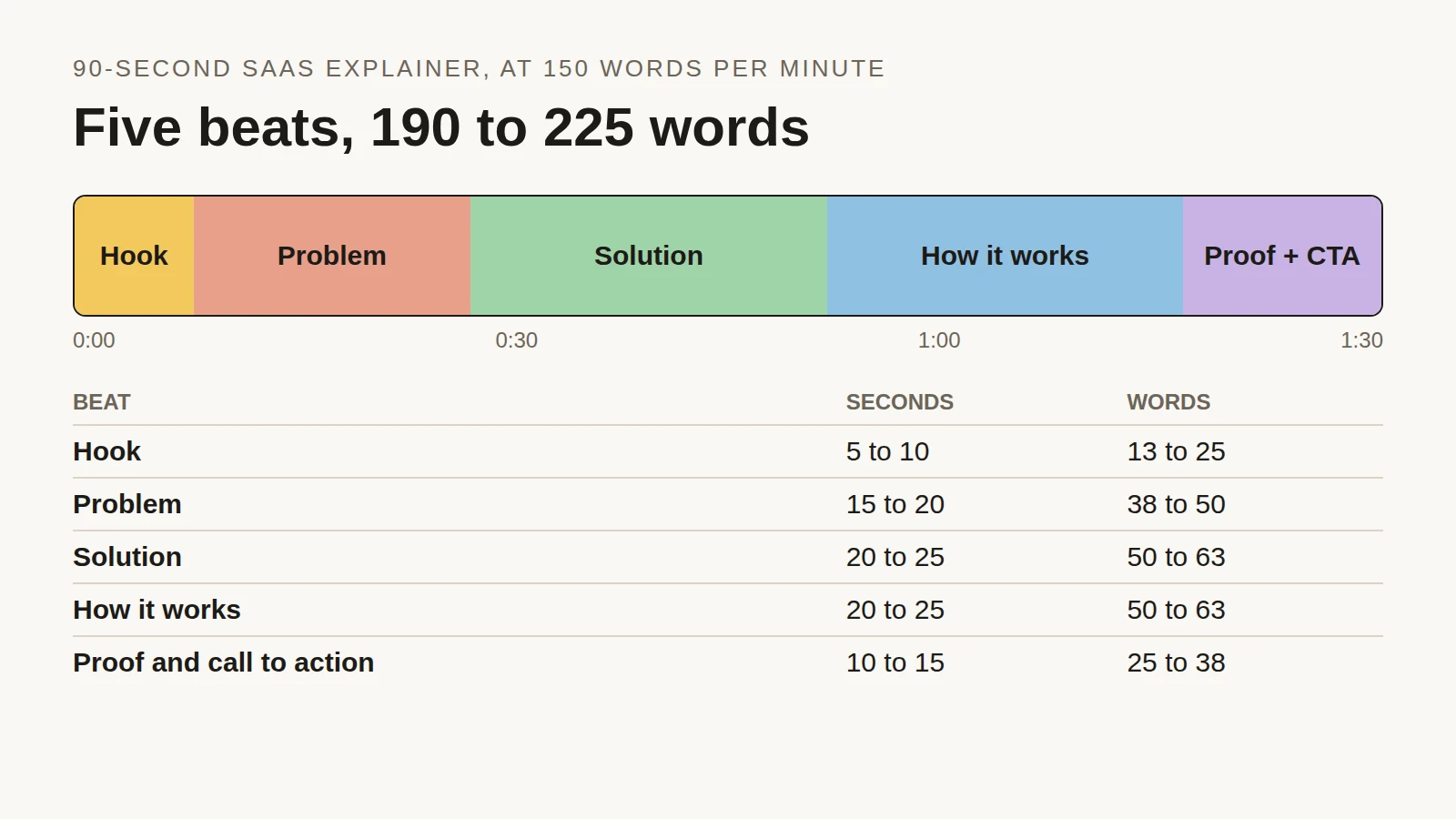
Most follow one arc: a problem the viewer recognizes, the idea that solves it, two to four steps showing how it works, and one action to take next. If a viewer can repeat the idea to someone else afterward, the video did its job. Writing that arc is the hard part, and our explainer video script template walks through each section.
What are the main types of explainer videos?
There are four common types, and each signals something different to the viewer.
Whiteboard explainer
Animated explainer
Screencast explainer
Live action explainer

A frame from Jellypod's Claymation style, one of the animated looks.
Jellypod covers the first two. Start with the AI explainer video generator. Its Whiteboard, Chalkboard, Crayon, and Blueprint styles are whiteboard-family looks (see the whiteboard explainer styles), and styles such as Claymation and Stickman are animated. It does not record your screen or film people, so use another tool for those two.
How long should an explainer video be?
Length follows the job. Here is what we see across 1,618 standalone videos rendered in Jellypod, the same data set behind our script length guide:
Whiteboard is the most-used style and runs roughly four times longer than the others, because people choose it when they need someone to understand something, such as a lesson or a procedure. The shorter styles get used for promos and social clips, where the video has to make its point before attention drops.

A workable rule: aim for 60 to 90 seconds when you are pitching a first-time viewer, and two to five minutes when the viewer came to learn. Split anything longer into one video per objective. For a vertical cut of the same idea, Jellypod also makes Shorts under a minute.
Which type of explainer video fits which job?
- Introduce a product. Animated on the landing page, then a screencast once someone is interested.
- Teach a concept or process. Whiteboard, because the drawn-as-you-go pacing keeps a viewer with each step. See how it applies to employee training videos.
- Onboard staff or customers. Whiteboard or screencast. Both are cheap to redo when the process changes.
- Explain care instructions. Whiteboard, with the same three answers a patient needs: what is happening, what happens next, and what to do. Our guide to patient education handouts covers why a video beats paper here.
- Build trust or tell a founder story. Live action.
How do you make an explainer video with AI?
In Jellypod, the workflow for a whiteboard-style explainer has four steps:
- Add a sourcePaste a script or topic, or upload a PDF, slide deck, or URL. Jellypod drafts narration grounded in that source.
- Pick a style and narratorChoose Whiteboard, Chalkboard, Crayon, Blueprint, or an animated style, then a voice.
- Edit the scriptRewrite any line before generating. Drafting and editing cost no credits.
- Generate and downloadCaptions are word-synced, and you download the finished MP4.
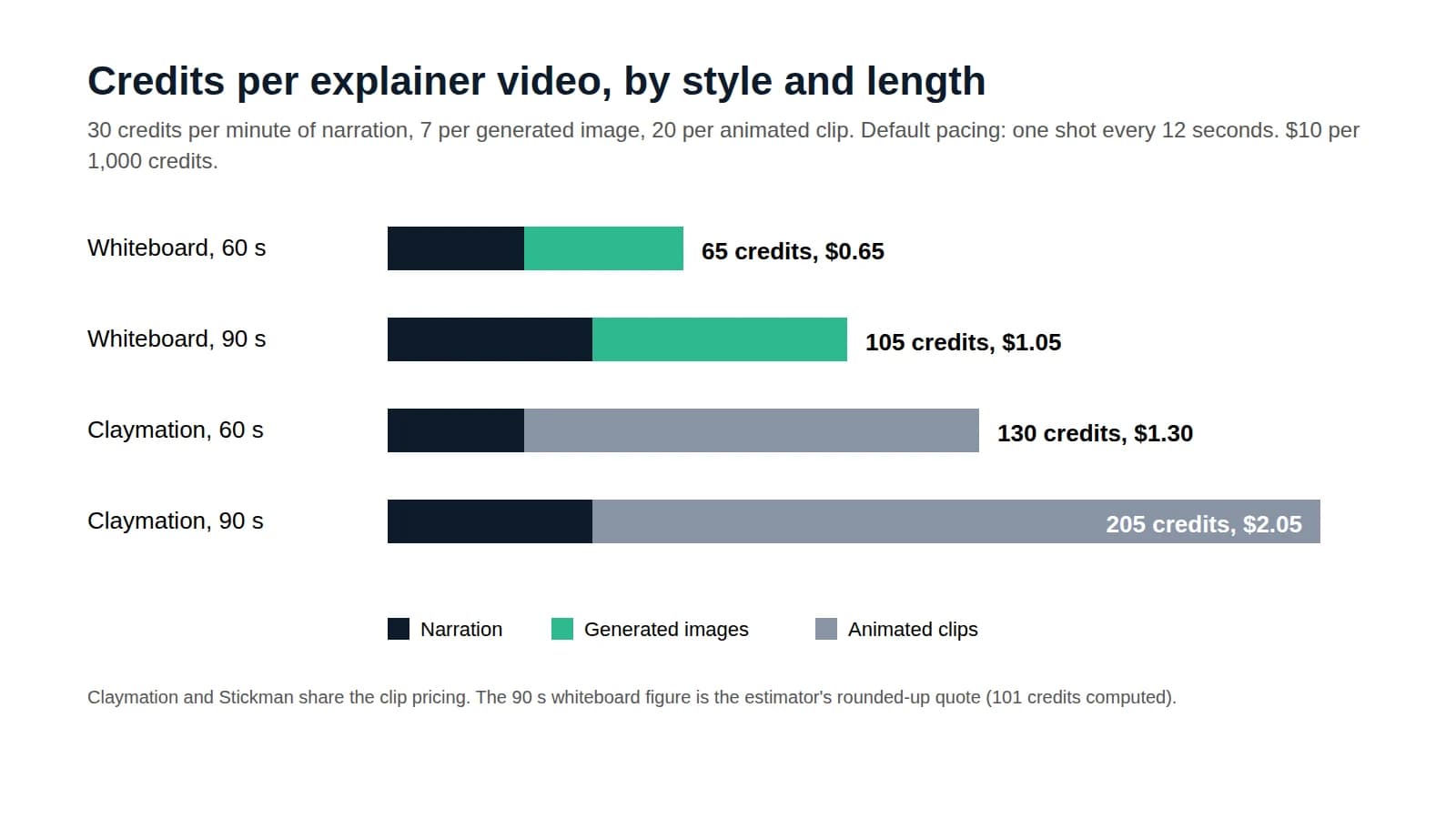
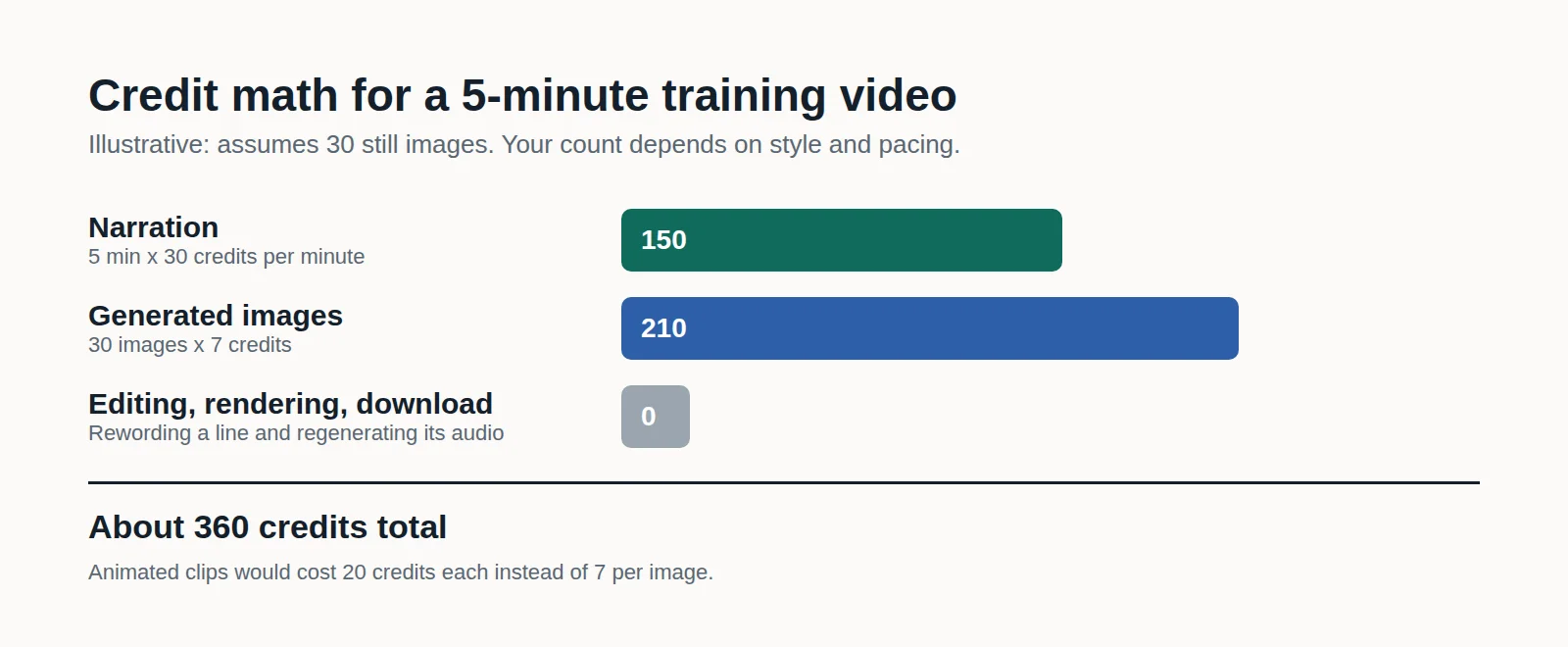
Narration costs 30 credits per minute, each generated image costs 7 credits, and credits run $10 per 1,000. A 60-second whiteboard explainer comes to about 65 credits, or $0.65, before your own time. The explainer video cost breakdown compares that with agencies and freelancers. Video length is capped by plan: 15 minutes on Starter, 20 on Creator, and 25 on Business.
How is this different from NotebookLM Video Overviews?
NotebookLM's Video Overview turns your notebook sources into a generated video, including a roughly 60-second Short format. Jellypod starts from a script you edit line by line before any visuals render. Our NotebookLM Shorts guide covers what Google's format does and when to use each.