A faceless YouTube channel publishes videos where no one appears on camera. The voice, the visuals, and the story carry the channel, so you never have to film yourself.
To make one, you pick a niche, turn each script into a narrated video with on-screen visuals, then upload the finished MP4 to YouTube. Both the narration and the visuals can be generated, which is why one person can run a faceless channel with no studio, no camera, and no editing background. Jellypod handles the production step: you drop in a prompt, a PDF, a URL, or a YouTube link, and it renders a narrated video as a 1080p MP4 with word-synced captions in your chosen visual style.
The format is not a loophole. YouTube pays for faceless channels on the same terms as any other, provided each video says something the last one did not, a bar its monetization policy states as "each video has a distinct storyline, focus, or concept."
What is a faceless YouTube channel?
A faceless YouTube channel is a channel that publishes video without the creator ever showing their face. Instead of a talking head, the screen shows illustrated scenes, slides, stock footage, screen recordings, or animated captions, while narration carries the content.
The format is common in education, commentary, storytelling, finance, and history, where the information matters more than who is presenting it. Faceless does not mean low effort or low quality. Plenty of channels with millions of subscribers never show a person on camera. What makes them work is a clear niche, a consistent voice, and visuals that match the script.
Because there is no filming, the whole channel can be produced from a laptop. That is why the format suits people who want a repeatable process rather than a personal brand built on their appearance, and why it has become the default for anyone treating a channel as a production line. The wider version of that approach, including the tooling and the economics, is covered in how YouTube automation actually works.
One rule is worth knowing up front: if you use AI to generate realistic narration or footage, YouTube may ask you to disclose it. More on that in the upload section below.
How do you pick a niche for a faceless channel?
Start with a topic you can produce consistently, because a faceless channel lives or dies on cadence. Pick a subject where you can write or source a new script every week without running dry, and where the audience wants information more than personality.
Common faceless niches include:
- Educational explainers: tutorials, how-tos, and breakdowns of a single subject.
- Commentary and analysis: trends, entertainment, tech, or sports.
- Storytelling: history, true stories, mysteries, or narrated fiction.
- Reference and list content: rankings, comparisons, and "top" videos.
The last category carries the most risk, because ranked lists with interchangeable entries are the easiest way to trip YouTube's rules on repetitive content. Explainers are the safest starting point, since every video answers a different question by construction. How YouTube automation actually works goes through which niches survive that policy and which do not.
For more angles that work without a camera, Descript's list of faceless YouTube ideas is a useful starting point. Once you have a niche, the production question becomes simple: how do you turn each script into a watchable video without filming anything?
How do you make the videos without showing your face?
You replace the on-camera host with visuals and narration. There are a few standard approaches, and most faceless creators mix them:
- Generated video: a tool turns your script into a narrated video with matching illustrated scenes and captions. This is the fastest path from idea to finished file.
- Slides and screen recordings: good for tutorials and explainers where the screen is the point.
- Stock footage and b-roll: clips that match the topic, layered under narration.
- Animated captions and waveforms: motion that keeps a mostly static frame from feeling flat.
The generation step is where Jellypod fits. You bring the source, and it produces the narration and the visuals together as a single MP4, so you are not stitching audio and video in a separate editor. Some creators still use a tool like Canva for a custom thumbnail or Descript for an extra trim, but that is finishing work on top of a video that already exists, not the way the video gets made.
How do you make faceless videos with AI?
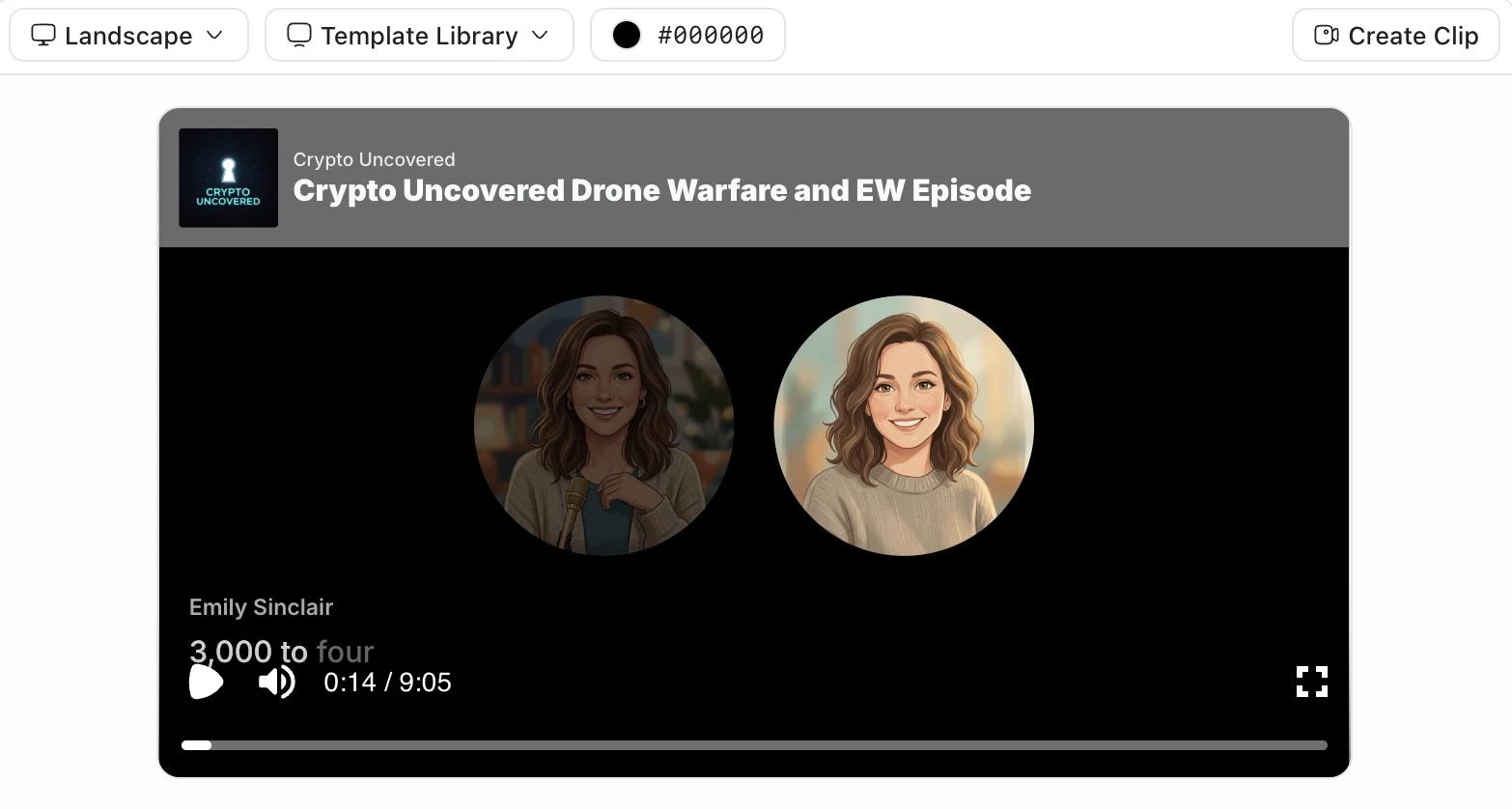
The workflow is short: source, episode, style, download, upload. Here is how it runs in Jellypod:
- Add a source. Start from a prompt, a document or PDF, a URL, or a YouTube link. Jellypod reads it and drafts the script.
- Generate the episode. Pick from nearly 400 voices across 70 or more languages, or use voice cloning to keep a consistent narrator without recording yourself.
- Pick a Video style. Choose any style in the Magic Video section. Every style renders with word-synced captions.
- Download the MP4. Export in landscape 16:9, portrait 9:16, or square 1:1, up to your plan's Magic Video length: 10 minutes of narration on Starter and Educator, 15 on Creator, and 25 on Business, per the plans and pricing page.
- Upload to YouTube. You download the file and post it to your channel yourself.
Want to see the audio half first? The free AI podcast generator turns any topic into a sample episode in seconds, no account needed, so you can hear the narration before you commit to a full video. For the video half, the free whiteboard explainer video generator renders a narrated 30-second sample in the Whiteboard Explainer style on the same terms.
For vertical clips, Jellypod Shorts generates standalone 30 to 60 second vertical videos with narration and music, sized for YouTube Shorts and TikTok. They are a low-effort way to feed the Shorts feed between longer uploads.
How long should faceless YouTube videos be?
Match the length to the format, not to a universal ideal. YouTube Shorts can run up to 3 minutes, while long-form videos have no practical cap. For faceless content, most explainers land between 5 and 12 minutes, long enough to cover the topic and earn watch time without padding.
Length is worth choosing deliberately, because the Partner Program counts watch hours rather than views. A 10-minute video holding half its audience produces five times the watch time of a 2-minute video at the same view count. That is the argument for putting your production budget into long-form faceless video rather than clips.
In practice, let the script set the length. A tight 6-minute explainer that holds attention beats a 15-minute video that drifts. Publishing one longer video plus a few Shorts each week gives the algorithm more surfaces to show your channel on.
How do you upload and optimize faceless videos on YouTube?
Download your finished MP4 and upload it in YouTube Studio the same way you would any video. Jellypod does not post to YouTube for you, so this step is a manual upload, which also lets you set everything by hand.
Optimize each upload with:
- A specific, searchable title that names the topic.
- A description that summarizes the video and includes a few relevant keywords.
- A custom thumbnail (a tool like Canva works well for these).
- Accurate captions, which improve accessibility and help search.
One requirement is specific to AI channels. YouTube asks creators to disclose realistic AI-generated or altered content using the altered content setting in Studio, per YouTube's disclosure policy. A stock voice or a clone of your own voice usually does not trigger it, but a voice built to sound like a specific real person does. Our explainer on YouTube's AI voice disclosure policy walks through the exact rule. For a full walkthrough of getting episodes onto the platform, see how to publish to YouTube and Apple Podcasts.
Can you monetize a faceless YouTube channel?
Yes. Faceless channels can join the YouTube Partner Program like any other channel, as long as the content is original and follows YouTube's policies. The absence of a face is not what gets flagged; mass-produced content with no added value is.
To qualify today, YouTube requires 1,000 subscribers plus 4,000 qualified watch hours in the past 12 months, or 1,000 subscribers plus 10 million qualified Shorts views in the past 90 days. That bar is moving. From February 1, 2027, new creators need 8,000 qualified watch hours in 365 days or 20 million qualified Shorts views in 90 days, while creators already in the program keep their status. A channel starting now has until January 31, 2027 to qualify under the lower threshold.
Original scripts, a distinct voice, and visuals that add context are what keep an AI-assisted faceless channel on the right side of those rules. Generate the substance yourself, use AI to produce it, and a faceless channel monetizes on the same terms as anyone else.
Frequently asked questions
Do faceless YouTube channels still work in 2026? Yes, and the format is more common than ever in education, history, finance, and analysis. What has changed is the enforcement bar: YouTube's inauthentic content policy rules out templated output, so a channel needs a distinct angle per video rather than volume.
How often should a faceless channel publish? Weekly is the usual floor, because the Partner Program counts watch hours on a rolling 365 days and a consistent cadence compounds. One longer video plus a couple of Shorts each week gives the algorithm more surfaces to test without stretching production past what one person can sustain.
How much does it cost to start a faceless channel? A laptop, a subscription for production, and your time. There is no camera, lighting, microphone, or studio in the budget, which is the main reason the format is popular with creators starting from nothing.
Can I use my own voice without showing my face? Yes. Voice cloning gives you a consistent narrator that sounds like you across every episode without recording each one, and it does not trigger YouTube's disclosure requirement since the voice is your own.
The short version
Pick a niche you can produce every week, make each video argue something the last one did not, turn each script into a narrated MP4, and upload it with a clear title and the right disclosure. Try Jellypod and generate your first faceless video today.