Most lists of the best AI video generators rank a cinematic clip model, a captioning app, and an avatar tool as if they did the same job. They do not, so pick by what you are making.
The best AI video generator depends on the output. For cinematic clips from a text prompt, use Runway, Veo (in Google Flow), or Kling. For a talking presenter, use HeyGen or Synthesia. For a narrated explainer built from a document you already have, use Jellypod, Knowlify, or Vyond. For short clips cut from a long video, use Opus Clip. For editing with AI on top, use Canva or CapCut.
Jellypod is our product, so weigh its section accordingly. It turns a PDF, slide deck, URL, or prompt into a narrated, illustrated explainer with no presenter, and it makes no cinematic clips or talking heads.
Key takeaways
- Pick the category first: cinematic text-to-video, avatar presenter, document to explainer, clip repurposing, or AI editor. Tools compete inside a category, rarely across them.
- Sora is gone: OpenAI closed the app on April 26, 2026 and the API on September 24, 2026.
- Runway, Veo, and Kling make short clips from prompts, not narration scripts from documents.
- HeyGen and Synthesia put an avatar on screen. Jellypod, Knowlify, and Vyond build explainers from documents or text without one.
- Prices below are printed only where we read them on the vendor's own page in September 2026. Everything else says "see vendor."
| Job | Tool | Best for | Price headline (Sept 2026) |
|---|---|---|---|
| Cinematic clips | Runway | Controllable text and image to video | Free 125 one-time credits; Standard $12/mo billed yearly ($15 monthly) |
| Cinematic clips | Google Veo in Flow | Prompt to video with Google's models | See vendor |
| Cinematic clips | Kling | Text and image to video with motion control | See vendor |
| Avatar presenter | HeyGen | Photoreal presenter, translation | Free plan; Creator $29/mo |
| Avatar presenter | Synthesia | Corporate and training avatars | Free plan; Starter $18/mo billed yearly ($29 monthly) |
| Avatar presenter | Colossyan | Training courses with SCORM export | See vendor |
| Document to explainer | Jellypod | Faceless illustrated explainers from documents, plus podcasts | 7-day free trial; see pricing |
| Document to explainer | Knowlify | Documents to narrated animated video | See vendor |
| Document to explainer | Vyond | Animated corporate and L&D video | See vendor |
| Document to explainer | Leadde | PPT, PDF, and Word to training video | Free plan; Starter $19/mo |
| Prompt to video | Pictory, InVideo AI | Script or article to stock-style video | See vendor |
| Clip repurposing | Opus Clip | Long video to short clips | Free plan; Starter $15/mo |
| Clip repurposing | Submagic | Captions and hooks on existing footage | Starter $19/mo ($12 billed yearly) |
| Editors with AI | Canva, CapCut | Editing, captions, and AI generation in one editor | See vendor |
How we chose: we read each vendor's homepage or pricing page in September 2026 and printed a price only when the page showed one, writing "see vendor" otherwise. We did not run a scored benchmark. Prices change often, so check the linked pages before you buy.
What are the best AI video generators for cinematic text-to-video?
For a shot that looks filmed, use Runway, Google Veo, or Kling. Runway's pricing page lists a free plan with 125 one-time credits, then Standard at $12/mo billed yearly, Pro at $28/mo, and Max at $76/mo (monthly billing costs $15, $35, and $95).
Kling lists a Kling 4.0 model, motion control, and a Canvas workspace for scripting and storyboarding. Google Flow is an AI creative studio for video, images, and custom tools.
Sora used to lead here. Per OpenAI's help center, the Sora app was discontinued on April 26, 2026 and the API on September 24, 2026.
The limit for teaching: these tools work from prompts, not your documents, and none of the pages above mention an editable narration script. They suit b-roll, ads, and short films.
What are the best AI avatar video generators?
Use an avatar generator when a person should appear on screen: HeyGen, Synthesia, or Colossyan. HeyGen's pricing page lists a free plan (3 videos a month, up to 1 minute each), Creator at $29/mo, Pro at $49/mo with 4K, and Business at $149/mo plus $20 per seat with videos up to 60 minutes. Synthesia's pricing page lists a free plan with up to 10 minutes of video, Starter at $18/mo billed yearly ($29 monthly), and Creator at $64/mo billed yearly ($89 monthly).
For training teams, Colossyan turns documents, PDFs, slide decks, URLs, and prompts into avatar videos through an agent called Cora, and exports SCORM.
See our best Synthesia, Pictory, and InVideo alternatives and the Jellypod vs HeyGen comparison.
What is the best AI video generator for turning documents into explainers?
For a narrated explainer built from a document, use Jellypod, Knowlify, Vyond, or Leadde. It suits teachers, trainers, clinicians, and marketers who already have the material. Compare inputs, script editing before render, and what appears on screen.
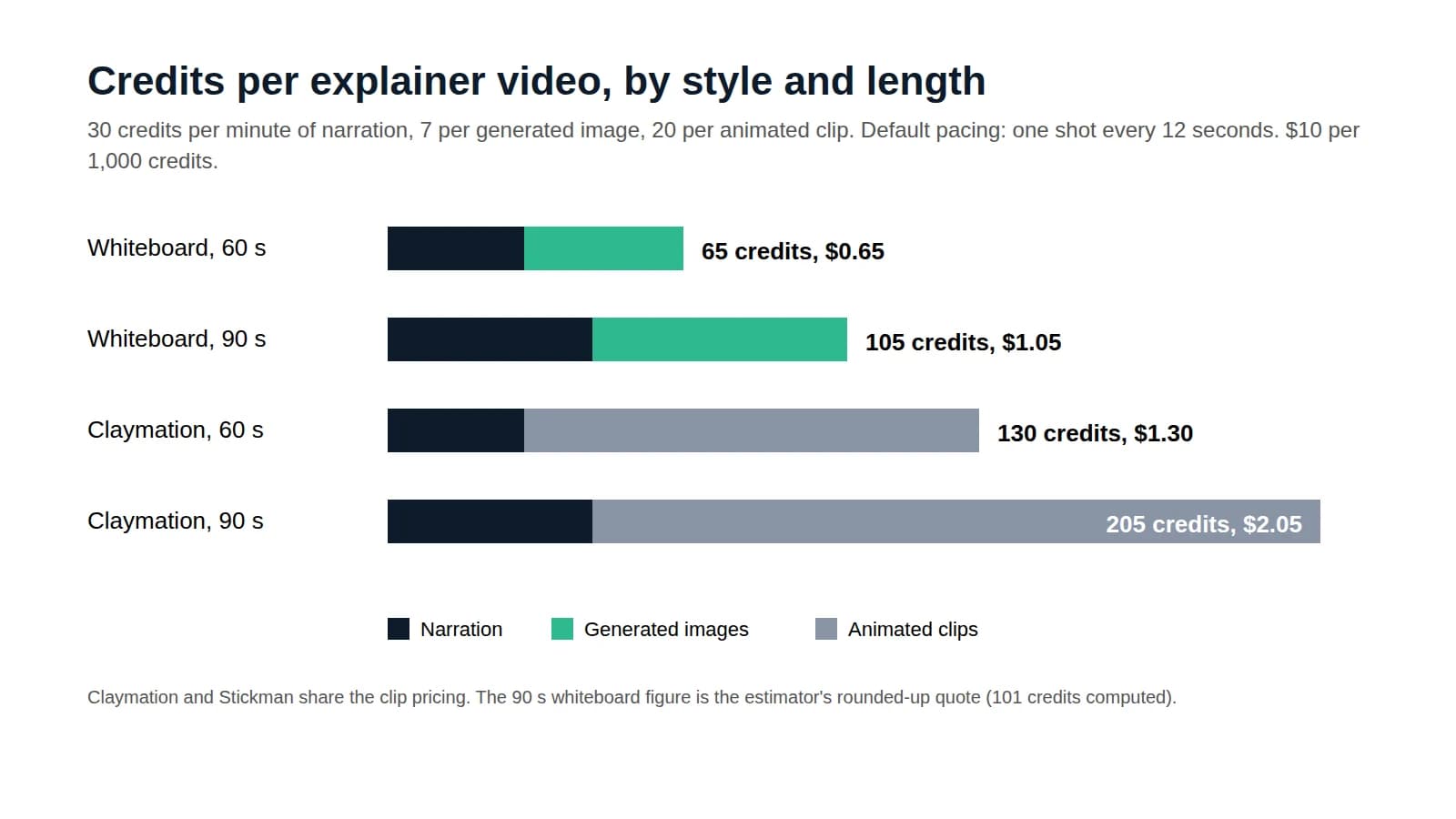
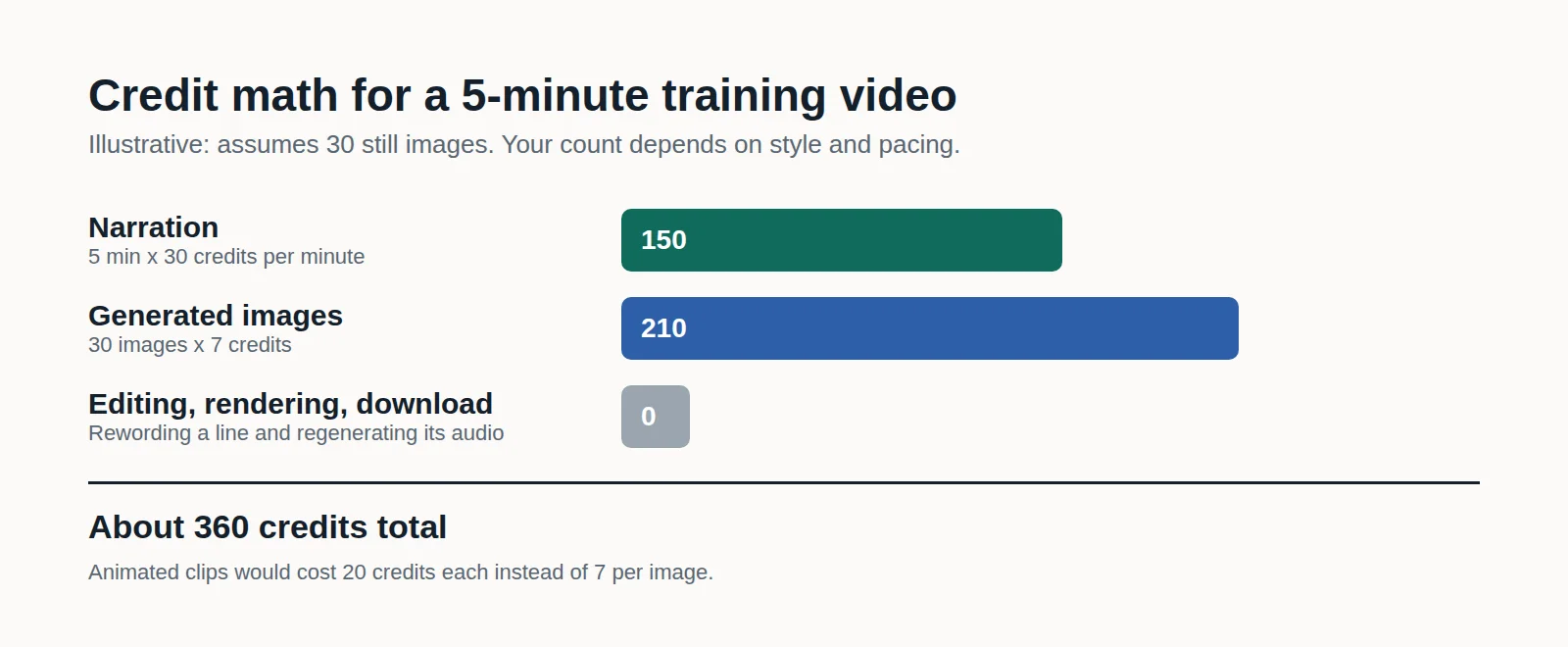
- Jellypod takes a PDF, slide deck, URL, or prompt, writes and voices the narration, then draws a scene for each line in an illustrated style such as whiteboard, claymation, or paper cutout. Revise a line of narration and only that audio regenerates. Videos run up to 25 minutes depending on plan, at 1080p, with word-synced captions. The same account makes podcasts, with hosting and RSS on paid plans.
- Knowlify says you can "upload a doc, a blog post, or an idea" to get a narrated, animated video, and edit it by chatting. It also offers a done-for-you studio with a stated turnaround of as little as 72 hours, and its homepage shows no pricing. Compare it in Jellypod vs Knowlify.
- Vyond is an enterprise video platform for L&D, HR, and marketing. Vyond Go turns ideas, documents, or URLs into videos, and it also lists AI avatars and PowerPoint and PDF conversion. See Jellypod vs Vyond.
- Leadde converts PowerPoint, PDF, Word documents, and text into training videos. It lists a free plan (10-minute maximum), Starter at $19/mo, and Creator at $59/mo.
Pictory and InVideo AI sit nearby. Pictory turns text, scripts, blog posts, URLs, PowerPoint, and audio into videos with AI visuals, voices, and avatars. InVideo AI now calls itself an agentic video editor, not a one-prompt generator. See Synthesia, Pictory, and InVideo alternatives for explainer videos.
To keep a PDF's own pages on screen during narration, use the PDF to video tool.
What are the best AI tools for repurposing long videos into clips?
If you already have a long video, a clipper finds the highlights and captions them: Opus Clip or Submagic.
Opus Clip lists a free plan, Starter at $15/mo, and Pro at $29/mo, and imports from YouTube, Google Drive, Vimeo, Zoom, and other sources. Submagic lists Starter at $19/mo (15 videos), Pro at $39/mo, and Business at $69/mo, with about 40% off on annual billing.
All of these cut and caption existing footage; none writes a video from a document. Jellypod's Shorts go the other way, generating a drawn, narrated 30-second or 1-minute video from an idea, file, or script. See Jellypod vs Opus Clip for when each fits.
Which video editors have AI generation built in?
Canva and CapCut are editors first and generators second, which suits you if you want to touch every frame.
CapCut lists a Video Studio that builds videos from text prompts, plus text-to-speech and auto captions. Canva's AI video page returned an access error when we tried to read it, so check Canva directly. Pick an editor when you have footage or a brand template, and a document-based generator when the script is the hard part.
How do you choose an AI video generator?
Start from what viewers should see, then what you have in hand.
- Filmed-looking shot from a prompt: Runway, Veo, or Kling. Budget for retries, since clips are short.
- Person talking to camera: HeyGen or Synthesia, or Colossyan for courses with SCORM export.
- PDF, deck, or article to explainer: Jellypod or Knowlify with no presenter, Leadde or Colossyan with an avatar, Vyond for enterprise animation.
- Long recording to short clips: Opus Clip or Submagic.
- Hand-editing with AI helpers: Canva or CapCut.
- One source that also becomes a podcast episode: Jellypod.
Run one real source through each free plan or trial. Script quality, voice, and how easily you can fix one wrong line matter more than a feature list. For costs against hiring a studio, see the explainer video cost guide.
Where does Jellypod fit among AI video generators?
Jellypod is for people who have material and need it explained, not footage. It writes and voices the narration from your document, deck, URL, or idea and draws scenes timed to it. It suits lessons, training, and patient education, and also makes vertical Shorts, voiceovers over your own pages, and podcast episodes from the same sources.
The limits are specific. It does not make talking-head avatars, lip-synced presenters, or photoreal and cinematic clips. Videos are 1080p and run up to 25 minutes on the top plan, while HeyGen offers 4K and up to 60 minutes on Business. There is no free plan, only a 7-day free trial that requires a payment method. For a comparison with Google's tool, see NotebookLM Video Overviews and Shorts.
Frequently asked questions
What is the best AI video generator overall?
None wins across the board, because the tools do different jobs. Runway and Kling lead for cinematic clips, HeyGen and Synthesia for avatar presenters, Opus Clip for clips from long video, and Jellypod for narrated explainers from documents. Choose by output, then compare price and limits inside that category.
What is the best free AI video generator?
Free plans exist at Runway (125 one-time credits), HeyGen (3 videos a month, 1 minute each), Synthesia (up to 10 minutes of video), Opus Clip, and Leadde. Jellypod has no free plan, only a 7-day free trial.
Is Sora still available?
No. OpenAI's help center says the Sora app was discontinued on April 26, 2026, and the Sora API is discontinued on September 24, 2026. Runway, Veo, and Kling are the usual replacements.
Can AI make a video from a PDF or document?
Yes. Jellypod, Knowlify, Vyond, Leadde, Colossyan, and Pictory each list document, slide, or URL inputs. Runway and Kling work from prompts and images. Try the PDF to video tool or the AI video generator.
Do I need an avatar in my AI video?
Usually not. An avatar helps when a face builds trust, such as in onboarding or sales outreach. For explainers and lessons, narration over illustrated visuals keeps attention on the idea and avoids the uncanny effect. Jellypod, Knowlify, and Pictory make videos without a presenter.
The short version
Pick the category before the tool. If you start from a document and want a narrated explainer with no presenter, try Jellypod's AI video generator with a 7-day free trial.