Hear a conversation in more than one voice

4.6out of 5 on G2












Jellypod writes the lines, or voices the script you already wrote
Give it a prompt and the Podcast Agent writes a conversation for your hosts. Paste each turn on its own line as [Maya] or Maya:, and those words are spoken in order.
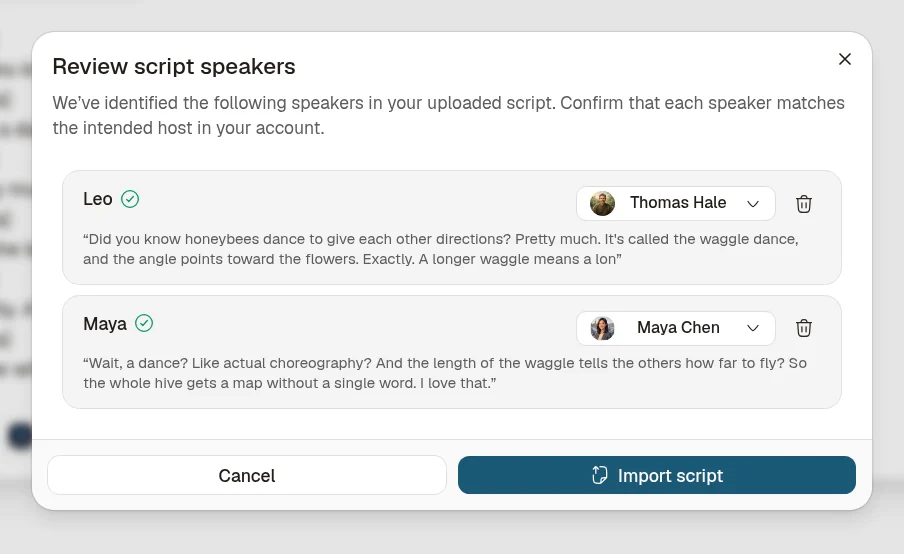
Upload Script and Import Script both open a speaker review. You match each name to a host before any audio is made.
Each speaker gets a voice, so a question and an answer stay distinct
A podcast, Magic Video, Short, or Voiceover takes up to four hosts, chosen from 3,300+ voices across 121 languages, or a clone of a voice you have the right to use. On a short or video, the review refuses a fifth distinct speaker.
Label the speakers, pick up to four voices, then generate
![Upload script dialog with a pasted two-speaker script. [Alex] asks whether the launch date moved to November 10, and [Maya] confirms it did and asks what failed in the proofs. The turns sit on consecutive lines, with Add script at the bottom right.](/_next/image?url=%2F_next%2Fstatic%2Fimmutable%2Fmedia%2Fpaste-two-speaker-script.0_vb1fgr43eu6.webp&w=3840&q=75)
Step 01
Start from a prompt or a labeled script
Describe who is talking and what they need to settle, or paste turns that each begin with [Name]. Speaker detection works most reliably when there are no blank lines between turns.Step 02
Match every name to a host
A saved character with the same name is preselected. Assign the rest, or remove a label that is not a speaker.Step 03
Generate the multi-voice text to speech
Edit a line, regenerate that line, then download an MP3 or an MP4. The Conversation template shows host avatars and live captions.
When those lines should become illustrated scenes, continue in script to video. When a PDF or deck should stay on screen while it is read, start with voiceovers.
For a show you want to publish, see the best AI podcast generators.
FAQ
Does Jellypod write the dialogue, or only read a script I bring?
How do I mark who is speaking?
How many voices can one dialogue use?
What is the script import limit?
Can I re-voice one line without redoing the whole script?
Can I download the dialogue as audio or video?
Are stage directions read aloud?
Do I need an account?
Discover more
Explore related tools
Finish the dialogue in Jellypod
Start free with 500 credits. No credit card required. Paid plans include a 7-day free trial.

Download the dialogue as audio or video
Edit a line and regenerate only that line. Download Audio saves an MP3. Download Video saves an MP4 of the template you picked.