The best whiteboard animation software depends on whether you want to place every drawing yourself or start from a prompt or document. VideoScribe and Doodly are hand-built editors; Golpo and Jellypod (our product) generate the video for you.
Prices checked October 17, 2026.
Key takeaways
- Hand-built editors: VideoScribe, Doodly, Vyond, Animaker, and Powtoon. You place the assets.
- A prompt or a document in, a whiteboard video out: Golpo and Jellypod.
Annual discounts that open only after a Check offer click are left out, because the discounted dollar is not printed.
What is the best whiteboard animation software?
For frame-by-frame control, pick VideoScribe, Doodly, Vyond, Animaker, or Powtoon. For a whiteboard video from a prompt or a document, pick Golpo or the Jellypod whiteboard explainer.
What is whiteboard animation software?
Whiteboard animation software makes a narrated video that looks drawn while a voice explains one idea. Editors give you a drawing hand and a timeline. Generators draw the scenes from what you type or upload.
How do you pick a whiteboard tool?
Match the tool to the control you want, then check length and the price on the vendor page.
- A drawing hand and assets you place: VideoScribe or Doodly.
- Characters and scenes, with an AI draft you then edit: Vyond or Animaker.
- Whiteboard templates in a general editor: Powtoon.
- A drawn explainer from a prompt, PDF, or deck: Golpo or Jellypod.
Which hand-built editors should you use?
VideoScribe
Best for: a drawing hand and scenes you place yourself.
VideoScribe runs in the browser or as a desktop app. You assemble hand-drawn images, pick a drawing hand, and direct the timeline and camera.
Price: The pricing page shows annual rates. Lite is $12.50/mo per license ($150/year, 5 downloads a month, videos up to 5 minutes). Core is $21.25/mo ($255/year, 30 downloads, 10 minutes, no watermark). Max is $26.67/mo ($320/year, unlimited downloads, 20 minutes). The 7-day trial is $0 with no card, 3 downloads, a 5-minute cap, and a watermark.
Doodly
Best for: doodle videos on Mac or PC.
Doodly is drag-and-drop software with whiteboard, blackboard, glassboard, and green-screen canvases. The homepage offers a 14-day trial.
Price: The pricing link opens Voomly. Standard Doodly comes with Voomly Cloud at $49/mo, or $41/mo billed annually ($490/year). Enterprise Doodly comes with Voomly Pro at $79/mo, or $66/mo billed annually ($790/year).
Vyond
Best for: character scenes, with an AI draft from a prompt, document, or URL.
Vyond's pricing page lists a scene editor and Vyond Go. See Jellypod vs Vyond.
Price: Starter is $99/mo, or $58/mo billed annually ($699/year). Professional is $100 per user per month billed annually ($1,199/year). Enterprise is $137 and Agency is $167 per user per month, both billed annually.
Animaker
Best for: whiteboard and infographic videos you start from a prompt and finish in the editor.
Animaker lists those formats and export from SD up to 4K. Free exports keep a watermark.
Price: On the pricing page, Starter is $45/mo, or $25/mo billed yearly ($300/year). Pro is $79/mo, or $43/mo billed yearly ($516/year). The FAQ says Basic is $15/mo and removes the watermark.
Powtoon
Best for: whiteboard templates inside a full editor.
Powtoon's whiteboard page lists templates, hand-drawn graphics, and doc-to-video.
Price: The pricing page lists Lite at $49/mo billed monthly or $15/mo billed yearly, Professional at $99/mo or $40/mo billed yearly, and Advanced at $199/mo or $125/mo billed yearly. Free is 720p, up to 3 minutes, with a watermark. Education is $8/mo billed yearly.
Which tools generate a whiteboard video?
Golpo
Best for: a whiteboard video from a document or prompt, with frame edits by prompt.
Golpo's pricing page sells that workflow. One credit equals one minute. See Jellypod vs Golpo.
Price: Free is one 1-minute video, watermarked, with no download and no card. Starter is $39.99/mo for 20 credits, Creator is $99.99/mo for 60, and Growth is $199.99/mo for 150. Business is $499.99/mo for 390 credits and Scale is $999.99/mo for 800. The annual discount sits behind Check offer, and that dollar amount is not printed.
Jellypod
Best for: a narrated whiteboard video from a prompt, a file, or a script.
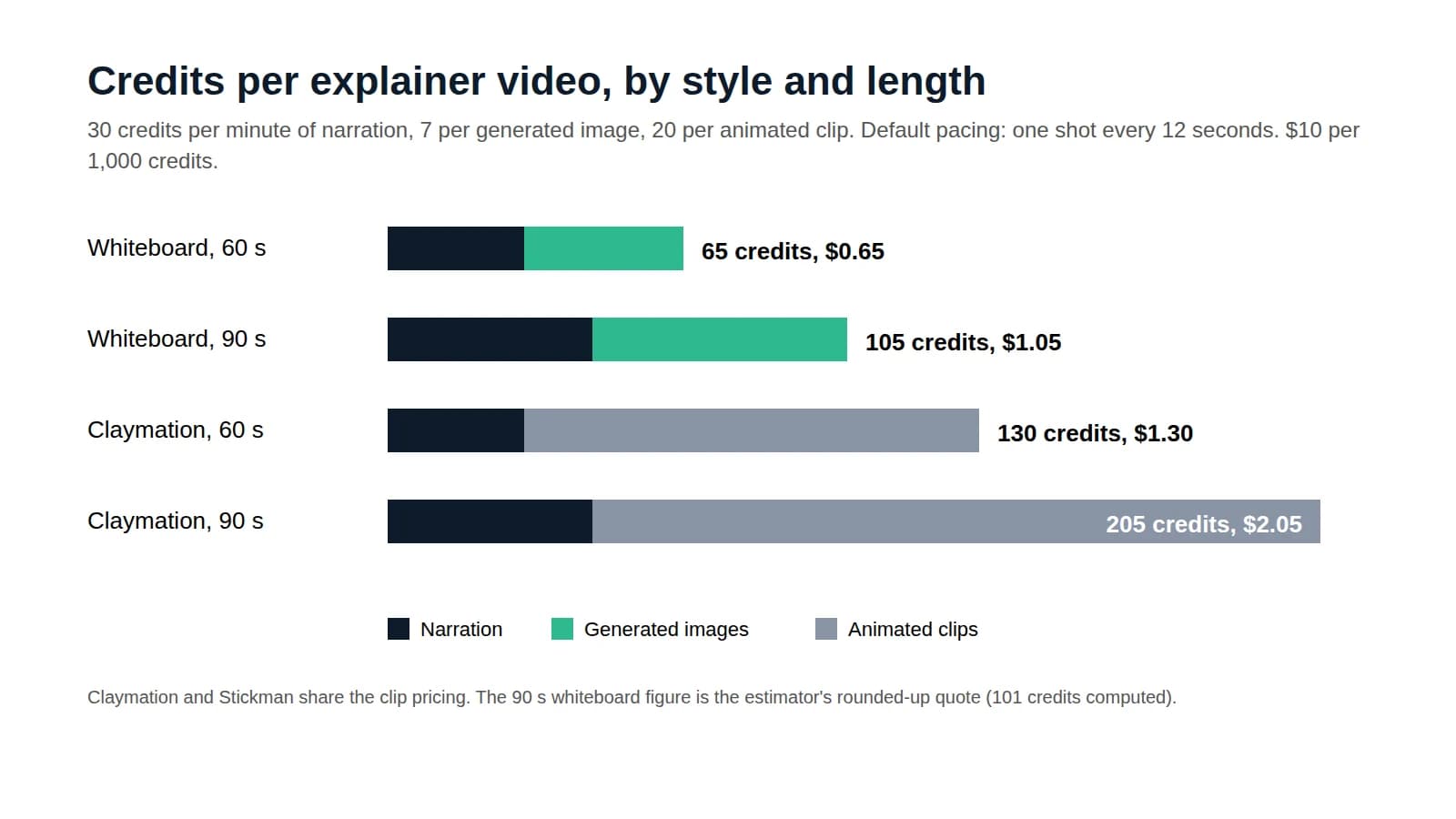
Jellypod writes the narration and draws the scenes. You can start from a topic or a source, such as a PDF, Word file, PowerPoint, EPUB, web page, or YouTube link, and pick Whiteboard Explainer, Chalkboard, Blueprint, Crayon, or Sketch. Narration costs 30 credits a minute, and each generated image costs 7. Rendering and downloading are free.
Price: On Jellypod pricing, Free starts with 500 credits and no card. Free video exports carry a small watermark. Starter is $30/mo billed monthly, or $25/mo billed yearly ($300/year), with 5,000 credits and videos up to 15 minutes. Creator is $60/mo, or $50/mo billed yearly ($600/year), with 11,000 credits and videos up to 20 minutes. Business is $150/mo, or $125/mo billed yearly ($1,500/year), with 30,000 credits and videos up to 25 minutes.
Where does Jellypod fit?
Jellypod fits when you already have the explanation and want it drawn. Hand-built tools fit when a specific drawing hand, a posed character, or an approved storyboard has to be placed by you. Start one on the whiteboard explainer page. For what a finished explainer costs against a studio, see explainer video cost.