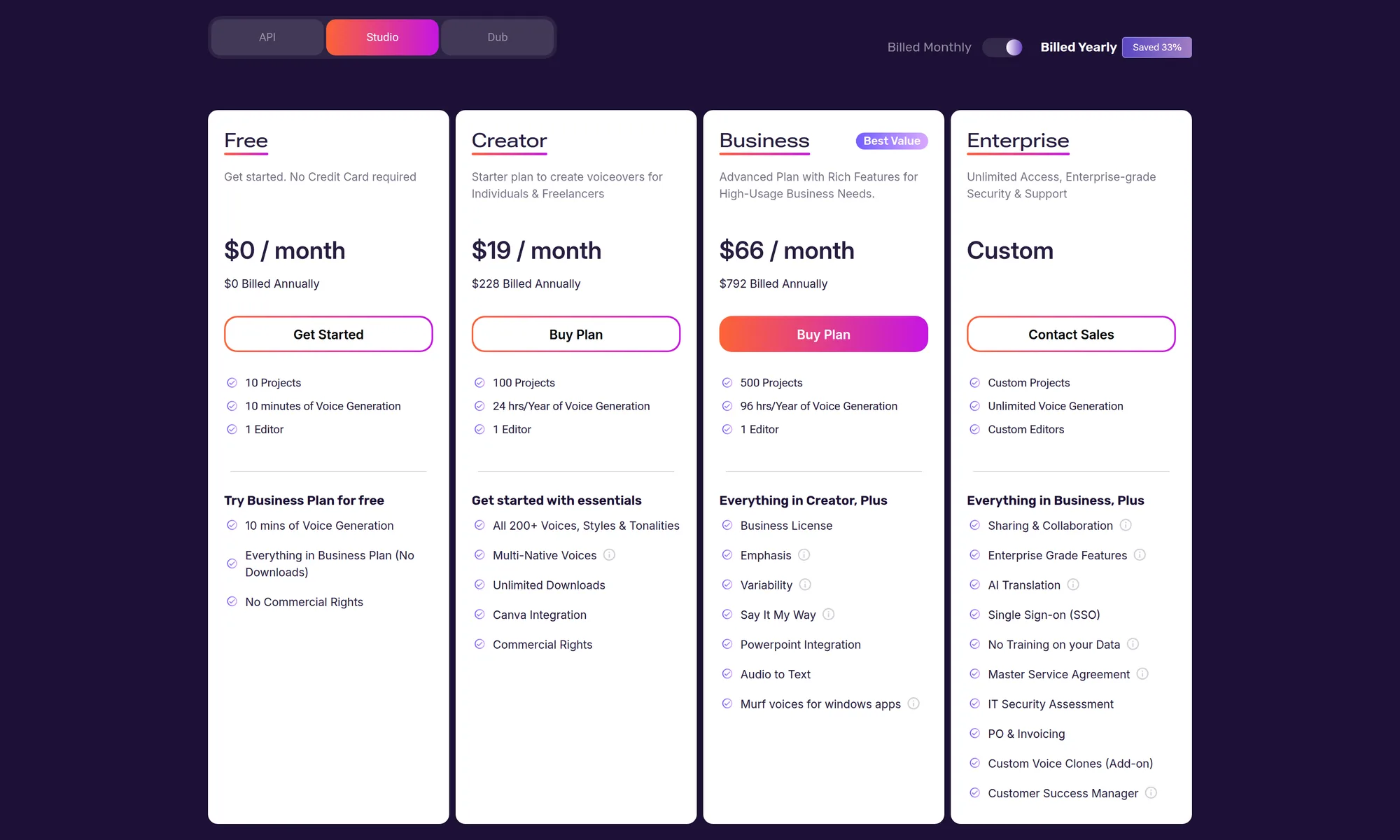
Murf Studio costs $0, $29, or $99 a month, or $19 and $66 a month on yearly billing ($228 and $792 a year). Enterprise is custom.
Prices checked October 17, 2026 on Murf's pricing page.
The page has three tabs: Studio, API, and Dub. Every price and limit below is from that page on that date.
Key takeaways
- Yearly billing is selected when Studio loads: Creator is $19 a month ($228 a year) and Business is $66 a month ($792 a year). Month to month, those plans are $29 and $99.
- Free is $0 with no credit card: 10 minutes of voice generation, 10 projects, and 1 editor.
- Creator includes 2 hours a month or 24 hours a year, 100 projects, and 1 editor. Business includes 8 hours a month or 96 hours a year, 500 projects, and 1 editor.
- API pay as you go lists Falcon at $0.01 per 1,000 characters. Dub pay as you go is $0.25 per credit, at 2 credits per minute per language.
- Prices checked October 17, 2026.
How much does Murf Studio cost?
The Studio tab opens on yearly billing, and the toggle is labeled "Saved 33%". Switching to monthly replaces the annual total with a higher monthly price and a smaller voice-time allowance.
Murf labels Business "Best Value". The Creator card calls it a starter plan for individuals and freelancers.
The Business card calls it an advanced plan for high-usage business needs.
What voice time and project caps come with each plan?
The plan cards change the voice-time line with the billing toggle. Monthly reads "2 hrs/Month" on Creator and "8 hrs/Month" on Business.
Yearly reads "24 hrs/Year" and "96 hrs/Year".
The pricing page FAQ says yearly plans have no monthly cap, only a yearly pool. Its example is 24 hours a year, which is the Creator yearly allowance, so one month can use more than 2 hours while the yearly pool still has time.
Project counts are a workspace cap. The same FAQ says project credits are not allotted every month, on a monthly plan or a yearly plan.
Free lists 10 projects, Creator 100, and Business 500. Enterprise says custom projects, and the comparison table says custom.
What does the free Murf plan include?
Free is $0 a month and $0 billed annually. The card says no credit card is required, and it lists 10 projects, 10 minutes of voice generation, and 1 editor.
The FAQ says there is no calendar limit on the free plan. You can keep it until those 10 minutes are used.
The FAQ also says unused free minutes carry over on upgrade, added to the account as additional minutes.
The Free card includes a separate line, "Try Business Plan for free": 10 minutes of voice generation, everything in the Business plan, no downloads, and no commercial rights.
What do the Murf API and Dub cost?
The API tab lists a free trial, pay as you go, and enterprise.
Under "Every Plan comes with", the page lists two text-to-speech rates: $0.01 per 1,000 characters for conversational speech (time to first audio under 100ms) and $0.03 per 1,000 characters for studio-quality speech.
Voice Changer is $0.10 a minute. Translation is $0.02 per 1,000 characters.
Dub is a separate tab. Its calculator says files use 2 credits per minute per language.
Murf AI review: what do the Studio plans include?
This section summarizes the Studio plan cards and the "Compare All Features" table on the pricing page. It is a list of what Murf publishes there, checked October 17, 2026.
Creator, Business, and Enterprise each list 200+ AI voices and 30+ languages and accents. The Enterprise column adds custom voices and custom languages.
Voice styles and tonalities are unlimited on Creator and Business, and custom on Enterprise. Core features and pronunciation changes are marked on all three.
The comparison table marks unlimited downloads and commercial rights on Creator, Business, and Enterprise. Royalty-free stock media, an embed code, and Canva are marked on all three as well.
Business and Enterprise add a business license, emphasis, variability, Say It My Way, the PowerPoint plugin, Google Slides, audio to text, and Murf voices for Windows apps. Those rows are marked off for Creator.
Editor seats are 1 on Creator and 1 on Business. Enterprise says custom editors, and the table says custom (5+).
Viewer seats are marked off for Creator and Business and unlimited for Enterprise. Shareable links are on all three.
Sharing projects, access control, unlimited viewers, and private folders are marked for Enterprise.
Transcription time is marked off on Creator, listed as 48 hours on Business, and unlimited on Enterprise. The table does not say whether those 48 hours are per month or per year.
AI translation credits are listed as unlimited on Enterprise only. Export formats are "All" on Creator and Business and custom on Enterprise.
Export quality is Full HD on Creator and Business, and Full HD at a higher bitrate on Enterprise.
Support on the table is email and chat for Creator, and priority support for Business and Enterprise. Enterprise also lists SSO, access logs, a custom contract, a security review, and no training on your data (that last line is on the Enterprise card).
How Jellypod compares
Jellypod pricing lists a Free plan, Starter at $30/mo or $25/mo billed yearly, Creator at $60/mo or $50/mo billed yearly, Business at $150/mo or $125/mo billed yearly, and Enterprise as custom.
The same plans cover podcasts, videos, and Shorts (plans and pricing).
What if you want a Murf AI alternative for a deck?
People comparing Murf AI alternatives are usually pricing voice time for a script or a deck.
Jellypod Voiceover takes a PPTX, a PDF, or images (up to 10 files), writes narration timed to those pages, and keeps the pages you uploaded as the visuals. Narration costs 30 credits per minute, uploaded visuals add nothing, and the charge settles to the narration actually produced (how credits work, creation settings).
For the same kind of price breakdown on other audio tools, see ElevenLabs pricing, Descript pricing, and NotebookLM pricing.