An explainer video script has five beats: a hook, the problem, the solution, how it works, and one call to action. For a 90-second SaaS explainer, that comes to 190 to 225 spoken words, and the same five beats stretch to a few minutes for a training video.
Jellypod drafts explainer scripts from a PDF, slide deck, URL, or prompt, and its script writer targets 150 spoken words per minute. The length people choose depends on the style: in 2,049 Jellypod videos, Whiteboard Explainer videos have a median target of 5 minutes, while every other style has a median of 30 seconds.
Key takeaways
- Use five beats in order: hook, problem, solution, how it works, proof plus one call to action.
- A 90-second script is 190 to 225 words at 150 words per minute. Cut anything past 225 instead of speeding up the voice.
- Length follows the job. Among 2,049 Jellypod videos, whiteboard-style explainers (teaching) target a median of 5 minutes, and other styles (promos, clips) target 30 seconds.
- Put the finished video where a viewer has already shown intent, such as a demo confirmation page or the first onboarding email, not only the homepage.
 Timing for a 90-second SaaS explainer at 150 spoken words per minute.
What should an explainer video script include?
Five beats, in this order. The timings below fit a 90-second SaaS explainer, and the word counts assume 150 words per minute.
The most common failure is covering every feature. Pick the workflow a new user cares about on day one, script that, and leave the rest to your site.
How long should an explainer video script be?
Match the length to the job: about 150 to 225 words for a 60 to 90 second pitch, and 700 to 750 words for a 5 minute teaching video. A promo has to earn the decision to keep watching. A training video already has the viewer's attention and has to earn comprehension, which takes more words.
Jellypod's own data shows the split. On 2026-09-29 we pulled every standalone video with a style and a target length set (2,049 videos, created since July 2026):
 Median target length by style, from the 2,049 videos in the table above.
Roughly 70% of Whiteboard Explainer videos target 3 minutes or longer, and roughly 77% of videos in every other style target 60 seconds or less. Whiteboard reads as teaching, so it gets chosen for lessons and training, and the faster styles for clips and promos.
This is the length creators asked for, not proof of what performs. Most videos use a preset (30 seconds, 1, 3, 5, or 7 minutes), so read the medians as demand. The query, run against the videos table:
select video_style_id, count(*) videos,
  percentile_cont(0.5) within group (order by target_duration_seconds) median_sec,
  round(avg(target_duration_seconds)) avg_sec
from videos
where video_style_id is not null and target_duration_seconds is not null
group by 1 order by 2 desc;
What does a 90-second SaaS explainer script look like?
Here is a finished script for Jellypod itself, about 190 words (roughly 75 seconds of narration, with the rest of the 90 going to pauses and visual beats). Every claim in it is something the product does today.
Hook (0:00) Your team has a 40-page onboarding doc that new hires skim on day one and forget by day three.
Problem (0:07) Turning it into training usually means a scriptwriter, a voice actor, and an animator. So the doc stays a doc, the same questions keep landing in your inbox, and when the process changes, the video you finally got made is out of date the same week.
Solution (0:25) Jellypod turns a document into a narrated, animated video. Upload the PDF and it drafts the script from what you already wrote, so the video says what your team says, not what a template says.
How it works (0:45) First, drop in the PDF, slide deck, or URL. Second, edit the drafted script line by line, which costs no credits. Third, pick a style, like Whiteboard Explainer, and a narrator, then generate. Captions sync to every word, so the video still works with the sound off.
Proof and call to action (1:10) Credits are charged when something generates, and you see an estimate before you commit. When the process changes, you edit the text and regenerate instead of rebooking a production. Paste your own doc into Jellypod and read the first draft today.
Two things to copy: the hook names a situation, not a product category, and the how-it-works beat has exactly three verbs (drop in, edit, pick). If your draft runs past 225 words, cut a beat's detail before you speed up the narration.
How do you write a longer explainer script for training?
Keep the same five beats and give the how-it-works beat more room. A five minute script is about 750 words, and the extra time goes to three or four segments, each covering one rule or step: state it, show the situation it applies to, and name what goes wrong when someone skips it. The hook still opens on the learner's friction, and the close still asks for one action.
Our guide to employee training videos covers what to teach and how to break it into modules. If you are still deciding whether you need an explainer at all, what an explainer video is lays out the formats.
How do you write an explainer script from a document you already have?
Start from the source, not a blank page. In Jellypod Studio, create a video from a PDF, slide deck, URL, or prompt, and set a target length. The script writer aims for roughly 150 spoken words per minute of that target, so a 90-second target yields about 225 words.
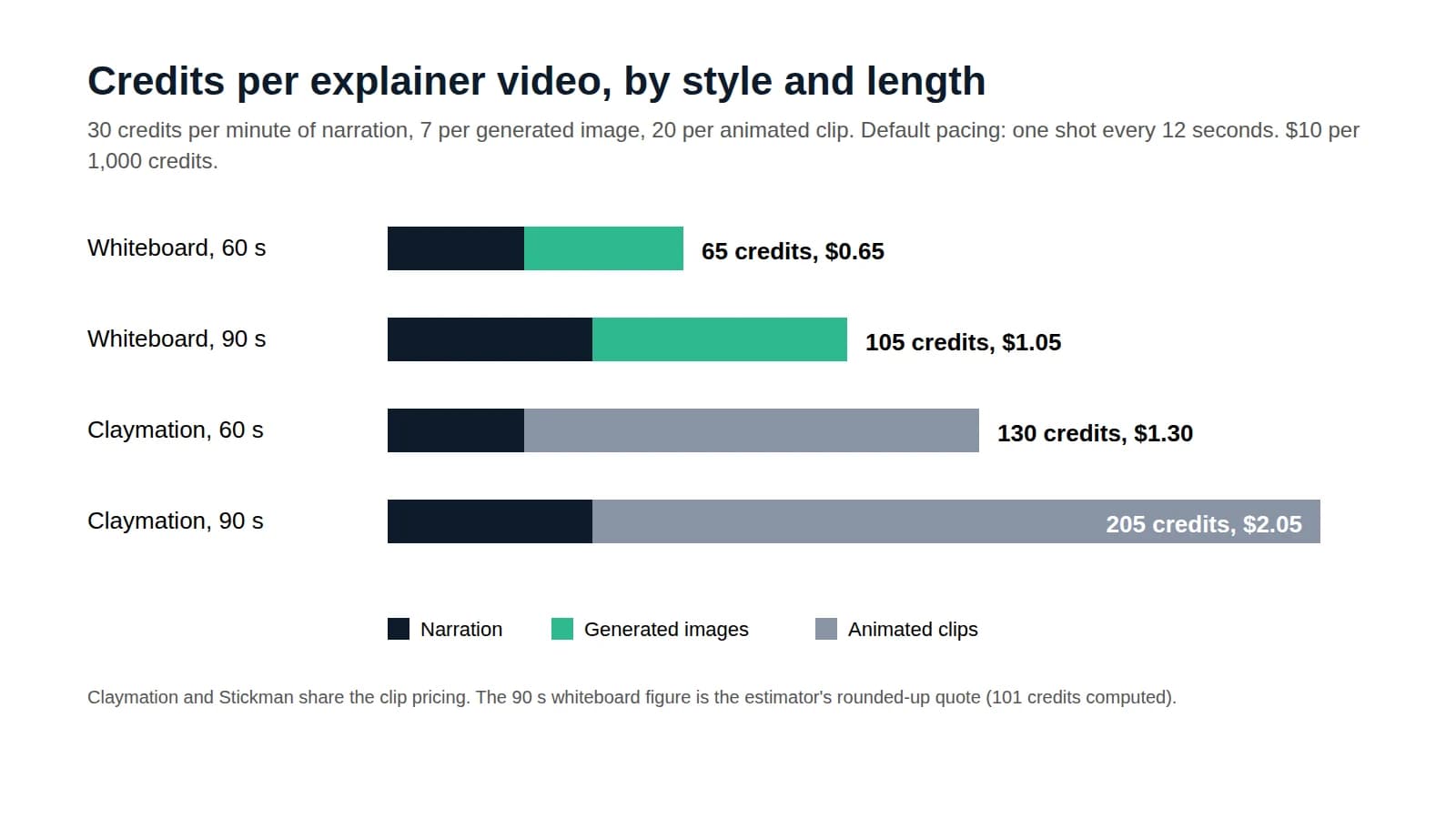
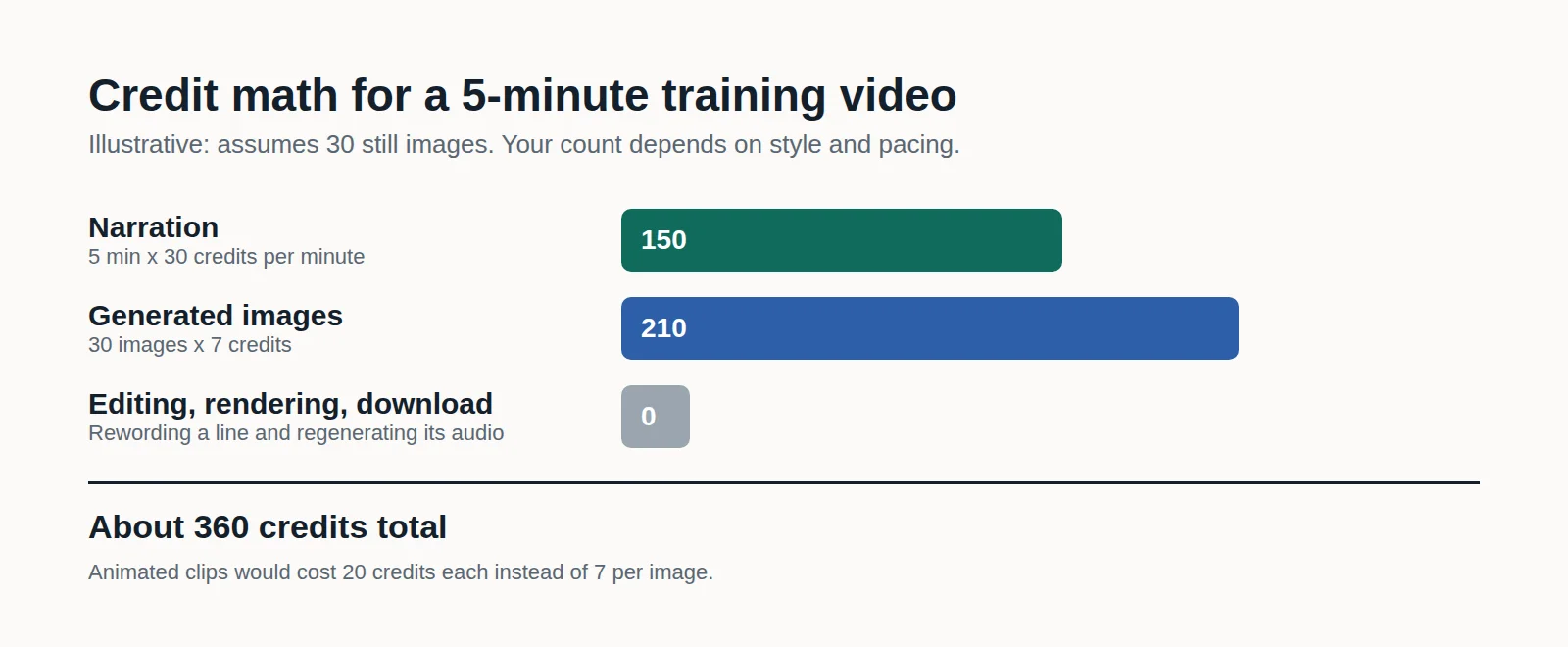
Then edit against the table above: does the hook name a real problem, does the how-it-works beat stay concrete, is there one closing action? Drafting and editing use no credits. Credits apply when narration and visuals generate, and the explainer video cost breakdown shows what a render settles at. Video length is capped by plan: 15 minutes on Starter, 20 on Creator, and 25 on Business, so a 90-second script fits any of them.
To try the whiteboard look before writing anything, the whiteboard animation maker starts from a single sentence.
Where should a SaaS explainer video live?
Place it where the viewer has already shown interest. In our view, three placements beat the homepage hero for a script this long: the confirmation page after a demo request, the first email of an onboarding sequence, and a proposal a rep sends after a call. Those viewers opted in, so they are more likely to watch a full 90 seconds.
Use the homepage for the shorter end, 60 to 75 seconds, since a first-time visitor has not decided the product deserves their time yet. This is judgment from how teams use the format, not a measured conversion lift, so test it on your own funnel.
Turn your document into an explainer videoTry Jellypod